TV Stand Guide: Types, Sizes, Setup, and Style
Choose a TV stand with a little extra width on each side, sized to place the screen center near seated eye level, and choose by fit first: wall span and walking space, then the gear you need to store, then the finish that suits the room. Get it wrong and the room looks top-heavy, cables sprawl, storage falls short, and the stand can even feel unsafe. This guide covers stand types, width and height sizing, setup limits, storage choices, and proportion tricks for small, medium, and large living rooms.
How do you choose a TV stand without guesswork?
Start with the measurements that affect daily use: correct width and height, enough depth and ventilation, and stable storage for the gear you actually use. I measure the TV first, then seated eye height, then device depth and cable clearance, and only after that do I pick the storage layout and finish.
Measure in this order
- Measure the TV’s full outer width rather than relying on the screen diagonal. Two 65-inch TVs can differ because bezel size and feet placement differ.
- Measure seated eye height from the floor to the viewer’s eye line in the main seat.
- Measure the deepest device, including plugs and stiff cables behind it.
- Measure soundbar width and depth if it will sit on top of the stand.
- Measure the wall span or corner span so the stand does not crowd a walkway.
Common failure cases to catch before buying
- Blocked vents: open cubbies look generous until a console, router, and cable slack fill the back.
- Weak stability: a stand can fit the TV width and still feel tippy on carpet, uneven floors, or in homes with kids and pets.
- Poor soundbar fit: many stands leave no clean spot for a soundbar without covering the IR receiver or pushing the TV feet too close to the front edge.
- Door interference: solid doors can block remote signals, and wide doors need side clearance to open fully.
- Baseboard conflict: rear legs or a full back panel can stop the stand from sitting flush to the wall.
What to verify on the spec sheet
Check width, depth, height, weight capacity, TV size compatibility, cable management, open versus closed storage, material and finish, anti-tip hardware, and assembly complexity. IKEA lists TV stands and media units as a dedicated category, and that split helps because some units are really storage walls, while others are simple TV support.
Evaluating Wampat TV stands for budget media storage
A Wampat TV stand delivers affordable media storage when your screen stays within the model’s stated size and weight limits. Choosing the widest unit that still clears your wall space prevents blocked vents, strained top panels, and cramped cable routing.
This Wampat TV stand review breaks down exact specifications, build quality, and storage layouts so you can match a specific model to your living room or apartment setup. It also compares Wampat units against common alternatives, highlighting where the budget price holds up and where compromises appear. Checking these details before buying ensures your equipment sits safely without sacrificing usable shelf space.
Must-have

Garvee 70-inch industrial TV stand
Based on specs and reviews, this is the practical pick for households that need width, mixed storage, and a stated weight capacity. The 70-inch top suits larger screens better than many budget cabinets, and the metal frame suggests a steadier feel than thin particleboard builds.
The tradeoff is visual weight. Industrial frames can look heavy in narrow rooms, and open sections demand disciplined cable routing or they read messy fast.

Bifins corner TV stand
A corner TV stand only works when the room truly benefits from angled placement. This Bifins model makes sense for small living rooms, bedrooms, or awkward apartment corners where a straight stand would squeeze the walking path.
The main drawback is viewing angle control. Corner setups can leave one seat perfect and another seat twisted off-axis, so the room plan matters more than the product style.

FurniNova floating TV stand
For renters with wall permission or owners planning a cleaner floor line, a floating unit can solve vacuum access and visual bulk in one move. Based on specs and reviews, the built-in cable holes and soft-close doors are the real reasons to look at it, not the glossy finish alone.
The drawback is install complexity. Wall condition, stud placement, outlet height, and baseboard depth matter, and a wall-mounted unit gives less freedom if the TV feet, soundbar, or consoles need deep support.
Nice-to-have

YLLGLTH mid-century modern TV stand
This is the long-stand option for wide walls and larger TVs. The 78.74-inch width gives breathing room around a big screen, and three drawers help contain remotes, controllers, and the clutter that open shelves never hide.
The drawback is price. At $698.96, it asks buyers to care about solid wood construction and a finished furniture look, because buyers paying mainly for function can spend much less.

chartustriable farmhouse TV stand
Based on specs and reviews, this is a value play for shoppers who want some concealed storage, an open center shelf, and a warmer style direction. The sliding barn door avoids swing-out door clearance, which helps in tight layouts.
The limitation is width. At 58 inches, it can be a squeezed match for many 65-inch TVs if the actual TV body is wide or the wall needs more visual balance.
Consumables and spares

HAIOOU 52-inch mid-century modern TV stand
This is the compact cabinet that tends to expose setup details. Based on specs and reviews, the adjustable middle shelf and sliding doors are useful, but smaller stands often need extra cable ties, adhesive clips, felt pads, spare levelers, and anti-tip straps to stay tidy and steady.
The drawback is capacity for growth. A 52-inch cabinet can work well for a smaller TV or low-storage household, yet it leaves little room if a soundbar, router, and console stack grow over time.
What spares are worth keeping after assembly
- Anti-tip straps and replacement screws
- Spare shelf pins and door bumpers
- Hook-and-loop wraps for future cable changes
- Felt pads for hard floors
- Adhesive clips for rear cable routing
- Small levelers or shims for uneven floors
How do I choose the right TV stand size for my TV?
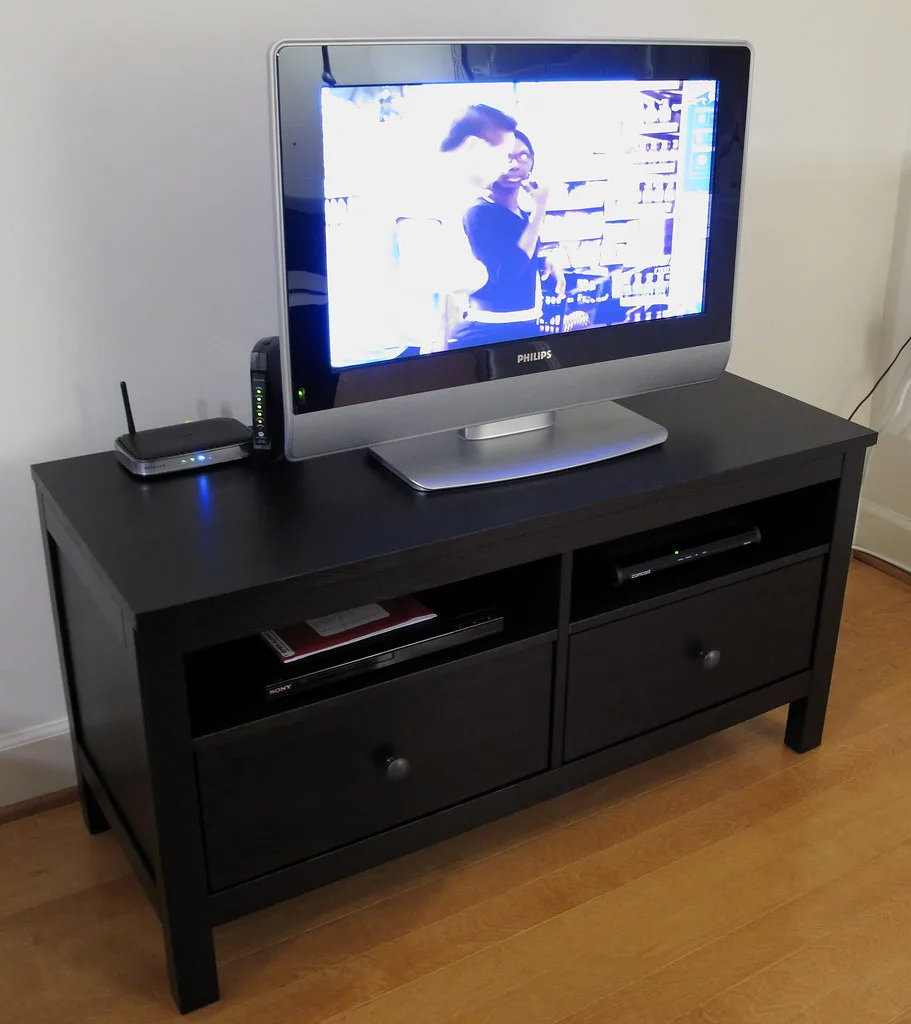
Use the TV’s actual width first, then choose a stand that adds side support, room for feet placement, and enough top space for a soundbar if needed. After width, verify depth for devices and height for viewing, because size mistakes usually start there, not with style.
Width first, diagonal second
The simplest rule is still useful: the stand should be wider than the TV. The better rule, from what I see in real rooms, is support and proportion. A target stand width of 2-6 inches wider than the TV on each side gives safer footing and a calmer look on the wall.
That is why actual TV width matters more than the diagonal printed on the box. Feet can sit near the outer corners, and some screens have thicker side frames. If the TV base nearly matches the stand top, setup options disappear fast.
How wide should a TV stand be for a 65-inch TV?
For a 65-inch TV, start with the TV’s measured body width and leave a few inches of extra space overall. Use the lower end when the room is tight and the TV stand must stay compact. Use the upper end when the wall is wide, the TV has broad feet, or a soundbar must sit cleanly in front.
Real furniture examples help show the spread. The BESTÅ TV bench with doors measures 180x42x38 cm. The BRIMNES TV bench measures 180x41x53 cm. Both give a broad footprint for many 65-inch setups, but one is lower and one is taller, which changes viewing height and storage use.
Long stand, standard stand, or storage combination
A long TV stand works best on wide walls because it balances the screen and keeps the room from looking top-heavy. A TV storage combination goes further. The HAVSTA TV storage combination measures 322x47x212 cm, which shifts the decision from simple TV support to full wall storage planning.
That larger footprint is useful when the wall also needs closed cabinets, bookshelves, or display storage. It is a poor fit when the room already feels crowded.
Scaling a TV Stand for a Large Living Room
A large living room demands a TV stand that fills roughly 60% to 80% of the wall section it anchors. Stands in the 70- to 90-inch range typically provide the visual weight needed so the setup does not look undersized or floaty. The console should also extend noticeably wider than the screen itself to maintain balance across a broad wall.
Choosing the right silhouette—whether a long low console, a media credenza with concealed storage, or a floating wall unit—depends on how much equipment you need to hide and the architectural style of the room. Proportion checks prevent a heavy, boxy appearance while ensuring adequate shelf space. Our guide to large living room stands breaks down sizing rules, storage tradeoffs, and specific console styles suited for expansive spaces.
How to fit a TV stand safely into a corner
A 45-degree or triangular TV stand maximizes awkward corner space, but only if the geometry aligns with your walls and your TV base fits fully on the top surface. A mismatched stand can tip over, block walkways, or leave expensive gear unstable.
Before buying, measure the available clearance along each wall, check the stand’s load capacity against your TV’s weight, and confirm the top platform is wider than your screen’s base. The guide to corner TV stands walks through these measurements and compares swivel models, electric fireplace units, and open-storage consoles so you can match the right design to your room layout.
Choosing the Ideal TV Stand for Modern Living Spaces
The article breaks down exactly what makes a TV stand work in a contemporary living room – proper width (2–6 inches wider than the screen), low profile, and the right balance of open or closed storage for your gear. It ranks options by visual weight, proportion, and how well they accommodate soundbars, consoles, and cables, letting you pinpoint the perfect match without trial‑and‑error. Understanding these criteria prevents a top‑heavy look, blocked walkways, or exposed clutter, and speeds up the decision process.
See the full comparison in our best TV stand guide.
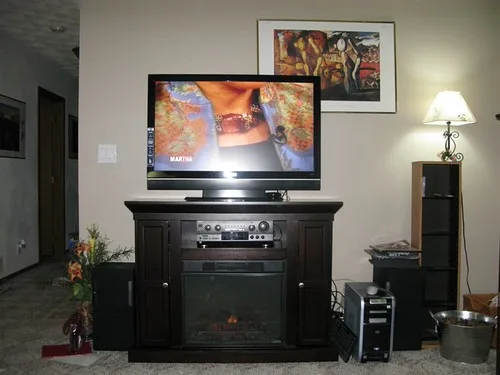
Fireplace TV Stand vs Standard TV Stand: Which Fits Your Space?
A fireplace TV stand only makes sense if it replaces a heater or media cabinet; otherwise, a standard stand is lighter, cheaper, and easier to place. Choosing incorrectly can waste floor space, add unwanted heat, or result in paying for unused storage.
This comparison evaluates room fit, heating output, storage capacity, cost, and safety across living rooms, apartments, and family rooms. Use the fireplace stand comparison to determine which option aligns with your spatial constraints and functional needs before purchasing.
Corner TV Stand vs Long TV Stand: Choosing by Room Layout
Select a corner TV stand when usable corner depth exceeds 24 inches and wall space is limited, or choose a long TV stand if you have at least five feet of clear wall and require additional storage. The wrong shape wastes floor space, blocks outlets, or creates poor viewing angles from your sofa.
This comparison evaluates fit, layout efficiency, storage capacity, and cable access to help you match the stand to your room’s dimensions. Review the full corner vs long stand guide for measurement tips and a decision matrix that prevents costly sizing mistakes.
Walker Edison TV Stand Quality and Sizing
Walker Edison TV stands offer a clean aesthetic for budget-conscious buyers, but selecting the correct model is critical to avoid wobble or insufficient support for larger screens. This guide details which open-shelf, closed-storage, and fireplace units safely accommodate TVs between 55 and 80 inches while highlighting specific weak points in lighter-duty construction.
Understanding these limitations prevents costly mismatches in finish and stability. The comprehensive Walker Edison review provides a model-selection matrix and quality breakdown to help you identify units that fit your room’s dimensions and weight requirements without compromising safety or style.
What is the best TV stand height for comfortable viewing?
The best height places the screen center near the seated eye line in the main seat. Low TV benches work well when the sofa is low and the TV is large, but they fail when a tall sectional or bed raises the viewer too high above the screen center.
Use seated eye height, not guesswork
Measure from the floor to eye level while seated in the seat used most often. Then compare that to where the center of the mounted or stand-placed screen will land. If the stand is too low, viewers angle their chin down. If it is too tall, neck fatigue shows up during longer viewing.
When a TV bench works better
IKEA describes the TV bench as influencing living room design, and the lower profile is the reason. In practice, a TV bench usually keeps the room calmer than a tall media cabinet. It suits larger TVs, low sofas, and rooms where the screen should not dominate the wall.
Examples show the range. The LACK TV bench measures 90x26x45 cm, which is compact and shallow. The KALLAX TV bench measures 147×60 cm. The FJÄLLBO TV bench appears in a 150x36x54 cm size. The STOCKHOLM 2025 TV unit measures 179x42x56 cm. Those heights produce very different screen positions once the TV feet are added.
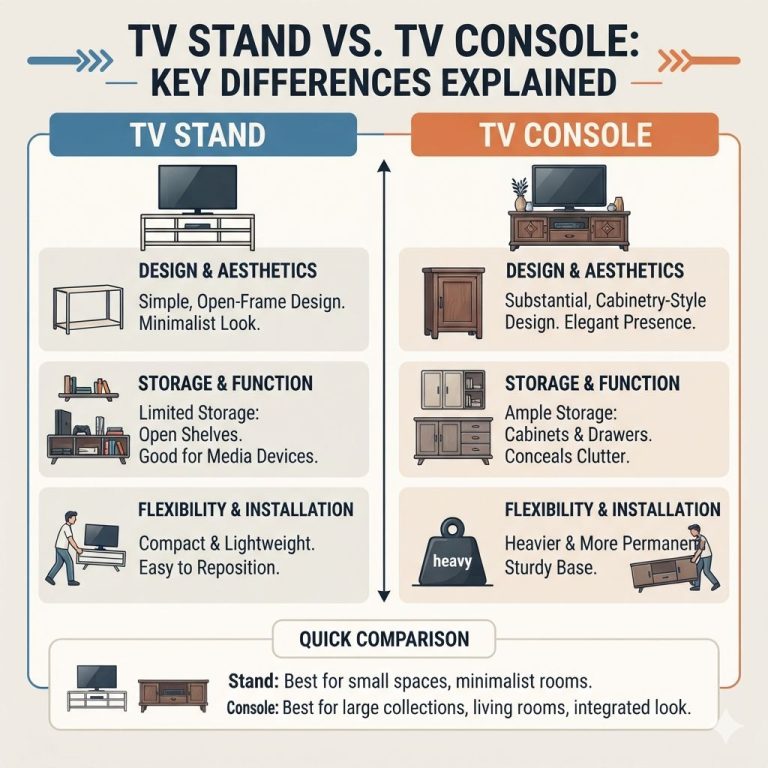
TV stand versus TV bench
A TV stand is the broader term. It can include taller consoles, media cabinets, and mixed-storage units. A TV bench is usually lower, longer, and visually quieter. That makes it the better pick when the screen already fills the wall and extra height would push viewing too high.
What type of TV stand is best for small rooms?
Small rooms usually benefit from one of three routes: a shallow straight stand, a corner TV stand, or a floating cabinet that clears the floor. The best choice depends on walking clearance, seat angle, and whether the room needs hidden storage more than display space.
Corner TV stand
A corner TV stand uses dead space well, but only if the seating can face it without constant neck turning. Its angled placement is useful in studios, bedrooms, and compact family rooms where every straight wall is already working hard.
Shallow stand or floating form
A shallow stand helps protect the walking path. So does a wall-mounted cabinet, especially in narrow apartments where every inch at shin level counts. vidaXL categorizes TV stands alongside TV cabinets, and that distinction matters here because cabinet-like pieces often project farther into the room than buyers expect.
Renter-friendly setup
Renters usually need lighter pieces, easier moving, and modest assembly demands. Closed storage helps hide cable slack from internet boxes and streaming devices, but deep swing doors can get annoying in tight rooms. Sliding or open-front designs often make daily use simpler.
Which TV stands work best for farmhouse interiors?
A farmhouse TV stand needs to be a few inches wider than your screen, with enough enclosed storage to hide cables and media devices. Choosing the wrong proportions makes the room feel cramped and leaves cords visible along the wall.
The guide to farmhouse decor TV stands compares wood, white, and fluted consoles by room size and subtype, including rustic, cottage, modern, and fireplace models. It breaks down specific picks for medium rooms, mixed-style homes, and tight budgets, detailing dimensions, drawer configurations, and weight limits so you can match a console to your layout without guessing.
Corner TV Stand vs Wall Mounted TV Shelf: Which Fits Your Room?
A corner TV stand works best when you need built-in storage, easy repositioning, or a room layout that lacks a clear flat wall. A wall-mounted TV shelf saves floor space but demands solid backing and a planned cable route before installation begins.
Choosing the wrong option leads to blocked walkways, visible cords, or costly wall repairs. This comparison breaks down how room shape, traffic flow, weight capacity, and renter risk determine the right fit for your setup. Review the full breakdown of corner TV stand options to match your specific floor plan, gear load, and lease terms before committing to hardware.
When a particleboard TV stand makes sense on a tight budget
Furinno TV stands target buyers who need the lowest-cost option for small to mid-size screens, typically up to 50 or 55 inches depending on the model. They use particleboard construction, which keeps prices down but demands strict attention to weight limits—exceeding them causes wobbling, sagging, or early failure.
This breakdown covers TV-size compatibility, storage layouts, assembly difficulty, and the specific durability tradeoffs you accept at this price point. A model-by-model decision table helps match your screen size and gear to the right unit before you buy. If your priority is spending as little as possible while safely supporting a lighter television, evaluating these specs prevents costly mistakes. Compare the fit and limitations in this Furinno TV stand review to confirm whether particleboard works for your setup.
Balancing scale and space in compact living areas
Scaling a TV stand to fit your specific room geometry is a critical step that many buyers overlook until furniture arrives. A stand that is too narrow creates a top-heavy visual effect, while an oversized unit can obstruct natural circulation paths and make the room feel cramped. The supporting guide breaks down exactly how to measure these clearances against your TV size and storage requirements. TV stand size comparison details when a compact unit offers better balance versus when a larger piece provides necessary structural stability. Use these concrete dimensions to ensure your media console integrates seamlessly into your layout without sacrificing functionality or visual harmony.
Which TV stands protect your rental deposit?
A freestanding console with a wide base, felt or rubber feet, and no-drill cable management keeps floors unmarked and walls intact. Cheap stands scratch hardwood and leave scuffs that landlords deduct from security deposits, so choosing one rated slightly above your TV’s actual weight prevents tipping and surface damage.
Our guide to renter-friendly TV stands compares lease-safe features like floor protection, portability, and easy move-out. It reviews specific models—from height-adjustable tabletop bases for strict leases to rolling carts for frequent movers—so you can match your exact living situation without drilling a single hole or risking your deposit.
Should I choose open shelves or closed storage in a TV stand?
Choose open shelves when heat, router signal, and easy device access matter most. Choose closed storage when dust control and visual calm matter more. The right answer often ends up mixed: one ventilated bay for hot gear and one concealed section for remotes, discs, and chargers.
When open shelves win
Open-shelf TV stands make device swapping easy. They also help consoles and routers breathe, and they avoid remote-signal problems through solid doors. The downside is constant visual clutter. Dust also settles faster on exposed shelves and cables.
When closed storage wins
Closed-storage TV stands hide the pileup. Accessories, game cases, spare remotes, and charging cords disappear behind doors or in drawers. They also keep the room calmer. The cost is access. Doors need clearance, hinges add one more failure point, and solid fronts can complicate router placement or remote use.
Use a mixed-storage layout when possible
A stand with one open center shelf and closed side cabinets usually handles modern setups best. Put the router or hottest console in the ventilated area. Put low-use accessories behind doors. If the soundbar sits on top, make sure it does not block the TV sensor or hang over the front edge.
Can a TV stand hold a soundbar, router, and game consoles?
Yes, if the stand top is wide enough for the TV base and soundbar, the shelves are deep enough for devices plus plugs, and ventilation is left around heat-producing gear. Most bad setups fail because plug depth, rear clearance, and remote access were never measured.
Depth planning matters more than most buyers expect
Measure the deepest device including the cable bend behind it. Then check rear panel cutouts, open-back sections, and wall clearance. A stand can have the right outer depth and still fail if the back panel forces plugs sideways or crushes thick HDMI connectors.
Soundbar placement
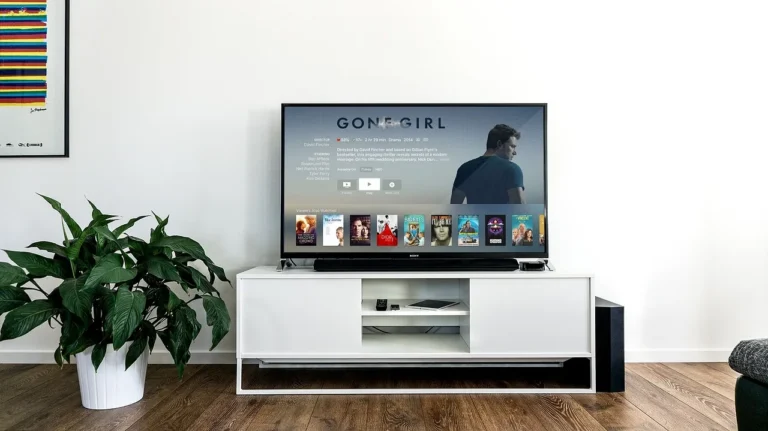
The cleanest soundbar setup is usually on the top surface centered under the TV. That means the stand top needs spare width after the TV feet are placed. If the TV feet sit wide, the soundbar may need risers, a shelf, or a different stand shape.
Router and console placement
Routers prefer open air. Consoles prefer vent space and front access. Drawers are for accessories, not hot electronics. If doors close over active devices, verify that the front still receives remote signals and the interior does not trap heat.
How do I style a TV stand so it matches my living room?
Start with proportion, not decoration. The stand length should relate to wall width and TV width, the base shape should match the room’s visual weight, and the finish should either blend with existing furniture or clearly anchor the media wall without making it feel bulky.
Use wall balance first
On a wide wall, a long TV stand looks settled. On a narrow wall, the same piece can feel swollen and reduce side breathing room. Leave enough empty wall around the screen so the TV does not read as a black block floating over a tiny cabinet.
Leg shape and visual mass
Raised legs lighten the look and expose more floor, which helps small rooms feel less cramped. Plinth bases and boxy cabinets look heavier but can ground a large screen better. Floating forms make the room feel airier, though they need cleaner cable planning and careful wall setup.
Material and finish choices
Walnut and oak tones warm up hard rooms with gray floors or black electronics. Painted white pieces reduce contrast on pale walls. Black and dark brown stands visually shrink the TV border but can read dense in small rooms. Metal-and-wood mixes suit loft-like spaces, though they can look colder than all-wood forms.
What belongs on top of the stand
Keep the top sparse. A soundbar, one low tray, or a pair of small objects at the far ends is usually enough. Avoid tall decor near side-firing speakers, router antennas, or remote sensors. Style should never interfere with use.
Signature Design by Ashley TV stand: fit, storage, and fireplace compatibility
The Ashley TV stand review evaluates how different cabinet widths interact with screen sizes to prevent blocked ventilation or cramped displays. It breaks down which farmhouse, rustic, modern, and coastal models offer adequate cable management versus shallow storage. The analysis specifically addresses whether built-in fireplace inserts justify the cost for living rooms requiring heat and ambience.
This section matters because mismatched dimensions are the primary cause of waste, including restricted airflow and unusable floor space. By comparing fit, storage depth, and fireplace compatibility against value, the review helps you skip models that fail these basic functional requirements before you commit to a purchase.
TV stand sizing worksheet and stability checklist
How to fill in the worksheet
Record the TV body width, then add the side allowance needed for stable footing and visual balance. Next write the target screen-center height based on the main seat. After that, measure the deepest device, then add space for cable bends, plug depth, and air behind heat-producing gear.
| Room type | TV width | Target stand width | Ideal viewing height | Required device depth | Cable clearance | Stability check |
|---|---|---|---|---|---|---|
| Living room | Measure outer TV body | TV width plus 4-12 in total | Screen center near seated eye line | Deepest console or router plus plug bend | Rear gap for HDMI and power slack | Yes/No: anti-tip fitted, level on floor, no overhang at TV feet |
| Bedroom | Measure outer TV body | Use lower end if wall is short | Higher than sofa setups if bed is primary seat | Streaming box or soundbar depth | Wall plug and baseboard checked | Yes/No: drawers do not tip unit forward when open |
| Playroom | Measure outer TV body | Favor extra side support | Keep screen center comfortable for sofa use | Multiple consoles and dock depth | Leave slack for frequent swapping | Yes/No: anti-tip fitted, doors latched, cords contained |
| Rental apartment | Measure outer TV body | Fit wall without blocking path | Based on primary chair or sofa | Router and set-top box depth | Extension lead route planned | Yes/No: floor pads fitted, easy to move, no wall damage risk |
Stability checklist by room type
- Living room: check anti-tip hardware, rug thickness, and whether pets can jump onto open shelves.
- Bedroom: check bed-height viewing and whether drawers hit nearby nightstands.
- Playroom: choose lower centers of gravity and more closed storage.
- Rental: favor easier disassembly, manageable weight, and floor protection pads.
Universal tabletop TV stands and compatibility checks
When replacing original TV legs or mounting hardware, a universal tabletop base offers a budget-friendly alternative to wall mounting. However, success depends entirely on strict physical measurements. Before purchasing, evaluate the Perlesmith TV Stand review to understand critical compatibility factors, including VESA pattern matching, maximum weight capacities, and base depth requirements relative to your media console.
Overlooking even one specification can result in an unstable setup, blocked rear ports, or a base that overhangs narrow furniture. Verifying your television’s dimensions and mounting hole spacing beforehand ensures a secure fit and prevents safety hazards in your living space.
Evaluating Bush Furniture TV stands for fit and stability
Bush Furniture TV stands deliver closed storage and ready-to-assemble convenience, but they require careful verification of TV width, weight rating, and cord routing before purchase. Skipping these checks often leads to wobbly setups, blocked ports, or insufficient shelf space for media gear.
This Bush Furniture TV stand breakdown details buyer-fit scoring, assembly difficulty, load capacity, and the specific weak points that affect long-term stability. It helps you determine whether a given model safely supports your screen size and component layout without compromising your living room arrangement.
Alphason compatibility and stability specifics
Alphason stands perform well only when your TV’s VESA pattern, width, and weight align precisely with the unit’s spec sheet. Mismatched dimensions lead to wobbling, dangerous overhang, or improper seating height. The linked guide breaks down these fit checks, evaluates base stability, and compares swivel or height-adjustment features against static models. It also covers assembly logistics, cable management, and no-drill installation methods for renters.
For UK buyers specifically, the review identifies safer alternatives available on Amazon when a particular Alphason model fails the fit test. You can verify these critical specs and stability factors in the Alphason TV stand review before purchasing.
When Bonzy Home TV stands work and when they wobble
Bonzy Home TV stands deliver storage and lighted display space, but only when the stand width, TV width, and room layout align. A mismatch causes wobble, weak center-load support, or a console too shallow for your screen.
This brand-specific breakdown evaluates exact specifications, stability limits, and a model-by-model buyer checklist so you can determine whether these units handle your equipment safely. If you need a heavy-duty console for a large, dense display, this evaluation clarifies exactly where the structural limits fall short. Reviewing the Bonzy Home TV stand details prevents buying a unit that looks right but fails under real weight distribution.
Budget setups
What to spend on first
Spend first on stability, useful width, and back-panel access. Fancy finishes come later. In low-cost rooms, better cable control and enough top width matter more than decorative hardware.
| Setup level | Best fit | Why it works | Price |
|---|---|---|---|
| Starter | HAIOOU 52-inch mid-century modern TV stand | Good for smaller TVs, low-storage homes, and buyers who need a compact cabinet with adjustable shelf space. | $139.99 |
| Mid | chartustriable farmhouse TV stand for 65-inch TV | Balanced pick for mixed open and closed storage, with a sliding door that saves side clearance. | $167.99 |
| Serious | YLLGLTH mid-century modern TV stand | Best for large walls and buyers who want furniture-grade presence, wider top space, and drawers that actually contain clutter. | $698.96 |
For families with game consoles, a router, and a soundbar, the Garvee or chartustriable layout is easier to organize than a tiny closed cabinet. For small-apartment use, the Bifins corner shape or the floating FurniNova can recover floor space and reduce bulk. vidaXL promotes free shipping above £70, but shipping perks should never override fit, depth, or stability.
Products related to this article
Sponsored / affiliate links. As an Amazon Associate I earn from qualifying purchases. I may earn additional commission from eligible campaigns.