How Much Is a Corner TV Stand?
Corner TV stands typically cost about $50 to $400, with basic particleboard models often near $50 to $120 and larger wood or metal units with storage closer to $150 to $400. Pick the wrong size or a flimsy build, and you can waste money, block cords, or end up with a stand that cannot support your TV safely. This guide breaks down price by size, material, storage, and features so you can match the stand to your room and budget. If you are comparing layouts, start with a corner TV stand that fits the corner footprint first, then narrow by storage and weight rating.
Corner TV stand price map

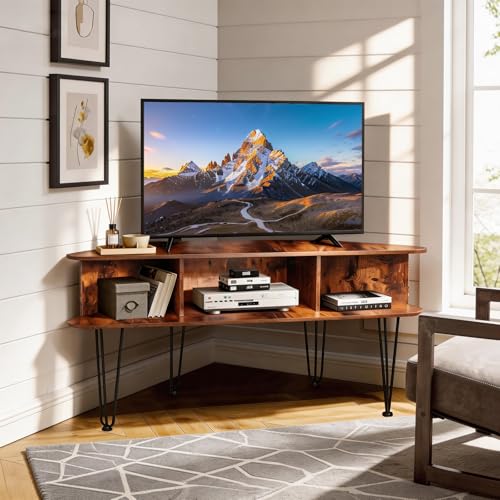


This price map is the fastest way to budget. The biggest jumps come from material, storage, and add-ons such as swivel mounts or fireplace inserts. A corner footprint can make a stand look smaller than it is, so check usable width at the room edge, not just the longest front edge.
| Price band | Typical dimensions | Material and build | Storage level | TV size fit | When it is worth paying for | Hidden costs |
|---|---|---|---|---|---|---|
| Low-cost | About 28 to 40 inches wide, 15 to 18 inches deep, and 20 to 24 inches tall | Particleboard or basic engineered wood, often with simple laminate finish | Light storage, usually one or two open shelves | Often best for 46-inch to 50-inch TVs, depending on top width and support | Good for a light TV, a rental, or a temporary setup where cost matters most | Delivery can add cost; assembly may be required; returns may be costly if the size is wrong |
| Midrange | About 38 to 48 inches wide, 16 to 20 inches deep, and 22 to 28 inches tall | Engineered wood with improved hardware, sometimes a veneer look | Moderate storage, often open shelves plus one cabinet or door | Commonly suited to 50-inch TVs and some 55-inch TVs | Worth it if you need better stability, cleaner cable routing, or extra device space | Assembly time may be longer; some models charge extra for threshold delivery |
| Upper-mid | About 44 to 55 inches wide, 18 to 22 inches deep, and 24 to 30 inches tall | Thicker engineered wood, veneer, or mixed materials such as wood with metal accents | Better storage, often closed doors, open shelves, and cable holes | Often fits 55-inch TVs when the stand width and shelf depth are generous enough | Worth paying for if you want better stability, a neater front, or heavier components | Delivery and assembly fees are more common; fireplace or electric insert features add cost |
| Premium | About 48 to 60 inches wide, 18 to 24 inches deep, and 26 to 32 inches tall | Higher-grade wood, veneer, metal, glass accents, or solid wood parts | High storage, often with more enclosed space and better device clearance | Best for larger TVs when the stand width and load rating both support the set | Worth it if you need appearance, storage, and a stronger build in one piece | Electric or fireplace features raise total cost; setup can take longer; delivery may be freight-based |
What is a corner TV stand?
A corner TV stand is a stand built to sit into a room corner, usually with a trapezoidal or angled footprint instead of a straight rectangle. That shape changes how much usable width you get along the wall. It can free floor space, but the front edge is often shorter than a standard stand of the same overall depth.
Angled footprint and room fit
The angled front lets the unit sit closer to two walls at once. That matters in small rooms, where a straight stand may extend farther into the traffic path. The tradeoff is that the corner cut reduces usable top width, so the TV and any devices must fit the actual stand surface, not the room’s widest opening.
How it differs from a straight stand
A straight stand usually gives you a more predictable shelf span from left to right. A corner stand uses the room geometry to save space, but the visible width can be misleading. A model that appears broad from the front may still have less useful flat surface once the angled sides are accounted for.
Picture a living room with 18 inches of clearance on each wall near the corner. A straight stand may push too far into the walkway, while a corner stand can keep the TV in the same viewing zone with less obstruction. The key check is not style. It is whether the stand’s actual footprint leaves enough room for doors, vents, and cords.

How much is a corner TV stand?
Most shoppers should budget $50 to $400, with the biggest price drivers being material, storage, and extras such as a fireplace insert or swivel hardware. Lower-priced units often use particleboard and simpler shelves. Higher-priced units usually give you more capacity, better finishes, and a sturdier frame that is less likely to wobble.
What drives the price
Material matters first. Particleboard and basic engineered wood usually cost less than veneer, solid wood, or mixed-material builds. Storage adds cost when the unit includes cabinet doors, adjustable shelves, or better cable routing. Specialty features such as electric heat, glass panels, or swivel support also push the price up.
Assembly can affect the real budget too. A stand that looks cheap online may cost more once you add delivery, labor, or a return fee. The same is true for fireplace models, which often cost more to ship because they are heavier and contain electrical parts.
When a higher price is worth it
Pay more when the TV is heavy, the room gets a lot of foot traffic, or the stand must do more than hold a screen. Extra money can buy better stability, more shelf clearance for consoles, and a stronger frame for larger TVs. It is also worth paying up if you want a cleaner finish, such as walnut-look veneer or better edge banding.
A common first-timer mistake is choosing a corner TV stand based only on the TV width and overlooking shelf depth, storage, and corner fit. Say your TV is 55 inches but the stand top is narrow, with shallow shelves and poor cable access. The set may fit on paper and still feel cramped in practice. In that case, a wider and sturdier midrange stand is safer than the cheapest option.
How do you measure for one?
Measure the corner, not just the wall. You need wall space, corner clearance, and the stand’s usable top width. Also measure the TV itself, because screen size in inches does not equal cabinet width. The stand must fit the room and support the TV without crowding the edges or blocking cords.
Corner clearance
Start with the two wall runs that meet at the corner. Check how far the stand can extend along each wall without hitting baseboards, outlets, heating vents, or trim. A corner unit can save space only if the angled sides still leave room to reach cables and open doors.
Stand width versus TV width
Do not compare the TV label to the stand label as if they mean the same thing. A 55-inch TV is not 55 inches wide; the screen diagonal is the marketing number. For fit, use the TV’s actual width and compare it with the stand’s top surface and any overhang limits from the manufacturer.
Suppose you are choosing between a 50-inch and 55-inch screen for the same corner. The larger TV may still fit if the stand is wide enough and the center of gravity stays stable. If the shelf overhangs too much, though, the unit can feel shaky even when the screen technically sits on top.
Room layout checks
- Measure the corner to the nearest obstruction on both walls.
- Measure the TV’s actual width, height, and stand feet spacing.
- Check where cables, outlets, and vents land behind the unit.
- Leave room for doors, drawers, and any swivel or tilt movement.
- Confirm the stand’s load rating and shelf limits before you buy.
What size TV fits a corner stand?
Common fit ranges include 46-inch, 50-inch, and 55-inch TVs, but the real limit depends on the stand’s top width, shelf depth, and weight capacity. One smaller stand fit TVs up to 46 inches, another only fit TVs up to 50 inches, and one model fit a 55-inch TV. A fireplace model held TVs up to 55 inches, while one swivel stand was not built for TVs over 88 pounds.
Screen width versus advertised TV size
TV size is measured diagonally, so the number on the box is only a starting point. The actual cabinet width can be several inches smaller or larger depending on bezel design. Check the stand’s usable top width and do not assume every 55-inch set has the same footprint.
Fit limits from the stand top and shelves
The top must hold the TV feet or base with room to spare. Shelves below also matter if you plan to place a soundbar, game console, or streaming box inside the stand. Device clearance matters because a shelf that is too short can trap heat or block ports.
One model was described as useful for medium-sized TVs and small spaces. That is the right kind of description to look for, but it is not enough by itself. Always verify the actual fit range, because a small room does not automatically mean a small TV, and a large screen does not guarantee a large base.
What features should you look for?
Look for storage that matches your devices, a load rating that covers the TV and accessories, and a frame that resists wobble. Swivel or tilt features matter if you need to cut glare or aim the screen toward a seating area. Finish choice affects durability, cleaning, and how much wear you will see over time.
Storage layout
Open shelves are easy to access and work well for consoles, but they leave cords and devices visible. Closed doors hide clutter better. Cable-management holes help keep power cords and HDMI lines from pinching behind the stand. If you use a soundbar, confirm its height will not block the TV screen or remote sensor.
Weight capacity and stability
Check the total load in pounds, not just the TV weight. A stand may hold the screen but still struggle with a heavy receiver, speakers, or stacked devices on lower shelves. One model was not built for TVs over 88 pounds, which is exactly the kind of limit that matters when you choose by size alone.
Stability is not the same as top strength. Tall corner units and wider-screen setups can wobble if the base is narrow or the wall anchor is skipped. Anti-tip hardware matters, especially in homes with children or pets. If the manufacturer includes anchors, use them.
Swivel or tilt options
Swivel and tilt features help when seating sits off-center or the room throws glare onto the screen. One swivel stand turned 70 degrees, which shows how much viewing adjustment a stand can add without moving the base. Height adjustment also matters, but the exact range varies by model, so check the listing before buying.
Material and finish
Particleboard is usually the lowest-cost option, but it is more sensitive to moisture and edge wear than better-built wood products. Veneer can give you a more finished look without solid-wood pricing. Solid wood is usually stronger and heavier, while metal or glass accents change the look and may improve rigidity or cleanability. A walnut finish can look more refined, but finish alone does not tell you how sturdy the frame is.
How do I choose between a corner TV stand and a wall mount?
Choose a corner TV stand if you want storage, easier cable access, and a piece of furniture that can support devices without drilling into the wall. Choose a wall mount if you want the cleanest look, more open floor space, and the flexibility to place the screen higher for viewing or furniture clearance. The right choice depends on whether you need a place for consoles, remotes, and media boxes, or whether you want the TV to disappear into the wall.
A stand is usually the better pick in rentals, rooms with tricky wiring, or setups that need frequent device changes. A wall mount makes more sense when the wall can support the hardware, the viewing height is clear, and you do not need built-in storage. If your room is small but still needs shelves for accessories, a corner stand often solves more problems at once.
Do corner TV stands have storage?
Yes, many do. Storage can range from a single open shelf to multiple shelves, closed cabinets, drawers, and cable openings for media gear. Some models focus on display and only hold the TV and one or two devices, while others are built to replace a small media cabinet.
If storage matters, check the shelf height, door clearance, and whether the lower sections will fit your console, soundbar, or router. Open shelves are the easiest to use, but enclosed storage hides clutter better. The best choice is the one that fits both your devices and your cable layout without crowding the corner.
Assembly and hidden costs
Assembly time can range from under 10 minutes to well over an hour, depending on part count, hardware, and instructions. Some models go together quickly, while others need more careful alignment. Hidden costs often include delivery, assembly service, and feature add-ons such as electric heat or fireplace inserts.
Typical assembly time
One stand assembled in under 10 minutes, which is the fast end of the market. Many other corner stands take longer, especially if they include doors, adjustable shelves, or a fireplace insert. Instruction quality matters because unclear diagrams can turn a simple build into a slow one.
Tool-required versus tool-free builds
Tool-free assembly is faster, but it is not common across every corner stand style. Tool-required builds may be sturdier or more adjustable, but they take more time and patience. Check the manufacturer’s listing for your model, because the assembly method can differ even within the same brand.
Delivery, assembly, and feature add-ons
Delivery fees can rise with weight and box size. Assembly service adds convenience but also raises total cost. Fireplace or electric features add another layer of expense because they introduce wiring, heating components, and more packaging. If a model includes heat or electricity, follow the product manual, keep cords away from heat-producing parts and clear of walkways, never plug the insert into a damaged outlet, and give the unit the clearance the manufacturer specifies on all sides.
Hidden costs can change the real price band. A $120 stand with freight delivery and assembly may cost more than a $180 stand that arrives in fewer boxes and needs less setup. Budget for the full order, not just the sticker price.
Frequently asked questions
How do you measure for a corner TV stand?
Measure the two wall runs that meet at the corner, then measure your TV’s actual width and the stand’s usable top width. Leave room for outlets, vents, cords, and any doors or drawers. The goal is to fit the stand and the TV without crowding the corner or blocking access.
How much does a TV stand cost?
Basic TV stands can start low, while larger or better-built models cost more. For corner units, the practical budget range is usually $50 to $400. The final cost depends on material, storage, size, and extras such as swivel hardware or a fireplace insert.
What size TV fits a corner TV stand?
Common fits include 46-inch, 50-inch, and 55-inch TVs, but size alone does not decide fit. Check the TV’s actual width, the stand’s top width, and the load rating. A 55-inch TV can fit some corner stands, while smaller models may only suit 46-inch or 50-inch screens.
Are corner TV stands good for small rooms?
Yes, they often work well in small rooms because the angled shape can free floor space and keep the TV out of the main traffic path. The tradeoff is reduced usable width at the corner edge, so you still need to measure carefully and make sure cords and shelves remain accessible.
What features should I look for in a corner TV stand?
Look for storage that matches your devices, cable-management holes, a stable base, and a load rating that covers the TV and accessories. Swivel or tilt can help with glare and off-angle seating. Material matters too, because particleboard, veneer, solid wood, metal, and glass all age differently.
How long does it take to assemble a corner TV stand?
Assembly can take under 10 minutes for the fastest models, but many take longer once shelves, doors, or electrical features are involved. Tool-free builds are usually faster than tool-required builds. Clear instructions matter a great deal, especially for corner units with angled parts and extra hardware.
Products related to this article
Sponsored / affiliate links. As an Amazon Associate I earn from qualifying purchases. I may earn additional commission from eligible campaigns.