How to Level a TV Stand: Step-by-Step
Level a TV stand by adjusting its feet, shimming the low corners, and rechecking until it stops rocking. If it still wobbles after about one full rotation of each adjustment, the floor or frame likely still needs correction. A wobbly stand can shift a TV, stress joints, and tip more easily on uneven floors. This guide shows how to locate the cause, check stability, and fix wobble on carpet, hardwood, and tile.
What you’ll need
- Bubble level
- Screwdriver or hex key
- Plastic or composite shims
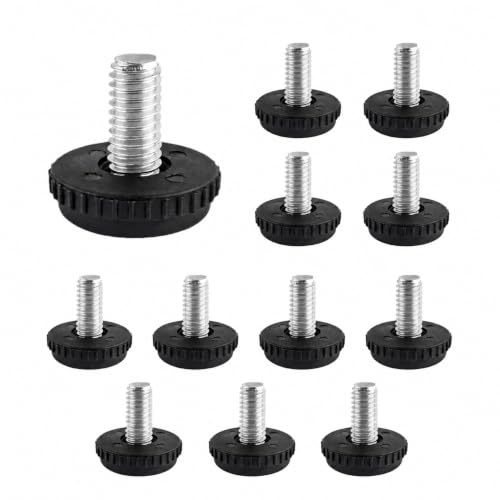
- TV stand leveling feet or adjustable glides
- Anchoring hardware, such as an anti-tip strap or wall anchor
- Soft cloth or cardboard to protect the floor while you work
A level stand sits flat at every contact point, so the first job is to separate floor problems from assembly problems. Check side-to-side first, then front-to-back, because both directions can create wobble. A stand can look level one way and still rock or make doors sit unevenly.
-
Clear and inspect the base. Remove the TV and any heavy items, then check that every foot, glide, or leg is present and tight. If the base has even one loose joint, a bubble level can point to the wrong fix.
-
Set the stand on its final surface. Place it on the carpet, hardwood, or tile where it will stay, because a different surface can change the wobble. Make sure the stand base is fully supported and that no edge is hanging off a ridge or rug pad.
-
Check both directions. Put a bubble level on the top surface, then repeat on a shelf edge to check left-right and front-back. The bubble should sit centered in both readings.
-
Tighten the frame first. Use a screwdriver or hex key to re-tighten all assembly screws before changing the feet. Loose fasteners often mimic an uneven floor, and fixing the legs first can hide the real problem.
-
Adjust the lowest corner. Turn a threaded foot or adjustable glide until the stand stops rocking, often in about 1/4-turn to 1/2-turn changes, then recheck. TV stand leveling feet must carry the full unit weight, so make sure they are not cross-threaded or sitting at an angle.
-
Shim only the low side. If the feet do not reach or the floor dips, slide a plastic or composite shim under the low leg or corner. Add one shim at a time, then test again; too many stacked shims can slip or compress unevenly.
-
Confirm stability again. Press gently on both front corners and on the top edge. A stable stand should not rock, twist, or click at the joints, and the doors should close evenly.
-
Add anchoring hardware if needed. If the stand is tall or top-heavy, install an anti-tip strap or wall anchor after leveling. That does not fix uneven feet, but it adds safety in homes with kids or pets.
Say your stand rocks only on the front-right corner after a 1/2-turn foot adjustment. That usually means the floor or the corner foot is still low, not that the whole unit is out of square. One plastic shim under that corner is safer than raising every foot equally.
TV stand troubleshooting table
| Symptom | Likely cause | Fastest fix | When to use shims versus adjustable feet |
|---|---|---|---|
| One corner rocks | Uneven floor or one foot is shorter | Turn the lowest foot in about 1/4-turn steps until the rocking stops. | Use adjustable feet if the stand has them; use a shim if the foot has no more travel or the floor dips under one corner |
| Doors do not close evenly | Stand is twisted front-to-back or side-to-side | Check the top surface and a shelf edge with a bubble level, then correct the lower side | Use feet for a repeatable correction; use shims if the floor is uneven and the frame is already tight |
| Carpet compression changes the level after setup | The pile settles under the base or foot pads | Recheck after the stand sits loaded, then reset the feet | Use wider foot pads or a solid base plate under the feet; use shims only if the carpet is thin and the load no longer changes |
| Stand stays uneven after reassembly | Loose fasteners, warped panel, or misaligned leg | Retighten all joints and verify the base sits flat before touching the feet again | Use shims only after the frame is confirmed square; adjustable feet will not fix a warped or loose base |
How do you know a TV stand is level?
A TV stand is level when the bubble on a level stays centered on the top and on a shelf edge, and the stand no longer rocks when you press opposite corners. If doors, drawers, or cabinet fronts align evenly, that is another useful check, especially after you move the stand onto carpet or tile.
Use two quick checks
Place the bubble level on the top surface for side-to-side balance, then turn it 90 degrees for front-to-back balance. If the bubble is centered in both positions, the stand is level enough for normal use.
Picture a 60-inch stand on tile with the left side level but the front edge low by a few millimeters. The bubble may look centered from one angle, yet the cabinet door on that side still drifts open. Checking both directions catches that twist before it becomes a larger wobble.
What should you put under uneven TV stand legs?
Use plastic or composite shims under the low leg or corner when the floor is uneven and the stand needs a fixed correction. Choose adjustable feet when the stand includes them and the gap can be removed with simple turning. Shims work best as a targeted, stable fill; feet work best when you want repeatable fine-tuning.
Pick the right fix for the surface
On hardwood or tile, a thin shim under one corner often solves a small dip. On carpet, foot pads or a firmer base are usually better, because the pile can compress after setup and change the level again.
If the stand has threaded feet or adjustable glides, start there. If the feet are already near their limit, or the frame still rocks after one full rotation of each adjustment, use a shim at the low corner instead of forcing the hardware farther.
Can you level a TV stand on carpet?
Yes, but carpet compression can change the result after the stand settles. Start with the feet adjusted on the finished carpet, then recheck after the weight is fully on the stand. If the pile keeps sinking, use wider feet or a firmer support under the stand’s contact points.
Work with the carpet, not against it
Move the stand into its final spot, load it as it will be used, and wait for the carpet to compress before doing the last adjustment. A stand that seems level before loading may tilt once the TV and devices are in place.
If that didn’t work, try this next
-
Reset the feet again. Turn each adjustable foot 1/4-turn at a time until the bubble centers, then stop. If one corner still sinks, that corner needs a shim or a firmer contact point.
-
Add a firmer base layer. Place a solid board or a purpose-made foot pad under the stand’s contact points if the carpet is thick or springy. That spreads the load and reduces later settling.
-
Anchor the top-heavy stand. Add an anti-tip strap or wall anchor if the unit is tall, narrow, or loaded with gear. Anchoring is a safety backup, not a leveling fix.
Common mistakes
- Leveling only one direction. A stand can look fine left-to-right and still lean front-to-back. Check both with the bubble level.
- Relying on decorative pads. Soft pads can slip or compress; use shims or adjustable feet for actual support.
- Skipping joint tightening. Loose screws can make a square stand feel uneven. Retighten before and after adjustment.
- Stacking too many shims. One shimmed corner is safer than a tall, unstable stack.
- Ignoring base width. The stand should be wider than the TV base, and the TV base should not overhang the edges.
- Choosing a stand that is too small for the set. TV size and base width both affect stability, especially on a narrow stand.
A common first-timer mistake is to fix the visible wobble before checking the frame. Suppose a stand is still uneven after reassembly and the left door catches. Tightening the side panel hardware first often solves the twist, and only then does the last corner adjustment matter.
Frequently asked questions
What to put under a TV stand?
Use the stand’s own leveling feet when they are available, then switch to shims only where the floor is uneven. On carpet, a firmer pad or solid base under the contact points can help if the pile keeps compressing after setup.
How can I make my TV stand higher?
The safest way is to choose a taller stand or add adjustable feet that are rated to support the full unit weight. Avoid improvised blocks that can slide; if you need more height, make sure the TV still sits within the stand’s stable footprint.
How low can a TV stand be?
It can be low as long as the screen center still lines up with seated eye height and the base stays stable. For most living rooms, stand height often falls between 20–30 inches, but the right height depends on your seated eye level and the TV size.
How deep should a TV stand be?
Deep enough to hold the TV base safely without overhang, with room for cables and devices. The stand should fit the TV’s size and available space, and the TV base should not sit past the front or back edges.
Is a TV stand necessary?
No, but the TV still needs a stable support that keeps the screen at a safe, comfortable height. If you do not use a stand, the alternative must still match the TV base width, support the full weight, and keep the set from tipping.
What can I use if I don’t have a TV stand?
Use a wall mount or another furniture piece only if it is rated to carry the TV safely and has a stable, flat top or mounting surface. Do not set a TV on a narrow shelf, loose crate, or unstable table; the base must stay fully supported.
How do I stop a TV stand from wobbling?
Check for loose fasteners first, then level the base with feet or shims. If the stand is tall or top-heavy, add an anti-tip strap or wall anchor after leveling so a bump does not turn a small wobble into a tip hazard.
How do I know if my TV stand is level?
Use a bubble level on the top surface and on a shelf edge. The bubble should sit centered in both directions, and the stand should not rock when you press opposite corners.
What is a TV stand called?
Common names include TV stand, media console, entertainment center, and TV cabinet. The right term depends on the design, but all of them should do the same job: support the TV safely, hold devices, and keep the base flat and stable.
Products related to this article
Sponsored / affiliate links. As an Amazon Associate I earn from qualifying purchases. I may earn additional commission from eligible campaigns.