TV Stand Depth Chart: How to Choose the Right Size
TV stand depth is the front-to-back measurement that determines whether a TV base sits safely on top of a console and still has room for cables behind it. Choose a stand that fits the actual base footprint, not the screen size alone, or the feet may overhang, cords may bend too sharply, and the set may sit too close to the wall. This guide shows how to measure the base, compare usable depth, and match the stand to the room layout.
What TV stand depth means


TV stand depth is the front-to-back measurement of the top surface or cabinet body. Usable depth can be smaller than the listed depth if the back panel, cord cutouts, trim, or doors cut into the space where the TV base and cables sit.
Most TV stands fall around 12 to 20 inches deep, or about 30 to 51 cm. Shallow wall-flush setups sit near the low end. Freestanding rooms, corner placements, and consoles with larger storage cavities often need more depth.
Front-to-back depth versus usable depth
The label on a product page often gives the outside depth, measured from the front edge to the back edge. That number helps, but it does not always match the safe placement area for the TV base. A closed-back cabinet may have a shallower internal shelf, and a fireplace console may lose depth to the firebox.
Depth matters for stability and cable space. If the base is too close to the edge, the TV can feel unstable, especially on a swivel pedestal. If the rear edge is too tight, HDMI plugs and power cords can bend sharply or press against the wall.
Measured depth vs TVD
Measured depth usually means the full front-to-back outside dimension of the stand or TV. TVD is often used the same way, but product pages can use it to describe either the outside shell or the usable interior space. The number that matters most is the one that shows where the base and cables can actually sit.
When the listed depth and the usable depth differ, trust the usable space. A stand can look deep enough on paper and still be too shallow once the rear panel, doors, or cable openings are included.
Standard depth ranges in practice
- 10 to 12 inches. Works for very shallow media consoles, but only if the TV base is narrow and cables exit downward or sideways.
- 13 to 16 inches. A common middle range for many living rooms. This often fits pedestal bases with modest rear cable space.
- 17 to 20 inches or more. Better for deeper feet, swivel stands, soundbars on the surface, or room layouts that need more margin behind the TV.
How to measure your TV and stand fit
Measure the TV base footprint first, then compare it with the stand top depth. Screen size alone does not tell you whether the feet land inside the surface, whether the pedestal reaches the back edge, or whether the cables can turn without strain.
Measure the TV base footprint
- Place the TV upright. Use a flat surface and keep the set stable. Measure the distance from the front edge of the feet or pedestal to the farthest rear point.
- Measure the widest support points. If the TV has two feet, measure the distance from the outer edge of one foot to the outer edge of the other. If it has a centered pedestal, measure its front-to-back depth instead.
- Record the widest dimension. The stand top must fit the full footprint with margin. A base that overhangs the front or rear edge creates a poor fit and can raise tip risk.
Check the TV overall dimensions
Look up three numbers: width without stand, height without stand, and depth with stand attached. Screen size is measured diagonally, so a 55-inch TV and a 65-inch TV can have very different legs, rear ports, and overall depth. Those details decide whether a stand is safe and whether the back panel can close.
Suppose a 65-inch TV has a 10-inch pedestal depth and rear HDMI ports that need 2 more inches. A 12-inch-deep stand may be too tight once the cords are plugged in, even if the screen itself seems to fit. The display size does not solve the depth question.
Map the stand top, back gap, and side clearance
Use a straight edge and painter’s tape to mark the stand footprint on the floor. Then mark where the TV base will sit and where the cables will leave the set. This makes the real clearance visible before you buy or assemble anything.
A level helps confirm whether the floor or stand leans. A slight tilt can make a shallow setup feel more cramped at the back, especially if the TV stands near a wall or in a corner.
What TV stand depth works for your setup?
The right depth depends on the TV base design, the cable exit path, and how close the unit sits to a wall or corner. A pedestal base often needs less width than two feet, but it may need more rear depth if the center column is deep or if the rear ports point straight back.
Pedestal base versus two-foot base
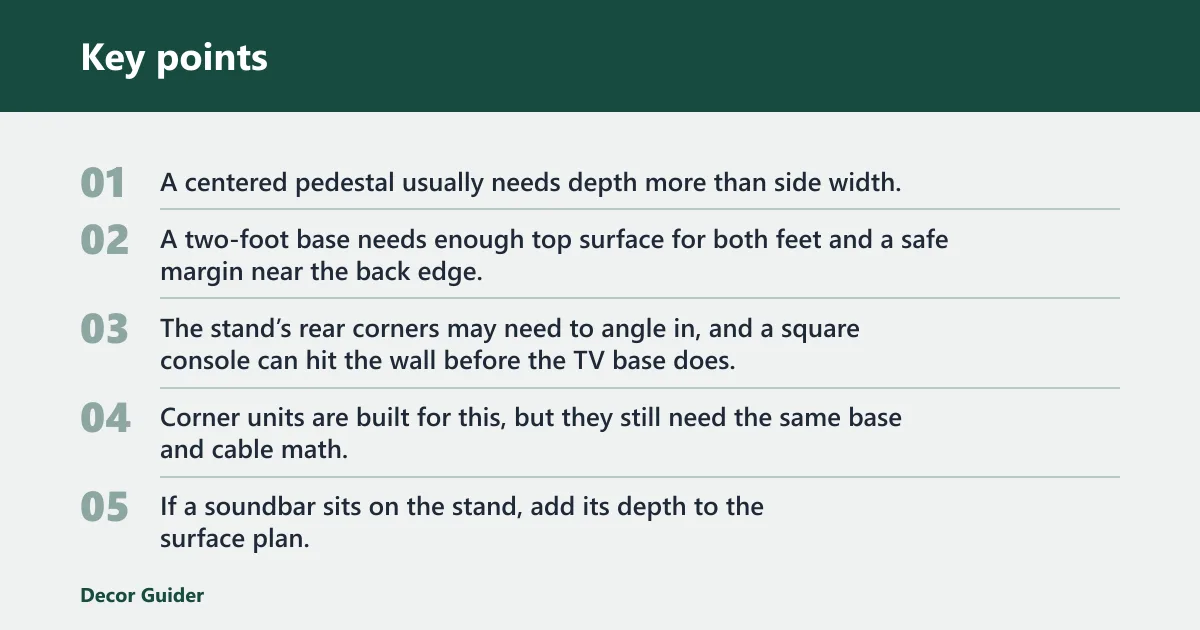
A centered pedestal usually needs depth more than side width. A two-foot base needs enough top surface for both feet and a safe margin near the back edge. For many setups, two feet are easier to place on a wider stand, while a pedestal can work on a narrower console if the rear ports are not blocked.
Check whether the base swivels. Swivel movement can require extra room behind the screen and beside the stand, because the TV may swing toward the wall or toward an armchair when adjusted.
Wall-flush placement versus freestanding placement
For wall-flush placement, the stand needs enough depth for the base plus cable bend space, but it also needs a rear gap so plugs do not press into the wall. For freestanding placement in the middle of a room, depth matters less for the wall and more for traffic paths and the visual balance of the piece.
Corner placement adds another limit. The stand’s rear corners may need to angle in, and a square console can hit the wall before the TV base does. Corner units are built for this, but they still need the same base and cable math.
Soundbar and rear-port clearance
If a soundbar sits on the stand, add its depth to the surface plan. If it hangs in front of the TV, make sure it does not block the screen’s lower bezel or remote sensor. Rear ports need room for straight plugs, and angled HDMI connectors can help when the stand is shallow.
A common first-timer mistake is buying a stand that fits the TV base but not the connectors. The base lands correctly, then the HDMI cord sticks straight out and leaves the TV a few inches from the wall.
TV stand depth fit checklist
This checklist gives a concrete way to compare a TV with a stand. The numbers below are fit targets, not universal product dimensions. Use the actual TV base footprint and port layout from the manufacturer before making a final choice.
| TV size | Actual TV base depth | Pedestal vs two-foot footprint | Minimum stand top depth | Rear cable clearance | Notes for wall-flush, corner, fireplace, and soundbar setups |
|---|---|---|---|---|---|
| 42-inch | 8 to 10 in | Pedestal or compact two-foot base can fit on a shallow top if the footprint is centered. | 12 to 14 in | 2 to 4 in | Wall-flush setups are usually workable if plugs point down or sideways. Corner units still need a flat landing area for the feet. |
| 55-inch | 9 to 12 in | Pedestal bases are easier to place on narrower consoles; two-foot bases need more width and a steady rear edge. | 13 to 16 in | 4 to 6 in | Good middle-ground size for most consoles. If a soundbar sits on top, add enough depth so the bar does not crowd the front edge. |
| 65-inch | 10 to 14 in | Two-foot bases often need the safer edge margin; deep pedestals may need more rear room than the label suggests. | 16 to 18 in | 4 to 6 in | Do not assume any 65-inch TV fits a shallow unit. Swivel bases and rear ports often push the required depth higher. |
| 75-inch | 12 to 16 in | Two-foot bases usually need the broadest landing zone, and a pedestal can still need a deep top for cable room. | 18 to 20 in | 5 to 6 in | Better suited to wider, deeper consoles. Corner placement and soundbar use both reduce margin fast, so verify the full footprint. |
Short checklist:
- Measure the TV base depth and width.
- Check the rear ports and plug direction.
- Add 2 inches beyond the base depth, or 4 to 6 inches if straight-back cables are used.
- Confirm the stand top is wider than the TV base and deep enough for the feet.
- Leave extra room if the TV swivels, a soundbar sits on top, or the unit sits in a corner.
How much clearance do you need behind the stand?
Plan for cable bend radius, plug shape, and airflow behind the TV and connected devices. A small rear gap can work for low-profile plugs, but straight connectors need more room, and enclosed cabinets need ventilation so boxes do not run hot.
Cable bend radius and angled connectors
For a basic fit, leave at least 2 inches behind the TV base if the cables turn downward or sideways. If HDMI, power, or antenna cords exit straight back, 4 to 6 inches is safer. Angled connectors can reduce that need, but they should not be forced against the wall.
Measured depth versus TVD matters here: the listed stand depth may say 16 inches, but the usable depth behind a deep pedestal can be much less once the plugs are installed. The usable number is the one that decides fit.
Ventilation behind electronics
Closed storage and fireplace consoles need more attention to airflow than open shelves. Receivers, streaming boxes, and game consoles need space around their vents, especially if doors close or the back panel is nearly solid. Keep the rear area open enough that cables are not packed tightly against warm surfaces.
Walkway and corner clearance
Room layout clearance matters as much as stand depth. Leave enough walkway space so the front edge of the stand does not block a hall, doorway, or seat path. In corners, check both wall legs of the unit and the swing path of nearby doors.
Which stand styles change the depth you need?
Stand style changes the usable depth, the cable path, and how close the unit can sit to the wall. An open shelf may give better access to ports, while a closed cabinet may hide cords but reduce interior depth. Fireplace and corner units add extra limits that need checking before purchase.
Open shelf and low-profile media console
An open shelf usually offers easier cable access and better ventilation. Low-profile media consoles can fit shallow rooms, but they leave less margin for deep TV feet and rear plugs. These styles work best when the TV base is shallow and the cable connectors are low-profile.
Closed storage and fireplace console
Closed storage can be useful for hiding devices, but it often reduces usable shelf depth. Fireplace consoles are often deeper overall, yet the firebox or trim can interfere with internal placement. Measure the interior opening, not just the outer face, before assuming a fit.
Corner unit placement
Corner units change the geometry. The TV may sit at a slight angle, which helps in small rooms, but the rear corners of the stand can touch the walls before the center of the set is fully supported. Measure both wall edges and the angled front line before buying.
Picture a 55-inch TV with a centered pedestal and two rear HDMI ports. A 14-inch-deep stand can work if the plugs angle down, but the same stand may feel cramped if the cords exit straight back and a soundbar sits on the top. One change in the port path can alter the fit.
Anti-tip hardware matters whenever the TV sits on a taller console or the room has children or pets. Wall anchoring reduces tip-over risk, especially when the TV is heavy, the base is shallow, or the stand is in a traffic path. If the product includes straps or anchors, install them.
How high is a TV stand
TV stand height affects viewing comfort, but it does not replace depth. A common range is about 20 to 30 inches tall for many consoles, though the best height depends on the seated eye line and the TV’s overall height with the base attached. If the stand is too tall, the screen can sit uncomfortably high even when the depth fits.
Use the TV’s height without the stand and add the base height to estimate the total display height. Then compare that number with your seating height and wall placement. Height should support the screen, not force you to tilt your head upward for every viewing position.
How to measure for a TV stand
Start with the TV dimensions, then measure the room, then compare both to the stand. That order prevents common mistakes such as buying for screen size only or forgetting that a pedestal needs rear clearance.
- Measure the TV first. Record width without stand, height without stand, and depth with stand attached. Use the manufacturer dimensions when available.
- Measure the base footprint. Check the feet spacing or pedestal depth, since that is the part that must sit safely on the surface.
- Mark the room limits. Use painter’s tape to mark wall lines, doorway swing, and the front edge of the stand.
- Compare cable space. Add room for HDMI plugs, power cords, and ventilation behind the set and devices.
- Confirm the style fit. Make sure the chosen open shelf, closed cabinet, corner unit, or fireplace console leaves enough usable depth.
How wide should a TV stand be? The stand should be wider than the TV for balance, but width alone is not enough. A wide stand with shallow depth can still fail if the feet overhang or the cords have nowhere to bend. Check both width and depth together.
Frequently asked questions
What is the depth of a TV?
TV depth is the front-to-back measurement of the television itself, usually listed as part of the overall dimensions. It matters most when the set has a thick rear housing, a deep pedestal, or ports that stick out. Use that number with the base footprint, not screen size, to judge stand fit.
What is the measured depth vs TVD?
Measured depth usually means the full outside depth of the stand or TV. TVD is often used to mean the same front-to-back dimension, but product pages may use it differently. Check whether the number describes the outside shell or the usable interior area, because those can differ by several inches.
What size TV stand do I need for a 65-inch TV?
A 65-inch TV needs a stand sized to its actual width and base depth, not the diagonal screen size alone. Many 65-inch sets fit best on a stand that is wider than the TV and about 16 to 18 inches deep, but the exact fit depends on the base, ports, and any soundbar.
Will a 12-inch deep TV stand fit my TV?
A 12-inch-deep stand can fit some compact TVs, but it is tight for many 55-inch to 75-inch models once you include feet, pedestal depth, and cable bends. It is most likely to work when the TV base is shallow and the plugs angle downward. Straight-back connectors often need more room.
How much clearance do I need behind a TV stand?
Plan for at least 2 inches behind the TV if cables turn downward or sideways, and 4 to 6 inches if they exit straight back. Add more room for enclosed cabinets, warm electronics, or wall-flush placement. The goal is enough space for cords to bend without being pinched.
How wide should a TV stand be?
A TV stand should be wider than the TV base and usually wider than the screen itself for balance. The exact amount depends on the TV’s width without stand and the layout of the room. Wider is not automatically better if the depth is too shallow or the unit blocks traffic paths.
Products related to this article
Sponsored / affiliate links. As an Amazon Associate I earn from qualifying purchases. I may earn additional commission from eligible campaigns.