How To Choose A Tv Stand: Complete Buying Guide
Choosing a TV stand involves matching size to your TV and room, considering material and style, and ensuring it’s stable and safe for all your devices.
Understanding TV Stand Basics
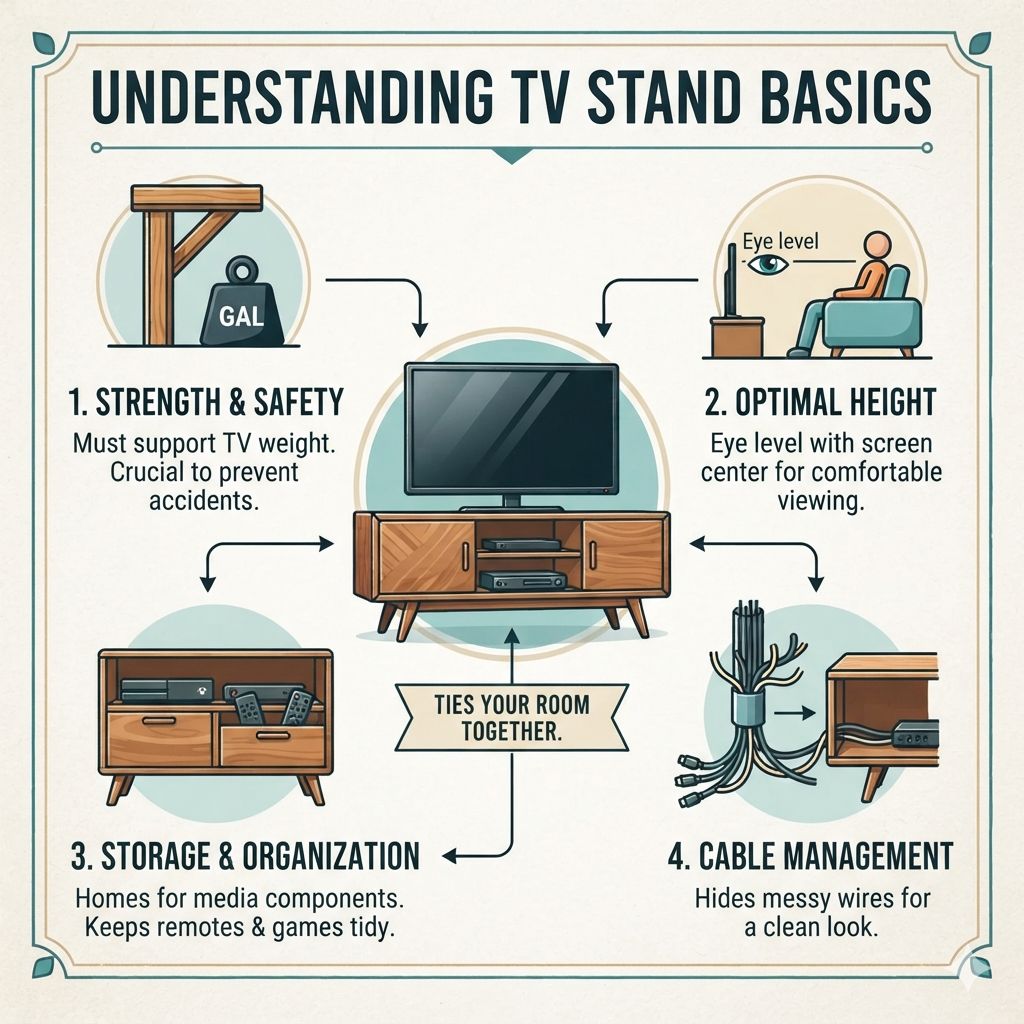
A TV stand is more than just furniture. It’s a key piece for your living space. It holds your television.
It also gives a home to your cable box, game consoles, and soundbar. The right stand ties your room together. It keeps things neat and tidy.
Think about its main job. It must be strong. It needs to support your TV’s weight.
This is very important for safety. A wobbly or weak stand can cause accidents. You also want it to be the right height.
This makes watching TV comfortable.
Many stands offer storage. This is great for keeping remotes, games, and movies organized. Some have built-in cable management.
This hides messy cords. Others are just simple platforms. They focus on a clean, minimalist look.
How to Measure for Your TV Stand
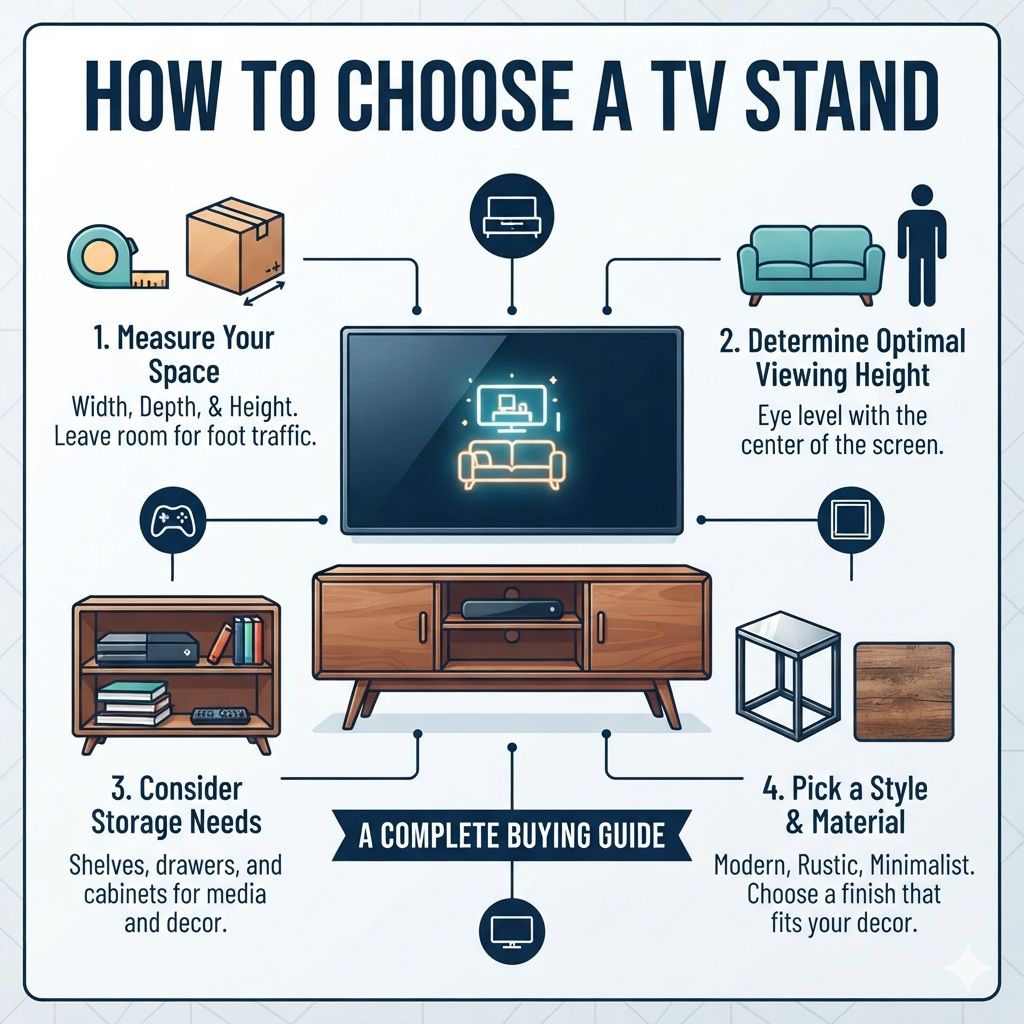
Getting the size right is step one. It prevents many headaches later. You need to measure your TV. Height matters as much as width, since the ideal stand height puts your screen center at eye level when seated; see our TV stand height guide for the exact range.
You also need to know your room’s space.
First, measure your TV screen. Do this from left to right. This is the screen’s width.
Most TVs are measured diagonally. But for a stand, width is key. Write down this number.
It’s good to have the exact width. Also, check your TV’s weight. This is usually in the manual or on the back of the TV.
Next, look at the space where the stand will go. Measure the width of that wall. How much room do you have?
You don’t want a stand that’s too wide. It will look out of place. A stand that is too narrow might not look stable.
Consider the viewing distance. How far are you usually from the TV? For a smaller TV, like 32 inches, you might sit closer.
For a large 70-inch TV, you likely sit further back. The stand’s width should complement this. A good rule is for the stand to be at least as wide as your TV.
Some people like it wider for a more balanced look.
Don’t forget height. How high do you want your TV? Most people prefer the center of the screen at or slightly below eye level when seated.
Measure from the floor to your eye level. Then, measure the height of your TV. Subtract the TV height from your eye level height.
This tells you the maximum ideal height for the top of your TV stand.
Lastly, think about depth. The stand needs to be deep enough for your TV. It should also be stable.
Measure the depth of your TV’s stand or feet. The TV stand’s surface should be wider and deeper than these. This ensures the TV doesn’t hang off the edge.
TV Stand Sizes Explained
TV stands come in many sizes. They are usually measured by width. Common sizes range from 30 inches to over 80 inches wide.
Small TV Stands (Under 40 inches wide): These are good for smaller TVs, like 20-32 inches. They fit well in small rooms or bedrooms. They often have simple designs.
Some might have a shelf or two.
Medium TV Stands (40-60 inches wide): These are very popular. They work with TVs from 40-55 inches. Many people find this size fits their main living areas perfectly.
They offer a good balance of space for the TV and storage.
Large TV Stands (Over 60 inches wide): These are for bigger TVs, 55 inches and up. They are often called media consoles or entertainment centers. They provide lots of room for multiple devices.
They also offer ample storage for games, movies, and accessories.
When choosing, aim for a stand that is at least as wide as your TV screen. A wider stand can make your TV look more stable. It also offers more surface for soundbars or decor.
Choosing the Right Material
The material of your TV stand matters. It affects its look, durability, and price.
Wood: This is a classic choice. Solid wood like oak, maple, or cherry is very strong. It looks beautiful and lasts a long time.
It can be more expensive. Engineered wood, like particleboard or MDF, is a cheaper option. It’s often covered with a veneer.
It looks like real wood. It’s good for lighter TVs. But it can be less durable.
Metal: Metal stands are often sleek and modern. They are very strong. They can hold heavy TVs.
They look good in industrial or contemporary homes. They might have glass or wood shelves.
Glass: Glass TV stands are very stylish. They can make a room feel more open. They are best for lighter TVs.
They can show fingerprints and smudges. They might also chip or break if not cared for. You need to be careful with glass.
Plastic/Composite: These are often the most affordable. They are lightweight. They might not be as durable.
They can look less high-end. They are good for small TVs or as a temporary solution.
Think about your home’s style. Do you have a rustic cabin feel? Wood would be great.
Is your home modern and sharp? Metal or glass might fit better. Also, consider the weight of your TV and other devices.
A heavier setup needs a stronger material.
Material Check: Durability vs. Style
Solid Wood: Top durability, classic style. Pricey.
Engineered Wood: Good looks, lower cost. Less durable than solid wood.
Metal: Strong, modern. Can be cold-looking.
Glass: Stylish, airy. Shows smudges, fragile.
Plastic: Cheapest, lightweight. Least durable.
Exploring Different TV Stand Styles
Styles for TV stands are as varied as tastes. What looks good in one home might not fit another.
Traditional: These stands often have ornate details. They might have carved legs or raised panels. They usually come in darker wood tones.
They fit well in classic or formal living rooms.
Modern: Modern stands are sleek and simple. They have clean lines. They often use materials like metal, glass, or high-gloss finishes.
They work best in contemporary spaces.
Farmhouse/Rustic: These have a warm, cozy feel. They often use natural wood finishes. They might have distressed paint or barn door accents.
They fit well in country or casual homes.
Industrial: Think metal pipes, reclaimed wood, and exposed hardware. These stands have a raw, edgy look. They are great for lofts or trendy apartments.
Mid-Century Modern: Characterized by tapered legs, simple shapes, and warm wood tones. These stands have a retro vibe that’s very popular.
Corner TV Stands: These are designed to fit snugly into a corner. They save space. They are great for smaller rooms where wall space is limited.
They can be triangular or L-shaped.
Floating TV Stands: These mount directly to the wall. They create a clean, minimalist look. They appear to float.
They offer storage and a surface for the TV. They require secure wall mounting.
When choosing a style, look around your room. What other furniture do you have? What is the overall feel?
Pick a stand that complements these. You want it to blend in, not clash.
Storage and Organization Features
A TV stand often needs to do more than just hold the TV. Storage is a big part of that. What do you need to store?
Shelves: Open shelves are great for easy access. You can put game consoles, streaming devices, or decorative items here. Make sure shelves are deep enough for your devices.
Drawers: Drawers are perfect for hiding smaller items. Remotes, extra batteries, or discs can go here. They keep clutter out of sight.
Cabinets with Doors: Doors hide everything. This is ideal for things you don’t want to see all the time. They can hold larger items like movie collections or game controllers.
Make sure the doors open easily.
Cable Management: This is a must-have for many. Look for stands with pre-drilled holes or grommets in the back. These help route cables neatly.
They prevent tangles. Some stands have built-in cable tie systems.
Open vs. Closed Storage: Open shelves allow for airflow. This is good for electronics that can get warm.
Closed storage keeps things dust-free and neat. Think about what you’ll be storing and how you want it to look.
I remember a time when my entertainment center was a mess. Cables were everywhere. Remotes got lost all the time.
I bought a new stand with doors and drawers. It made such a difference. Everything had its place.
It looked so much cleaner. I felt much calmer just by looking at it.
Storage Smarts
- Open Shelves: For easy access gadgets.
- Drawers: For small, hidden items.
- Cabinets: For concealing clutter.
- Cable Holes: To manage wires neatly.
Weight Capacity and Stability
This is super important. Your TV stand must be able to hold your TV and everything else you put on it. This is about safety and preventing damage.
Always check the weight capacity. This is usually listed by the manufacturer. It will tell you the maximum weight the stand can safely support.
This is often broken down by total weight and sometimes by shelf weight.
Total Weight Capacity: This is the most crucial number. If your TV and all your devices together weigh 100 pounds, your stand needs a capacity of at least 100 pounds. It’s wise to get a stand with a higher capacity than you need.
This gives you a buffer. It also means the stand won’t be strained.
Shelf Weight Capacity: If you plan to put heavy items like a game console or a large soundbar on a specific shelf, check that shelf’s limit too. Some shelves are not as strong as the main top surface.
Stability: Beyond weight, the stand needs to be stable. This means it shouldn’t easily tip over. Look for stands with wide bases.
Or ones that have feet spaced well apart. If you have kids or pets, consider anti-tip straps. These can be secured to the wall.
They add a vital layer of safety.
I once saw a friend’s TV slide off a flimsy stand. It was terrifying. Thankfully, no one was hurt.
But the TV was ruined. That taught me to always check the weight limits. And to make sure the stand felt solid.
When assembling, follow the instructions carefully. Make sure all screws are tight. If the stand wobbles, check the assembly.
Sometimes adjusting the feet can help on uneven floors. A stable stand is a safe stand.
Safety Features to Consider
Safety is not just about weight capacity. There are other things to think about.
Anti-Tip Kits: Many modern TV stands come with these. They are straps or brackets that attach to the back of the stand and the wall. They prevent the stand from tipping forward.
This is a lifesaver if you have curious kids or pets. Or if you live in an earthquake-prone area.
Rounded Corners: If you have small children, stands with rounded corners are safer. They reduce the risk of bumps and bruises. Sharp corners can be a hazard in busy play areas.
Ventilation: Electronics like TVs, game consoles, and streaming boxes can get hot. A good TV stand should have some form of ventilation. This could be open back panels or vents.
Proper airflow prevents overheating. Overheating can damage your devices.
Cord Management: While not strictly a safety feature, tidy cords reduce tripping hazards. They also prevent accidental unplugging of important devices. Many stands now include built-in cable holes or clips.
Secure Assembly: Always ensure the stand is assembled correctly. Use all provided hardware. A poorly assembled stand is a safety risk in itself.
Double-check all connections before placing your TV on it.
My nephew is a toddler. He likes to climb. When I got a new TV, I made sure the stand had an anti-tip kit.
I also picked a stand with no sharp corners at the front. It gave me peace of mind. It’s the little things that count for safety.
Safety First Checklist
- Anti-tip straps: Essential for safety, especially with kids.
- Rounded corners: Reduces injury risk.
- Good ventilation: Protects electronics from heat.
- Neat cord management: Prevents trips and tangles.
- Proper assembly: Use all parts and follow instructions.
Considering Your Room and Decor
The TV stand needs to fit your room’s style. It’s part of the overall look.
Room Size: A huge stand in a tiny room will feel cramped. A tiny stand in a large room will look lost. Match the stand’s size to the room’s dimensions.
For small rooms, consider a corner stand or a floating mount.
Color and Finish: Does your room have light or dark walls? What are your other furniture colors? A black stand might look bold against a white wall.
A light wood stand could warm up a room with cool tones. Think about contrast. Or choose something that blends in.
Style Match: As mentioned before, match the stand’s style to your decor. A modern TV stand won’t look right in a Victorian-style living room. Try to create a cohesive look.
Functionality beyond TV: Does the stand need to hold books? Plants? Or just your tech?
Some stands are designed as display pieces. Others are purely functional. Choose one that fits your needs.
I have a small apartment. My living room also serves as my office. I needed a TV stand that didn’t take up too much space.
I chose a slim, modern design. It had a few shelves for my books and plants. It made the room feel bigger and more organized.
It was a game-changer.
TV Size vs. Stand Size: A Visual Guide
This is a common question: how big should the stand be for my TV?
Rule of Thumb: The TV stand should ideally be as wide as, or wider than, your television screen.
Here’s a simple guide:
- TV Size (Diagonal): Stand Width Suggestion
- 20″ – 32″: 30″ – 40″
- 40″ – 50″: 40″ – 60″
- 55″ – 65″: 50″ – 70″
- 70″+: 65″ – 80″+
Why Wider? A wider stand offers visual balance. It makes the TV look more secure. It also provides extra space.
You can place speakers, decor, or a soundbar on either side. Or on the stand itself.
What if the Stand is Narrower? If the stand is significantly narrower than your TV, it can look unsafe. The TV might also overhang the edges. This is generally not recommended.
Always ensure the TV’s feet or base sit fully on the stand’s surface.
I bought a TV. It was bigger than I expected. My old stand was too narrow.
The TV looked like it was about to fall off. It was quite stressful. I had to buy a new, wider stand right away.
That experience really hammered home the importance of matching sizes.
Stand Width Guide
Your TV is 40″ wide? Get a stand at least 40″ wide, maybe 50-60″ for better balance.
Your TV is 60″ wide? Look for a stand 60″ or wider, perhaps 70-80″.
Key takeaway: Wider is usually better for looks and stability.
Mounting vs. Stand: What’s Right for You?
You have two main options for placing your TV: on a stand or mounted on the wall.
TV Stand Pros:
- Flexibility: Easy to move the TV. Good if you rearrange your room often.
- Storage: Offers space for devices, games, and decor.
- Cost: Often less expensive than professional mounting.
- No Wall Damage: No holes in your walls needed.
TV Stand Cons:
- Takes up floor space: Can make a room feel smaller.
- Cable mess: Can be harder to hide cords neatly.
- Lower viewing angle: TV is usually lower than eye level.
Wall Mounting Pros:
- Sleek look: Very clean and minimalist.
- Space-saving: Frees up floor space.
- Optimal viewing: Can position TV at perfect eye level.
- Kid-safe: Harder for kids to knock over.
Wall Mounting Cons:
- Less flexible: Harder to move the TV.
- Limited storage: Requires separate media consoles or shelving.
- Installation: Can be tricky and may require professional help.
- Wall damage: Creates holes in the wall.
I personally love the look of a wall-mounted TV. It makes my living room feel so open. But I also need storage for my game consoles.
So, I opted for a floating media console. It gives me the best of both worlds. It’s mounted to the wall but still offers storage.
Budgeting for Your TV Stand
TV stands can range from under $100 to over $1000. Your budget will guide your choices.
Under $200: You’ll find basic stands here. They are often made from particleboard or MDF. They might have simple shelves and a limited weight capacity.
Good for smaller TVs or as a temporary solution. Look for sales at big box stores.
$200 – $500: This range offers more options. You can find stands made from better engineered wood. Some may have metal accents or nicer finishes.
You’ll see more storage options like drawers or cabinet doors. Better weight capacity is common here.
$500 – $1000+: At this price point, you’ll find solid wood stands. Or high-quality engineered wood with premium veneers. These stands are built to last.
They have excellent weight capacities. They offer sophisticated designs and features like soft-close drawers. You might also find custom or artisan pieces.
Factors Affecting Price:
- Material: Solid wood is most expensive.
- Brand: Well-known furniture brands cost more.
- Features: Built-in fireplaces, LED lights, or complex storage add cost.
- Size: Larger stands naturally cost more.
- Construction: Hand-crafted or complex designs increase price.
When I was younger, I always bought the cheapest option. Now, I try to invest a bit more in key furniture pieces. A good TV stand is one of them.
It makes a big difference in how my room looks and feels. Plus, it lasts much longer.
Maintenance and Cleaning Your TV Stand
Keeping your TV stand looking good is easy if you know how.
For Wood and Engineered Wood:
- Dust regularly with a soft, dry cloth.
- For spills, wipe them up immediately. Use a slightly damp cloth.
- Avoid harsh cleaners. They can damage finishes.
- For wood, you can use a wood polish occasionally. Test it on an inconspicuous spot first.
- Protect from direct sunlight. This can fade finishes.
For Glass:
- Use a glass cleaner and a microfiber cloth.
- Spray the cleaner onto the cloth, not directly onto the glass. This prevents drips.
- Wipe gently to avoid scratches.
- Clean fingerprints often.
For Metal:
- Dust with a soft cloth.
- For smudges or dirt, use a damp cloth. Dry it well.
- Some metal finishes can be sensitive. Check manufacturer recommendations.
General Tips:
- Use coasters for drinks.
- Avoid placing hot items directly on the surface.
- When moving, lift the stand. Do not drag it.
I used to just wipe down my old stand with whatever cloth I found. It left streaks. Now I use a microfiber cloth.
It makes a huge difference. My wooden stand looks so much better. It’s amazing how much a little care can do.
Cleaning Quick Tips
Daily: Quick dust with a dry cloth.
Weekly: Wipe with a slightly damp cloth if needed. Use appropriate cleaner for material.
Monthly: Polish wood if desired. Clean glass thoroughly.
Immediate: Wipe up spills right away.
Real-World Scenarios: Finding Your Perfect Stand
Let’s look at some common situations and how to choose a stand.
Scenario 1: The Small Apartment Dweller
Problem: Limited space. Need to maximize every inch. Often moving or rearranging.
Solution: Look for compact designs. Corner stands are great. Floating TV stands are ideal.
They save floor space and look sleek. Choose a stand with good vertical storage. Maybe a slim cabinet or shelves.
Materials like glass or light wood can make the space feel bigger.
Scenario 2: The Family with Young Kids
Problem: Safety is the top priority. Kids climb and bump into things.
Solution: Prioritize stability and safety features. Choose a stand with a wide base. Make sure it has an anti-tip kit.
Rounded corners are a big plus. Avoid glass stands. Consider a sturdy wood or metal unit.
Ensure weight capacity is high. Keep the TV and stand away from climbing access points if possible.
Scenario 3: The Home Theater Enthusiast
Problem: Need space for multiple devices. Sound quality matters. Cable management is crucial.
Solution: Opt for a large media console or entertainment center. Look for ample shelving. Ensure there’s room for a soundbar.
Good ventilation is a must for multiple electronics. Cable management features are essential. A stand made of solid wood or metal will handle the weight and provide a stable platform for acoustics.
Scenario 4: The Minimalist Decorator
Problem: Wants a clean, uncluttered look. Less is more.
Solution: A floating TV stand is perfect. Or a very simple, legless stand with clean lines. Minimal hardware.
Hidden storage is key. Choose a stand in a neutral color that blends with the wall. A single, long, low-profile stand can also work well.
In my own home, I have a mix. My living room is spacious, so I have a larger entertainment unit. My bedroom is small.
There, I chose a simple, wall-mounted shelf for the TV and a small cabinet below. It works well for that space.
Common TV Stand Problems and Solutions
Even with the best planning, issues can pop up.
Problem: Wobbly Stand.
Solution: Check assembly. Ensure all screws are tight. Some stands have adjustable feet to level them on uneven floors.
If it’s still wobbly, it might be a design flaw or poor quality. Consider adding corner braces or an anti-tip kit for safety.
Problem: Not Enough Storage.
Solution: Get creative. Use decorative baskets or bins on open shelves. Add a separate small shelving unit next to the stand.
If possible, upgrade to a larger stand when budget allows.
Problem: Cables are a mess.
Solution: Invest in cable ties, sleeves, or raceways. Use the stand’s built-in cable management holes. If your stand lacks them, you can buy stick-on cable clips for the back.
Hide them behind furniture where possible.
Problem: TV is too high or too low.
Solution: For height issues, if the stand is too low, you might need risers or a taller stand. If it’s too high, consider a lower-profile stand. Or, if it’s a mounting issue, you might need to reposition the mount or use a different type of mount.
Problem: Scratches or Damage.
Solution: Minor scratches on wood can sometimes be fixed with a furniture repair pen or wax stick. For deeper damage, touch-up paint or a veneer patch might be needed. For glass, chips are usually permanent unless professionally repaired.
I had a stand that was a little too short for my liking. I bought some sturdy wooden blocks from a hardware store. I painted them to match the stand.
Then I placed the stand on top of them. It worked perfectly and gave me the height I wanted without buying a whole new unit.
When to Buy a New TV Stand
Is it time for an upgrade? Here are signs it might be time for a new TV stand.
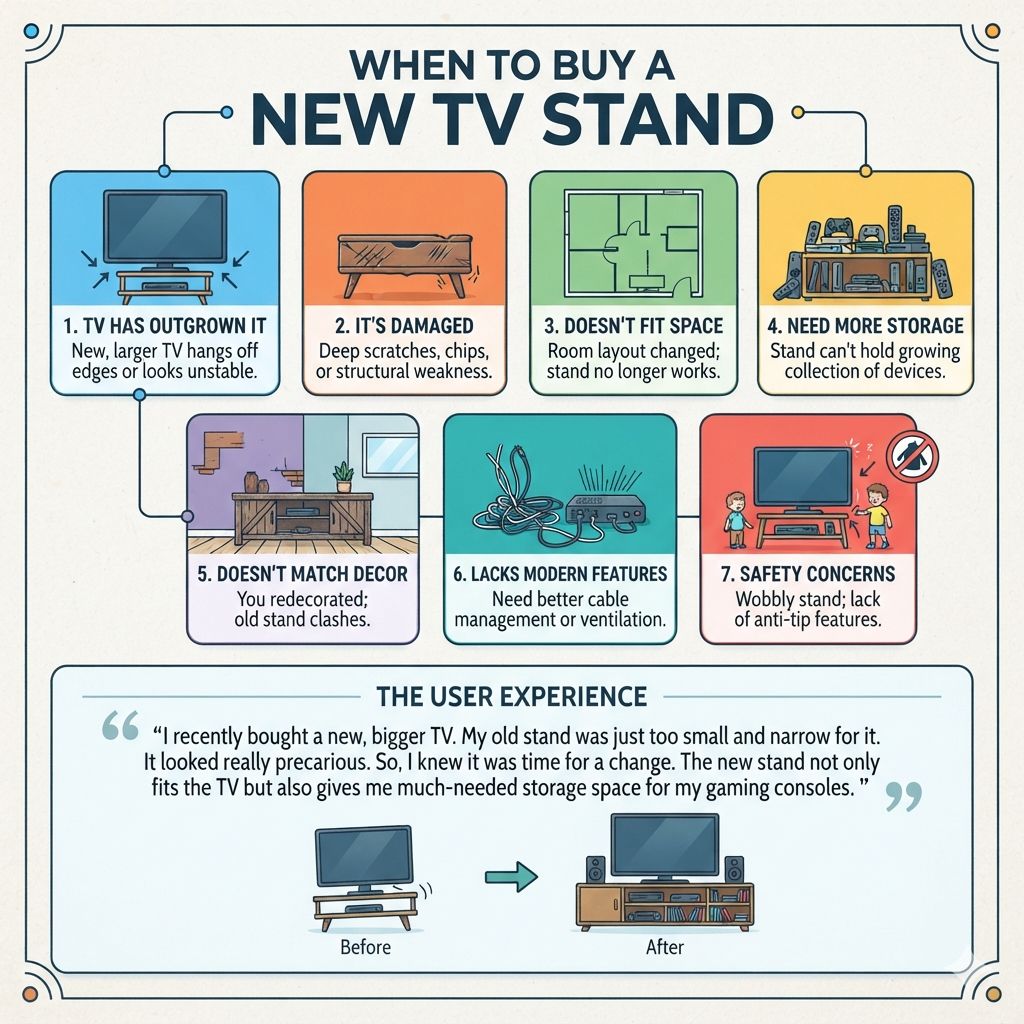
- Your TV has outgrown it: Your new, larger TV hangs off the edges or looks unstable.
- It’s damaged: Deep scratches, chips, or structural weakness make it unsafe.
- It doesn’t fit your space: Your room layout has changed, and the stand no longer works.
- You need more storage: Your current stand can’t hold your growing collection of devices or media.
- It doesn’t match your decor: You’ve redecorated, and the old stand clashes.
- It lacks modern features: You really need better cable management or ventilation.
- Safety concerns: The stand feels wobbly, or you have young children and it lacks anti-tip features.
I recently bought a new, bigger TV. My old stand was just too small and narrow for it. It looked really precarious.
So, I knew it was time for a change. The new stand not only fits the TV but also gives me much-needed storage space for my gaming consoles.
Frequent Questions About TV Stands
What is the best height for a TV stand?
The ideal height places the center of your TV screen at or slightly below your eye level when you are seated. Measure from the floor to your eyes while sitting, then subtract half the TV’s height. This gives you the target height for the TV’s center, and thus, the stand’s top surface.
Can I put a TV on a shelf instead of a stand?
Yes, you can. However, ensure the shelf is specifically designed to hold the weight of your TV. It must also be wide and deep enough.
Wall-mounted shelves are a good option. Standard bookshelves might not be strong enough on their own.
How do I measure my TV for a stand?
Measure the width of your TV screen from one side to the other. Also, note the width and depth of the TV’s base or feet. You’ll also need to know your TV’s weight.
This information helps you select a stand that is wide, deep, and strong enough.
Should the TV stand be wider than the TV?
Yes, it’s generally recommended. The stand should be at least as wide as your TV screen. A stand that is wider provides better visual balance and stability.
It also offers space for accessories like a soundbar or decor.
What is the difference between a TV stand and a media console?
The terms are often used interchangeably. A media console is typically larger and designed to hold multiple electronic components, often with more storage. A TV stand can be simpler, sometimes just a platform for the TV, but many modern stands function as media consoles.
How do I hide TV cables on a TV stand?
Look for TV stands with built-in cable management features like holes or grommets in the back. You can also use cable ties, sleeves, or raceways that attach to the back of the stand. Some stands have enclosed cabinets to hide everything.
Is a glass TV stand safe for a heavy TV?
Tempered glass TV stands are designed to be strong, but you must check the weight capacity. If your TV is very heavy, a solid wood or metal stand might be a more secure choice. Always verify the glass’s thickness and the stand’s overall construction.
Final Thoughts on Choosing Your TV Stand
Finding the right TV stand makes a big difference. It impacts your room’s look and how you use your space. Take your time.
Measure carefully. Think about your TV size and room. Consider style and storage needs.
Safety features are non-negotiable. By following these tips, you’ll find a stand you love.
Products related to this article
Sponsored / affiliate links. As an Amazon Associate I earn from qualifying purchases. I may earn additional commission from eligible campaigns.