What Size Tv Stand For A 55-Inch Tv? Expert Guide
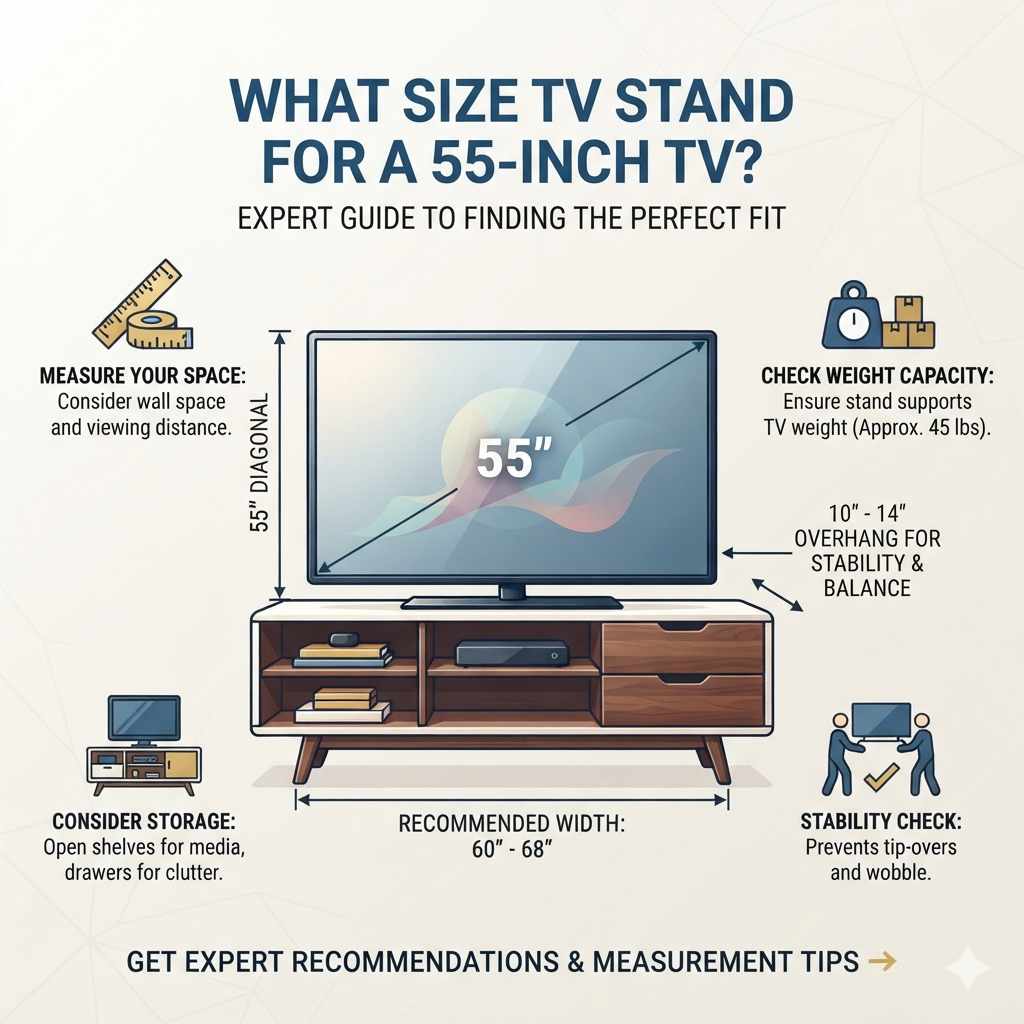
Finding the right TV stand size for a 55-inch TV involves balancing screen width with stand width and considering overall room aesthetics and functionality. Generally, a stand should be wider than the TV for visual appeal and stability.
Understanding TV Stand Dimensions for a 55-Inch TV
So, you have a shiny new 55-inch television. That’s great! Now you need a place to put it.
A TV stand is more than just furniture. It’s a key part of your entertainment setup. Getting the size right is super important.
If the stand is too small, it can look wobbly. It might not be safe. If it’s too big, it can make your room feel cramped.
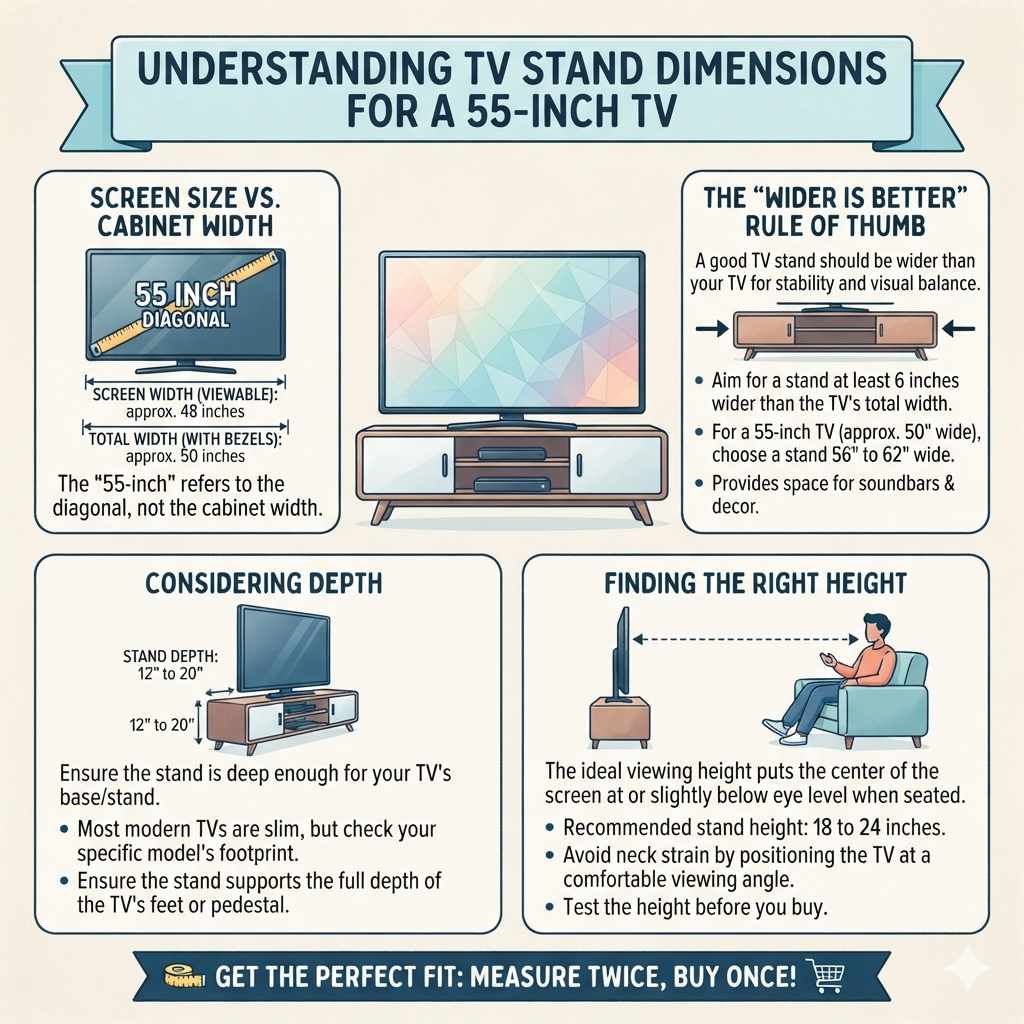
Let’s talk about screen size first. When we say a 55-inch TV, that number usually means the screen’s diagonal measurement. It’s from one corner to the opposite corner.
The actual width of the TV cabinet itself is different. It’s usually a few inches wider than the screen. For a 55-inch TV, the screen itself is about 48 inches wide.
The total width, including the bezels, can be around 50 inches.
This is where stand width comes in. Most experts and designers agree. Your TV stand should be wider than your TV.
This creates a nice balance. It makes the setup look stable and visually pleasing. A good rule of thumb is to aim for a stand that is at least 6 inches wider than the TV.
So, for a 55-inch TV that’s about 50 inches wide, you’d want a stand that is at least 56 inches wide. Some people like even more space. They might choose a stand that’s 8 to 12 inches wider.
This gives you about 3 to 6 inches of space on each side of the TV.
Think of it like framing a picture. You don’t want the frame to be smaller than the art. You want it to complement it.
A wider stand provides that visual anchor. It also gives you extra space for things like soundbars, gaming consoles, or decorative items. We’ll talk more about these functional aspects later.
Another thing to think about is the depth of the stand. You need to make sure your TV fits comfortably. Most modern TVs are quite slim.
But some older models or specific designs might stick out more. Check the depth of the TV’s base or stand if you plan to use it. Most TV stands have a depth of about 12 to 20 inches.
This is usually plenty for a 55-inch TV.
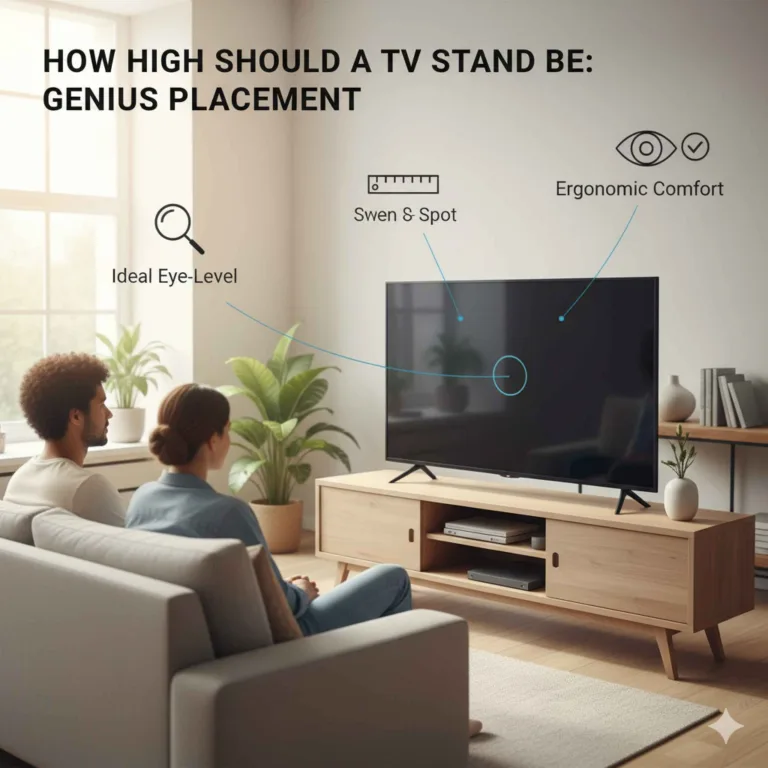
Height is also a factor. The ideal viewing height is when the center of the screen is at or slightly below eye level when you’re seated. For most people, this means a TV stand around 18 to 24 inches tall.
This range works well for many living room seating arrangements. You don’t want to crane your neck up or feel like you’re looking down too much.
The Visual Appeal: Width and Balance
Let’s dive a bit deeper into why width matters so much for the visual appeal of your TV setup. It’s not just about having enough space to put the TV down. It’s about how it makes your room feel.
A stand that is too narrow can make your 55-inch TV look like it’s about to tip over. It creates a sense of unease. It doesn’t look right.
Your eyes are drawn to the imbalance.
When you have a wider stand, it feels grounded. It looks stable. Imagine a beautiful painting.
If you put it on a tiny easel, it looks silly. It looks fragile. But if you put it on a sturdy, well-proportioned easel, it looks impressive.
It commands attention in the right way. Your TV is similar. A wider stand acts like a proper base.
It supports the visual weight of the screen.
This wider footprint also helps to anchor the entire entertainment area. It can define the space where you watch TV. Think about your living room layout.
If your TV stand is too small, the TV might feel like it’s floating awkwardly. It might not connect with the rest of your furniture. A broader stand helps to tie everything together.
It makes the TV area feel more intentional and complete.
Consider the proportions of your room too. A large room can handle a larger, wider stand. A smaller room might benefit from a stand that is still wider than the TV, but perhaps not excessively so.
The goal is to create harmony. You don’t want the stand to overpower the TV, nor do you want it to look like an afterthought.
I remember helping a friend set up their new living room. They had a gorgeous 55-inch TV. But they bought a stand that was barely wider than the TV itself.
It looked… precarious. Even though it was structurally sound, it didn’t look right. We ended up swapping it for a stand that was about 20 inches wider.
The difference was astonishing. The room suddenly felt more complete. The TV looked like it belonged.
It was a simple change, but it made a huge impact on the overall feel of the space.
So, when you’re shopping, look at the total width of the TV stand. Measure your TV’s actual width (including the frame). Then, aim for that stand width to be at least 6 inches more.
If you have the space and like a more substantial look, go for 8 to 12 inches more. This is a great starting point for visual success.
Quick Size Check: 55-Inch TV Stand
TV Screen Diagonal: 55 inches
Approximate TV Width: 48 inches (screen)
Approximate TV Unit Width: 50 inches (with bezels)
Recommended Stand Width: 56 inches minimum (50 inches + 6 inches)
Ideal Stand Width: 58 – 62 inches (for better balance)
Recommended Stand Depth: 12 – 20 inches
Ideal Stand Height: 18 – 24 inches (for optimal viewing angle)
Functional Needs: More Than Just a Place to Put the TV
Okay, so we’ve talked about how the stand looks. Now let’s think about how it works for you. A TV stand isn’t just a platform.
It’s a hub for your entertainment devices. For a 55-inch TV, you likely have more than just the TV connected. You might have a cable box, a streaming device, a game console, or a soundbar.
This is where the depth and storage space of the stand become really important. Do you want to hide your electronics? Or are you okay with them being visible?
Open shelves are great for easy access. They also allow for better ventilation for your devices. This can prevent them from overheating.
Closed cabinets or drawers are good for hiding clutter.
Think about cable management. Many modern TV stands have built-in features for this. Look for holes in the back of the shelves or cabinets.
These allow you to thread cables neatly. This is a game-changer. It prevents a messy tangle of wires behind your TV.
It makes the whole setup look much cleaner and more professional.
What about a soundbar? If you plan to add one, measure its dimensions. Make sure there’s enough space on top of the stand or inside a cabinet for it.
Some soundbars are quite long. You’ll need to factor that into your stand width. Or, you might need to place it in front of the TV on the stand.
Ensure the stand is deep enough for this.
Gaming consoles are another common item. They often have specific ventilation needs. Placing a console inside a tightly enclosed cabinet without proper airflow can cause it to overheat.
If you’re using an enclosed space, ensure it has vents or that you leave the doors open when in use. Many gamers prefer open shelving for easy access and better cooling.
Let’s not forget about accessories. Do you want space for a few decorative items? Maybe a small plant, some photos, or your favorite books?
A wider stand gives you more surface area for this. It helps to personalize your space and make it feel less like a sterile showroom.
In my own home, I have a 55-inch TV. I decided on a stand that was quite wide. It had a few open shelves and some drawers.
I put my game console and streaming device on the open shelves. The drawers are perfect for storing remotes, controllers, and any spare cables. I even have a little space on top for a small plant.
It makes the whole area functional and tidy. Without that extra space, it would have been a chaotic mess of wires and devices.
Consider the weight capacity of the stand too. A 55-inch TV can be quite heavy. You need a stand that is built to support that weight safely.
Check the manufacturer’s specifications. A sturdy, well-made stand is an investment in safety. It protects your TV and your family.
Essential Storage Needs for Your 55-Inch TV Setup
Electronics: Cable box, streaming stick, game consoles, Blu-ray player.
Audio: Soundbar, speakers.
Accessories: Remotes, controllers, charging cables, headphones.
Decor: Plants, photos, books, decorative objects.
Cable Management: Built-in solutions like holes or channels are a big plus.
Choosing the Right Style and Material
Now that we’ve covered the practical size and functional aspects, let’s talk about style. The TV stand should match your existing decor. It shouldn’t stick out like a sore thumb.
There are many styles available, and finding one that fits your taste is part of the fun.
Modern and Minimalist: These stands often feature clean lines, sleek surfaces, and simple hardware. They might be made of laminate, metal, or lacquered wood. They often have integrated storage that hides electronics.
They are perfect for contemporary homes.
Farmhouse or Rustic: These stands often use natural wood finishes, distressed paint, or reclaimed wood. They might have barn door accents or visible grain patterns. They bring a cozy, warm feel to a room.
Mid-Century Modern: Think tapered legs, geometric shapes, and wood veneers like walnut or teak. These stands have a retro yet timeless appeal. They are elegant and functional.
Industrial: These designs often combine wood with metal elements like iron or steel. They can have exposed hardware and a raw, unfinished look. They suit loft-style apartments or homes with an edgy vibe.
The material of the stand also plays a role in its look and durability.
- Wood (Solid and Veneer): Wood offers warmth and durability. Solid wood is more expensive but lasts longer.
Veneers can offer the look of wood at a lower cost.
- Metal: Metal stands are strong and can have a modern or industrial feel. They are often used for frames or legs.
- Glass: Glass shelves or tops can make a stand look lighter and more open. However, they can be prone to smudges and scratches.
- MDF/Particle Board: These are common in more affordable furniture.
They can be durable if well-made and finished, but they are less resistant to moisture.
When I was choosing a stand for my own living room, I had a 55-inch TV. My room had a mix of modern and slightly rustic elements. I looked for a stand that was made of a dark wood finish, perhaps oak or walnut.
I wanted clean lines but also a bit of warmth. I found a great piece with a simple, flat top. It had open shelves for my devices and two cabinets below.
The hardware was brushed nickel, which matched my other furniture.
It’s also worth considering the color of the stand. A dark wood can absorb light and feel more substantial. A lighter wood or white stand can make a room feel brighter and more spacious.
If your TV has a dark bezel, a darker stand often creates a more cohesive look. If your TV has a silver or white bezel, a lighter stand might be a better match.
Don’t forget about the floor it will sit on. Make sure the stand has sturdy legs or a solid base. This is especially important if you have hardwood floors.
You don’t want to scratch them. Some stands come with floor protectors. If not, you might want to add felt pads to the bottom of the legs.
Finally, think about the overall aesthetic of your room. Is it cozy and traditional? Sleek and modern?
Eclectic? Your TV stand should complement that. It’s part of the larger design picture.
Choosing the right style and material will ensure it fits in seamlessly.
Style Spotlight: Matching Your TV Stand to Your Room
For a Modern Room: Look for metal and glass, or sleek laminate finishes. Simple, geometric shapes work well.
For a Cozy Room: Dark wood tones, rustic finishes, or distressed paint add warmth. Consider farmhouse or traditional styles.
For a Minimalist Room: White, black, or light wood finishes with hidden storage are ideal. Keep hardware minimal or absent.
For a Transitional Room: A blend of modern and traditional elements. Look for clean lines in natural wood or neutral painted finishes.
Placement and Viewing Angles
Once you have your stand, where do you put it? Placement is key to both the visual appeal and your viewing experience. For a 55-inch TV, you want to place it where it’s easily visible from your main seating area.
Measure the distance between your primary couch or chairs and where the TV will be. A good general guideline for a 55-inch TV is to have it between 5.5 to 11 feet away from your seating. This range allows for comfortable viewing without straining your eyes or having to move your head too much.
The height of the stand plays a crucial role here. As we mentioned, the center of the screen should be at or slightly below eye level when you’re seated. If your stand is too low, you might find yourself looking down too much.
If it’s too high, you’ll be looking up.
I once visited a friend’s house where their TV was mounted way too high above a fireplace. It was above eye level even when standing. Watching TV for an hour gave me a neck ache!
They later got a longer media console and moved the TV to it. It made a world of difference for comfort.
Consider the natural light in your room. You don’t want the TV screen to be directly opposite a window. The glare from sunlight can make it hard to see the picture.
If this is unavoidable, consider using blackout curtains or blinds. You might also need to adjust the brightness and contrast settings on your TV.
Think about the flow of traffic in your room. You don’t want the TV stand or the TV to be a major obstacle. People should be able to walk around the room easily.
If you have a corner placement, make sure the stand fits snugly without jutting out too far into the room.
What about corner stands? While they can save space in some layouts, they often have a smaller surface area. This might make it harder to find a stand that’s wide enough for a 55-inch TV and still looks balanced.
For a 55-inch TV, a straight wall placement is usually best for aesthetics and stability.
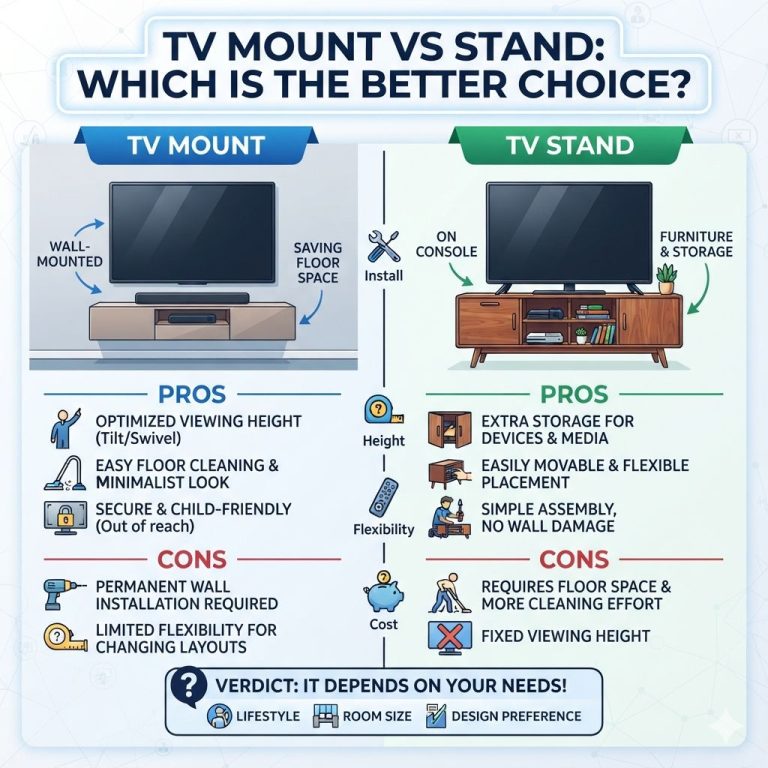
If you plan to wall-mount your TV instead of placing it on a stand, you’ll still need a media console. The console will go underneath the wall-mounted TV. It provides a place for your electronics and helps to balance the visual weight of the TV on the wall.
In this case, the console still needs to be wider than the TV, perhaps 6-12 inches wider on each side, to achieve that pleasing aesthetic.
Don’t forget about viewing angles. If you have multiple seating areas, try to position the TV so it’s visible from as many as possible. A slight swivel feature on a TV mount or stand can be helpful if you often have guests or move around the room.
Ultimately, the best placement depends on your room’s layout and your personal habits. Walk through the space. Imagine watching TV from different spots.
Does it feel comfortable? Does it look right? These simple checks can help you avoid placement mistakes.
Optimal Viewing Distance & Height
Viewing Distance: 5.5 to 11 feet (for a 55-inch TV)
Ideal Screen Height: Center of screen at or slightly below eye level when seated.
Stand Height Range: 18 to 24 inches typically works well.
Light Considerations: Avoid direct sunlight glare on the screen. Use curtains or blinds.
Traffic Flow: Ensure the stand doesn’t block walkways.
Common Mistakes to Avoid
Even with the best intentions, people sometimes make mistakes when choosing a TV stand. Being aware of these can save you time, money, and frustration.
One of the most common errors is choosing a stand that is too small. We’ve hammered this home, but it bears repeating. A stand that’s only a little wider than the TV looks awkward.
It doesn’t provide enough stability visually. It can make a large TV seem overwhelming for the furniture.
Another mistake is neglecting cable management. A tangle of wires can ruin the look of even the most stylish setup. It also creates a dust magnet and can be a tripping hazard.
Always look for stands with built-in cable management solutions. If it doesn’t have them, consider adding some cable clips or ties.
Overlooking the depth of the stand is also common. If the stand is too shallow, the TV might hang off the front. This looks bad and is unsafe.
Ensure the TV’s feet or stand fit completely on the surface. Also, make sure there’s enough depth for your other components like a game console or soundbar.
Some people focus too much on looks and forget about functionality. You might fall in love with a beautiful minimalist stand. But if it has no storage and you have a lot of devices and remotes, it will quickly become a cluttered mess.
Think about what you need to store before you buy.
Another pitfall is not considering the weight capacity. TVs are heavy! A flimsy stand can buckle under the weight.
This is a serious safety concern. Always check the maximum weight the stand can hold. Ensure it’s well above the weight of your 55-inch TV.
Finally, not measuring your space is a big mistake. Before you even start looking, measure the wall where the TV will go. Measure your current seating area.
This will help you narrow down your options and avoid buying something that’s too large or too small for your room.
I learned this the hard way when I bought a large sectional sofa. I measured the wall for the TV, but I forgot to consider how the huge sofa would change the viewing distance. My TV suddenly felt too small for the new seating arrangement.
It took some reconfiguring to make it work.
By being mindful of these common mistakes, you can make a much more informed decision. You’ll end up with a TV stand that looks great, works perfectly, and keeps your entertainment area safe and tidy.
Mistake vs. Smart Choice
Mistake: Stand too narrow.
Smart Choice: Stand at least 6 inches wider than TV.
Mistake: Messy wires.
Smart Choice: Stand with cable management.
Mistake: Stand too shallow.
Smart Choice: TV and components fit fully.
Mistake: Overlooking weight limits.
Smart Choice: Check stand’s weight capacity.
What This Means for Your Living Room
So, what’s the takeaway from all of this? Choosing the right size TV stand for your 55-inch TV is a mix of art and science. It’s about creating a balanced look and a functional space.
For most people, a stand that is at least 6 inches wider than the TV itself is the golden rule. This usually means a stand in the 56-inch to 62-inch range. This width provides visual stability and aesthetic appeal.
Beyond width, consider the depth. Make sure it’s enough for your TV’s base and any other components you plan to place on or in it. Think about your storage needs.
Do you want to hide clutter or keep things accessible?
The height of the stand should allow for comfortable viewing. Aim for the center of the screen to be around eye level when you’re seated. For many, this translates to a stand height between 18 and 24 inches.
The style and material of the stand should complement your room’s existing decor. Whether you prefer modern, rustic, or something in between, there’s a stand out there for you.
Don’t forget about placement. Position your TV and stand to avoid glare and ensure comfortable viewing from your main seating area. Measure your space carefully before you buy.
When you get this right, your living room transforms. The TV becomes a focal point, but not an overwhelming one. The entertainment area feels organized and inviting.
It’s a space where you can relax and enjoy your favorite shows and movies without fuss.
It’s about creating a cohesive look. A well-chosen stand doesn’t just hold your TV; it enhances your entire room. It shows attention to detail.
It makes your home feel more complete and personal.
Quick Tips for Choosing Your Stand
Here are some final quick tips to help you make the best choice:
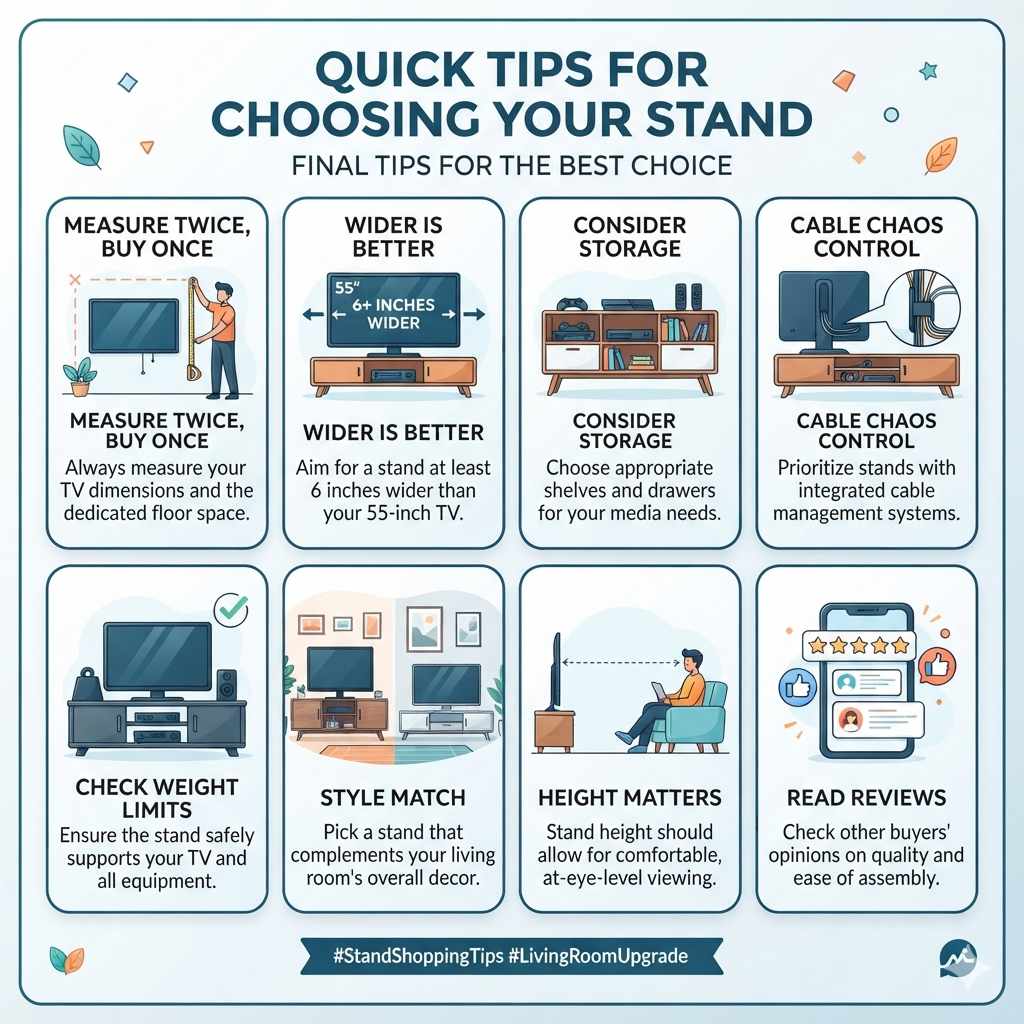
- Measure Twice, Buy Once: Always measure your TV and the space where the stand will go.
- Wider is Better: Aim for a stand that’s at least 6 inches wider than your 55-inch TV.
- Consider Storage: Think about what you need to store and choose a stand with appropriate shelves or drawers.
- Cable Chaos Control: Prioritize stands with built-in cable management.
- Check Weight Limits: Ensure the stand can safely support your TV and other components.
- Style Match: Pick a stand that fits the overall decor of your living room.
- Height Matters: Ensure the stand height allows for comfortable, at-eye-level viewing.
- Read Reviews: See what other buyers say about the stand’s quality and ease of assembly.
Frequently Asked Questions
What is the ideal width for a TV stand for a 55-inch TV?
For a 55-inch TV, which is about 50 inches wide including the frame, a good rule of thumb is to choose a TV stand that is at least 6 inches wider. This means a stand of about 56 inches or more. Many people prefer stands that are 58 to 62 inches wide for better balance and more surface area.
Can I use a TV stand that is the same width as my 55-inch TV?
While technically possible, it’s generally not recommended. A stand that is the same width as your TV can look unbalanced and less stable. It’s best to have a stand that is wider than the TV to create a more pleasing aesthetic and ensure better stability.
What is the recommended height for a TV stand with a 55-inch TV?
The ideal height places the center of the TV screen at or slightly below your eye level when you are seated. For most living rooms, this typically falls between 18 and 24 inches from the floor to the top of the stand. This ensures comfortable viewing without straining your neck.
How deep should a TV stand be for a 55-inch TV?
Most 55-inch TVs are relatively slim. A stand depth of 12 to 20 inches is usually sufficient. You need to ensure the TV’s base or stand fits completely on the surface without overhang.
Also, consider the depth needed for any audio equipment or game consoles you plan to place on or in the stand.
Can I wall-mount my 55-inch TV and still use a TV stand?
Yes, you can. If you wall-mount your 55-inch TV, you can still place a media console or TV stand underneath it. This console will house your electronic devices like cable boxes, gaming consoles, and soundbars.
The stand should still be wider than the TV for visual balance.
What if my 55-inch TV has very thin bezels?
If your 55-inch TV has ultra-thin bezels, the overall width of the TV unit might be slightly less than 50 inches. However, the general recommendation to have a stand at least 6 inches wider still applies. The goal is visual balance and stability, regardless of bezel thickness.
Conclusion
Finding the perfect TV stand for your 55-inch TV is all about thoughtful consideration. It’s about balancing how it looks with how it works. Aim for a stand that’s wider, not just wider, but also right for your room’s style and your storage needs.
This approach ensures a stable, attractive, and functional entertainment center for years to come.
Products related to this article
Sponsored / affiliate links. As an Amazon Associate I earn from qualifying purchases. I may earn additional commission from eligible campaigns.