Should A Tv Stand Be Wider Than The Tv? Expert Answer
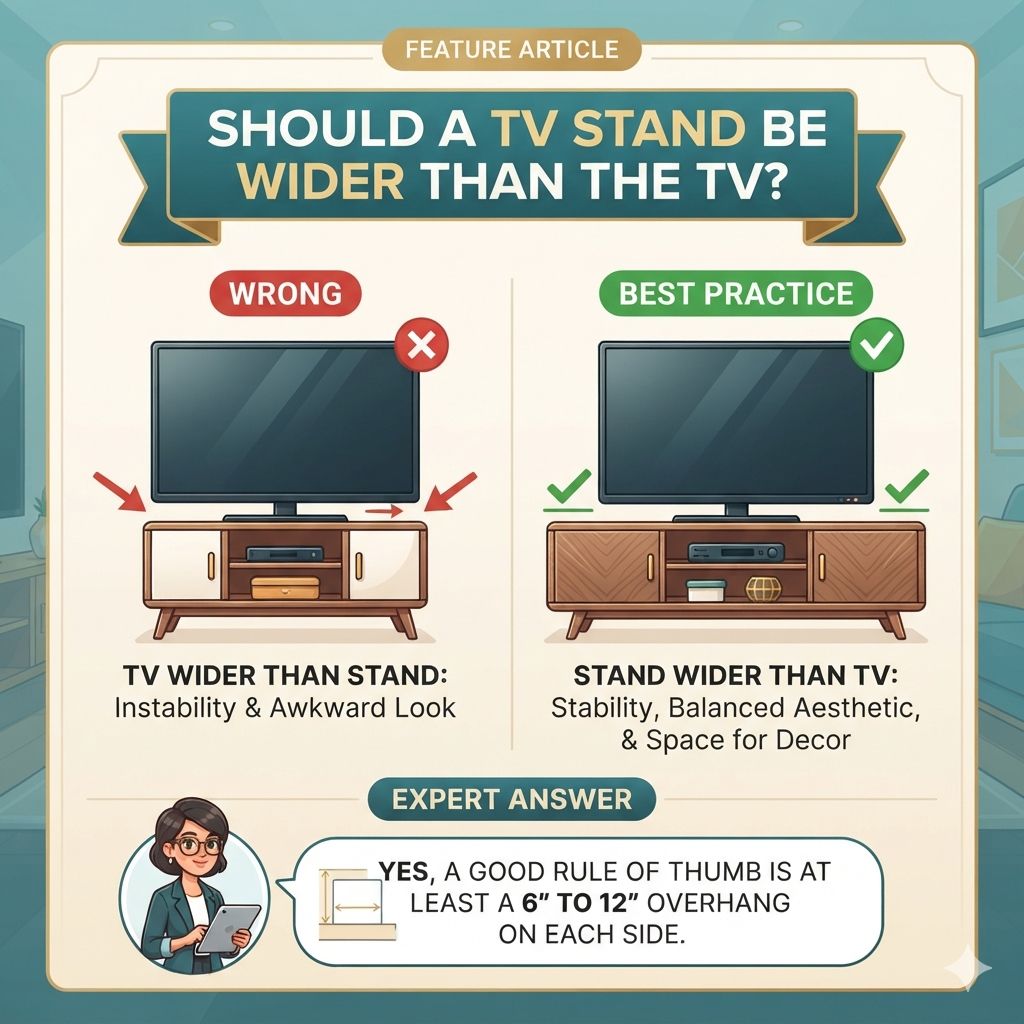
You don’t always need a TV stand wider than your TV. The best width depends on stability, aesthetics, and the size of your TV. A stand that’s too narrow can be unstable. A stand that’s much wider can look unbalanced unless it’s designed that way. Aim for a stand that is at least as wide as your TV, or slightly wider, for a safe and pleasing look.
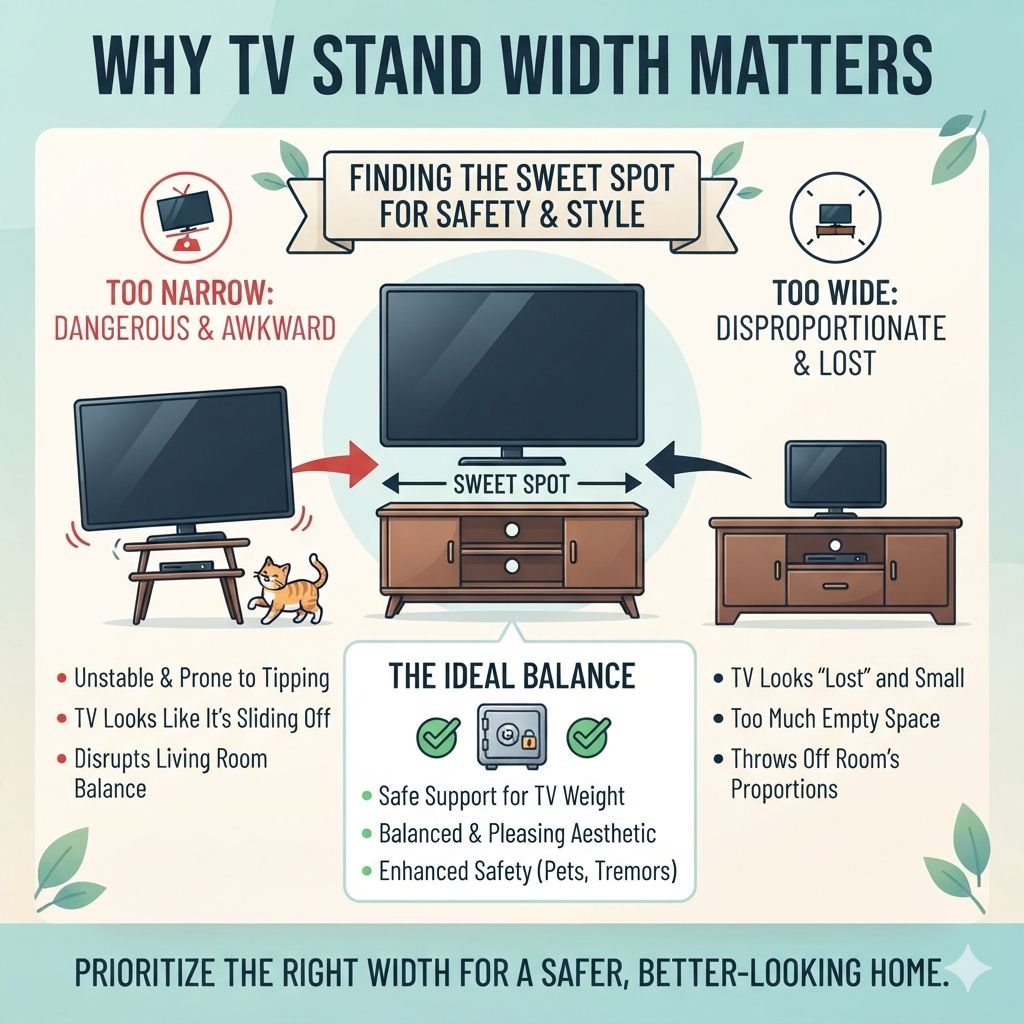
Why TV Stand Width Matters
The width of your TV stand plays a big role. It’s not just about looks. A stand that is too small just won’t do a good job.
It needs to hold your TV safely. Think about it like a table for a big vase. If the table is too small, the vase might fall.
Your TV is much heavier and more precious.
A stand that is too narrow can easily tip over. This is especially true with taller or heavier TVs. Earthquakes or even a playful pet could cause trouble.
Plus, a stand that’s too small just looks awkward. It makes the TV look like it’s about to slide off. This isn’t a good look for your living room.
On the other hand, a stand that’s way too wide can also be a problem. It might make the TV look lost. It can feel like there’s too much empty space around it.
This can throw off the balance of your whole room. So, finding that sweet spot for width is key. It helps keep things safe and makes your space look great.
My Own Wobbly TV Stand Scare
I remember one time, not too long ago, I was setting up a new, larger TV in my home office. I had this sleek, modern entertainment unit that I loved. It was a bit narrower than the TV I’d just bought.
“It’ll look fine,” I told myself. “It’s a bit of overhang, but it’s sturdy.” Famous last words.
So, I carefully placed the TV on the stand. It looked. precarious.
The edges of the TV stuck out a good few inches on each side. Every time someone walked past, I’d hold my breath, half expecting a tremor. One afternoon, my cat, a curious creature named Luna, decided to leap onto the desk nearby.
The slight shake that followed was enough. The TV wobbled. My heart leaped into my throat.
Luckily, it didn’t fall, but the fear was real. That’s when I learned a hard lesson: safety and stability trump aesthetics every single time. I ended up getting a wider stand that very week.
It’s funny how a simple piece of furniture can cause so much stress. This experience really hammered home the importance of a proper fit. It wasn’t just about my TV not looking like it was about to take a dive.
It was about peace of mind. Knowing that my expensive electronics were secure made a huge difference. The new stand was wider, and instantly, the room felt more grounded and balanced.
The TV looked like it belonged, not like a guest that had overstayed its welcome.
TV Stand Width Guide
Rule of Thumb: Aim for a TV stand that is at least as wide as your TV, or 4-6 inches wider on each side for most setups.
For Large TVs (65 inches+): Consider a stand that is 1-2 feet wider than the TV for better stability and visual balance.
For Small TVs (under 40 inches): A stand that is the same width or just a few inches wider is usually fine.
Special Cases: Some ultra-wide TVs or specific design styles might look good with less overhang. Always check weight limits.
Understanding TV Sizes
TV sizes are measured diagonally across the screen. A 55-inch TV is very different from a 75-inch TV. The bigger the TV, the more weight and surface area it has.
This means it needs a stronger and wider base to sit on securely.
When you buy a TV, it often comes with feet or a stand. These are usually placed near the edges of the TV. This is important because your TV stand needs to be wide enough to support these feet.
If the feet are too far apart for the stand, it’s a problem.
Most TV feet are adjustable. You can often move them closer to the center. This is a great option if you have a stand that’s a bit too narrow.
Always check your TV’s manual for foot placement options. It can save you from buying a new stand when you don’t have to.
For example, a 65-inch TV might have feet that are 40 inches apart. You’ll need a stand that’s at least 40 inches wide, plus some extra for safety. If the stand is only 30 inches wide, the feet won’t fit.
Your TV would be unstable.
Quick TV Size vs. Stand Width Chart
TV Size (Diagonal)
Up to 32 inches
32 – 49 inches
50 – 65 inches
65 inches+
Recommended Stand Width
At least TV width
TV width + 4-6 inches
TV width + 6-12 inches
TV width + 12-24 inches
The “Hanging Over” Scenario
Seeing the edges of your TV extend past the TV stand is called “hanging over.” This is generally something to avoid. It’s a red flag for stability. Think of it like a table with a very heavy object sitting near the edge.
It’s prone to tipping.
The amount of overhang matters a lot. A tiny bit might be okay for very light TVs. But if more than a couple of inches of your TV is hanging off each side, it’s a risk.
This is especially true if you have kids or pets who might bump into things. It could also happen if you live in an earthquake-prone area.
When a TV hangs over, it puts uneven stress on the stand. The stand’s weight capacity is usually for the weight spread evenly across its top surface. If the weight is concentrated on the edges, it’s not supported properly.
This can lead to the stand bowing or even breaking.
It can also look unbalanced. A big TV on a small stand makes the room feel off. The TV seems too big for its spot.
It can detract from the overall look you’re trying to achieve. It’s like wearing a huge hat on a tiny head; it just doesn’t fit right visually.
Some very specific, very low-profile TV stands are designed to be nearly the same width as the TV. These often have a different structure to ensure stability. But for most people, a bit of extra width is the safer and more attractive choice.
Always double-check the weight limits of your stand. Make sure it can handle your TV, even with a little overhang.
Stability vs. Aesthetics: Finding the Balance
This is the core of the TV stand width question. You want your entertainment center to look good. But it absolutely must be safe.
Stability is non-negotiable. Aesthetics are important for your home’s feel, but they come after safety.
A stand that is too narrow is a safety hazard. It’s like building a house on a shaky foundation. It might look okay for a while, but it’s not built to last or withstand minor disturbances.
A wobbly TV is a danger to itself and anyone nearby. It can lead to expensive damage or injury.
On the other hand, a stand that is much wider than the TV can also be an aesthetic issue. It can make the TV look small. It can make the stand itself seem bulky and out of place.
This can disrupt the visual flow of your room. It can make your space feel cluttered or disproportionate.
The ideal scenario is a stand that supports the TV well and looks good. For most TVs, this means a stand that is at least as wide as the TV, and often a few inches wider on each side. This provides a good visual balance and ample support.
If you have a very wide TV, like a 75-inch or larger, you might need a stand that is significantly wider. This helps distribute the weight better and creates a more pleasing visual ratio. Consider the overall size of your room too.
A huge stand can overwhelm a small space, even if it fits the TV.
Visual Balance Scorecard
Scenario
Stand much narrower than TV
Stand same width as TV
Stand 4-12 inches wider than TV
Stand 1-2 feet wider than TV
Stability Score
Poor (Risk)
Fair (May be OK for light TVs)
Good (Most common choice)
Excellent (For large TVs)
Aesthetic Score
Poor (Unbalanced)
Fair (Can look cramped)
Excellent (Balanced, modern)
Good (Can be imposing, check room size)
When is a Narrower Stand Okay?
There are a few situations where a TV stand might be slightly narrower than the TV and still work. These are exceptions, not the rule, and require careful consideration.
One is if your TV has feet that can be positioned very close together. Some TVs allow you to move the feet to the innermost position. If these inner feet are well within the width of your stand, it might be stable enough.
Always check the distance between the feet and ensure it fits securely on the stand’s surface.
Another case is with very lightweight, smaller TVs. A tiny 20-inch TV on a stand that’s only slightly narrower might be perfectly fine. The overall weight is so low that it doesn’t pose a significant tipping risk.
However, it’s still best practice to have some overhang for visual balance.
You might also see very specific, often wall-mounted TV consoles or ultra-slim stands that are designed to be nearly flush with the TV. These often have specialized mounting hardware or a very low center of gravity to ensure they don’t tip. They are often part of a larger entertainment system designed for a particular look.
Finally, if your TV has a built-in stand that is centered and very wide, you might get away with a narrower console. However, even then, the outer edges of the TV screen would still overhang. This overhang is the main concern.
It’s the part that’s not supported by the stand underneath.
The key takeaway is this: if any part of the TV itself (not just the screen, but the physical edges of the unit) extends beyond the support surface of the stand, you’re introducing risk. The further it extends, the greater the risk. It’s about ensuring the center of gravity of the TV is safely above the stand.
The Role of TV Stand Design
The design of the TV stand itself is a huge factor. Not all stands are created equal, even if they are the same width.
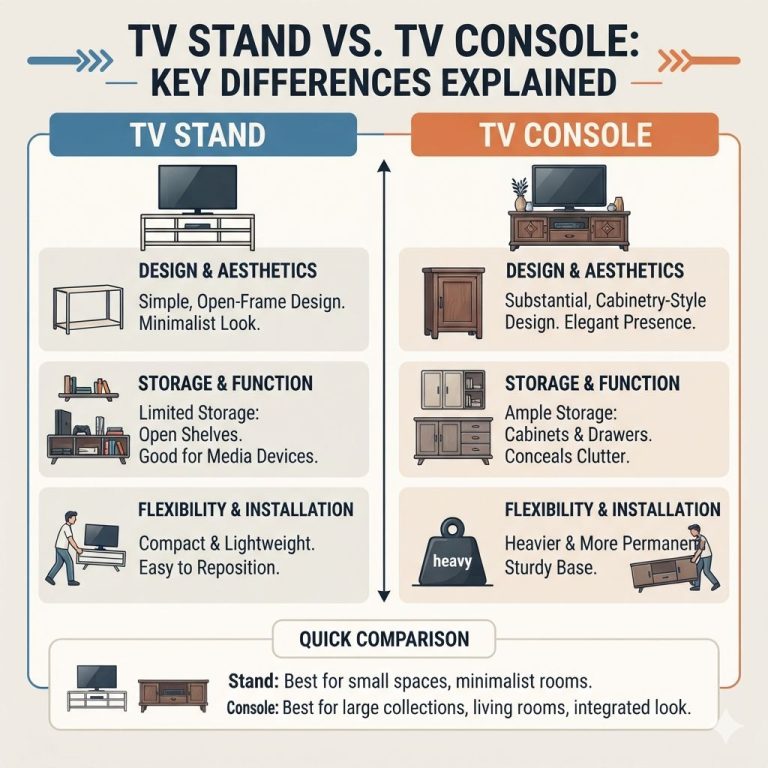
Legs vs. Solid Base: Stands with four sturdy legs evenly spaced are generally more stable than those with two central legs. A wider stance between the legs helps prevent wobbling.
Solid bases offer excellent stability, provided they are large enough.
Depth: The depth of the TV stand matters too. A deeper stand offers more support for the TV. A shallow stand, even if it’s wide, might not provide enough depth for the TV’s feet to sit on securely.
This is crucial for preventing forward tipping.
Material and Build Quality: A stand made of solid wood or heavy-duty metal will be much more stable than one made of thin particleboard. Cheaply made stands might look good but can be flimsy. Always check reviews for build quality.
Weight Capacity: Every TV stand has a weight limit. You must ensure your TV’s weight is well below this limit. A stand might be wide enough, but if it can’t hold the weight, it’s dangerous.
Style: Some modern designs feature minimalist stands that are very sleek. These might have a narrow profile. If you choose such a design, double-check its stability features.
It might have a special internal weighting system or anchoring options.
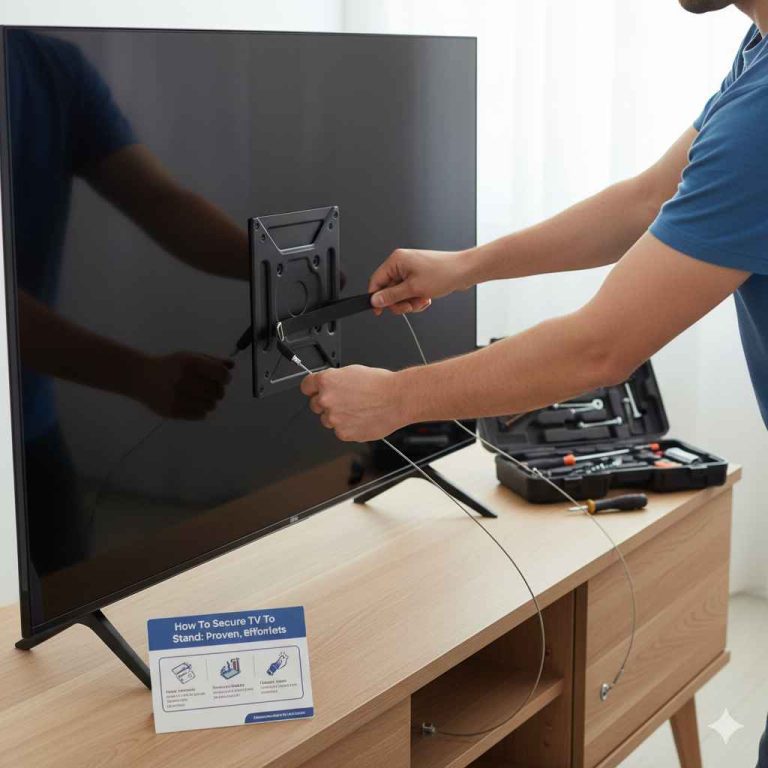
Anti-Tip Straps: Many TV stands and even TVs themselves come with anti-tip straps. These are fantastic safety features. They attach the TV or stand to the wall.
If you have young children or pets, or live in an area prone to tremors, these are a must-have. They can compensate for a slightly less ideal stand width.
Design Features for Stability
- Wide Leg Stance: More stable than narrow or central legs.
- Sufficient Depth: Ensures the TV feet have a solid surface.
- Sturdy Materials: Solid wood, metal, and high-quality composites are best.
- High Weight Capacity: Always check this against your TV’s weight.
- Anti-Tip Anchors: Essential for securing the unit to the wall.
When is a Wider Stand Better?
A wider TV stand is almost always better for stability. It provides a larger footprint for your TV to rest on. This is especially true for larger or heavier televisions.
For TVs that are 60 inches or larger, a stand that is significantly wider than the TV is recommended. This is for several reasons:
- Weight Distribution: Larger TVs have more weight. A wider stand spreads this weight over a larger area, reducing stress on the stand.
- Tipping Prevention: The wider the base, the harder it is to tip over. This is crucial for safety, especially with tall, top-heavy TVs.
- Visual Harmony: A large TV can overwhelm a narrow stand. A wider stand creates a more balanced and proportionate look in your room. It makes the TV look like it belongs there.
- Space for Accessories: A wider stand can also provide more room for other components, like soundbars, gaming consoles, or streaming devices.
Consider a TV that is 70 inches wide. If your stand is only 50 inches wide, the TV will overhang by 10 inches on each side. That’s a lot of unsupported TV.
A stand that is 80 inches wide would give you 5 inches of support on each side, which is much better.
Think about the overall design. Some entertainment units are designed to be wider than the TV to create a visual frame. This can look very stylish, but only if done correctly and if the stand is still fundamentally stable.
When in doubt, go wider. It’s a much safer bet for your television and for the peace of mind in your home. A stand that looks good and functions well is the goal.
Extra width often contributes to both.
Common Mistakes to Avoid
People make a few common mistakes when choosing a TV stand width. Knowing these can help you avoid them.
1. Ignoring TV Feet Placement: Many people assume the TV will just sit on the stand. They forget to check how far apart the TV’s own feet are.
If the feet are wider than the stand, it’s an instant problem. Always measure the distance between your TV’s feet.
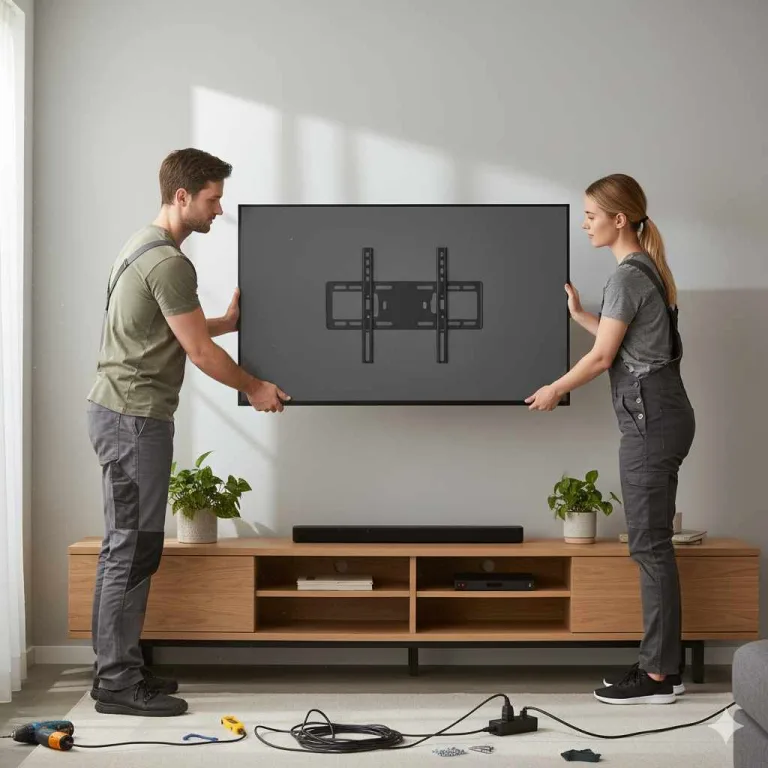
2. Over-Reliance on Wall Mounting: Wall mounting is great, but not everyone wants to drill holes in their walls. If you’re placing the TV on a stand, the stand’s width is critical.
Don’t assume wall mounting solves the stand width issue if you’re not mounting it.
3. Buying Based Purely on Style: A sleek, minimalist stand might look amazing in a magazine. But if it’s too narrow for your TV, it’s a bad choice.
Style is important, but it must be functional and safe first.
4. Not Checking Weight Limits: This is a big one. A stand might be the perfect width, but if it can’t hold the weight of your TV, it’s dangerous.
Always verify the weight capacity.
5. Forgetting About Other Components: You might have a soundbar, a game console, a cable box, or other devices. Make sure the stand width also allows space for these things without making the TV look cramped.
6. Assuming All TVs are the Same: Different TV brands and models have different foot designs and weights. What works for one 55-inch TV might not work for another.
Always measure your specific TV.
Mistake Checklist
- Did you measure the distance between your TV’s feet?
- Did you check the TV stand’s weight capacity?
- Does the stand offer enough depth for stability?
- Will there be room for other media devices?
- Is the stand truly stable, or does it wobble?
What This Means for Your Setup
So, what does all this mean for your own home? It means taking a moment to measure and think before you buy or set up.
When it’s normal: It’s normal for a TV stand to be the same width as your TV, or slightly wider (a few inches on each side). This is common for smaller TVs or when the TV’s feet are close together. It’s also normal for a stand to be significantly wider than the TV, especially for larger screen sizes, as this provides better stability and visual balance.
When to worry: You should worry if the edges of your TV hang over the TV stand by more than 2-3 inches on each side. You should also worry if the stand feels unstable, wobbles, or if the TV’s feet don’t sit firmly on the stand. Another sign to worry is if the stand’s weight capacity is close to or exceeds your TV’s weight.
Simple checks:
- Measure your TV’s width and the distance between its feet.
- Measure the width of the TV stand.
- Compare these measurements. Aim for the stand to be at least as wide as the TV, ideally a few inches wider on each side.
- Check the TV stand’s weight limit.
- Gently try to wobble the stand once the TV is on it.
If your current stand is too narrow, don’t panic. There are solutions. You can buy a wider stand.
You can also look into TV feet adapters that bring the feet closer together. Or, consider using anti-tip straps to secure the TV to the wall, adding a layer of safety. The goal is a setup that looks good, feels secure, and lasts a long time.
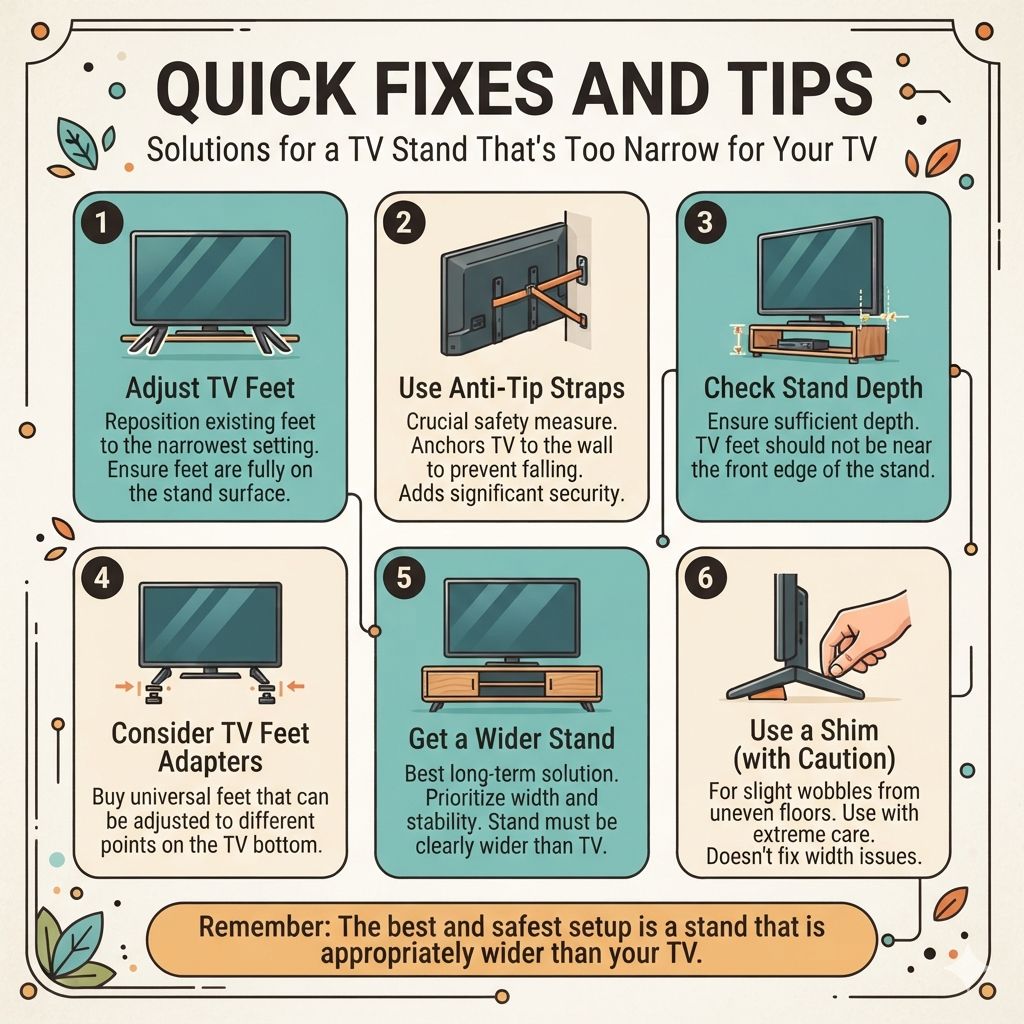
Quick Fixes and Tips
If you find yourself with a stand that’s a bit too narrow, there are a few things you can do. These are not permanent solutions, but they can help in a pinch or for temporary setups.
1. Adjust TV Feet: As mentioned, many TVs allow you to reposition their feet. Move them to the narrowest possible setting.
This might allow them to sit more securely on your current stand. Always ensure the feet are fully on the stand surface.
2. Use Anti-Tip Straps: This is a crucial safety measure. Even if your stand is a bit narrow, anti-tip straps that anchor the TV to the wall can prevent it from falling.
They add a significant layer of security.
3. Check Stand Depth: Sometimes, a stand might be narrow but very deep. If the depth is sufficient, it might provide enough support.
Ensure the TV’s feet are not near the very edge of the front of the stand.
4. Consider TV Feet Adapters: You can buy universal TV feet that can be positioned at different points along the bottom of the TV. These are often adjustable and can help if your TV’s original feet are too far apart for your stand.
5. Get a Wider Stand: This is often the best long-term solution. When buying a new stand, prioritize width and stability.
Look for stands that are clearly wider than your TV.
6. Use a Shim (with caution): In very rare cases, if there’s a slight wobble from an uneven floor, a thin shim under one leg might help. However, this doesn’t fix a width issue and should be done with extreme care.
Remember, these are tips to improve the situation. The most secure and visually appealing setup usually involves a stand that is appropriately wider than the TV.
Frequently Asked Questions
Is it bad if my TV stand is narrower than my TV?
Yes, it is generally not good if your TV stand is narrower than your TV. This can lead to instability, making the TV prone to tipping. It also creates an unbalanced visual look.
For safety and aesthetics, the stand should ideally be at least as wide as the TV, and often a few inches wider on each side.
How much wider should my TV stand be than my TV?
A good rule of thumb is that your TV stand should be about 4 to 6 inches wider than your TV on each side. For larger TVs (65 inches and up), you might want the stand to be 12 to 24 inches wider in total (6-12 inches on each side) for better stability and balance.
What if my TV’s feet are wider than my stand?
If your TV’s feet are wider than your stand, it’s a critical issue. You need to get a wider stand. Alternatively, you can look for TV feet adapters that allow you to reposition the feet closer together.
Using anti-tip straps to secure the TV to the wall is also highly recommended in this situation.
Does the depth of the TV stand matter for width?
Yes, the depth of the TV stand matters. While width is about side-to-side support, depth is about front-to-back stability. A stand needs to be deep enough to fully support the base or feet of your TV, preventing it from tipping forward.
A narrow stand with good depth can be more stable than a wide stand that is too shallow.
Can I use a stand that’s the exact same width as my TV?
It’s often acceptable for a stand to be the exact same width as your TV, especially for smaller and lighter models. However, having a stand that is a few inches wider on each side provides extra safety and visual balance. If the TV’s feet are positioned near the edges, an exact-width stand can be risky.
What about TVs that have a single, central stand?
TVs with a single, central stand can be tricky. You still need to ensure the stand’s base is stable and wide enough to support the TV’s weight distribution. Even with a central stand, the TV’s overall footprint matters.
You’ll need to check if the stand itself is wide enough to provide a stable base, and that the TV doesn’t overhang significantly.
Conclusion
Choosing the right TV stand width is a blend of safety and style. For most homes, a stand that is a few inches wider than your TV on each side offers the best of both worlds. It ensures stability, prevents accidents, and makes your entertainment setup look polished.
Always measure carefully and consider your TV’s weight and foot placement. Prioritizing a secure setup means peace of mind for you and safety for your electronics.
Products related to this article
Sponsored / affiliate links. As an Amazon Associate I earn from qualifying purchases. I may earn additional commission from eligible campaigns.