Harbor Breeze Ceiling Fan Review: Is It Worth Buying?
Harbor Breeze is worth buying for plain rooms where average motors and thin parts support are acceptable; I would skip it for large bedrooms, heavy remote use, or homes where future repairs matter. Pick wrong, and you can end up with wobble, weak airflow, or a dead remote you cannot replace easily. This guide breaks down the best room matches, the models I would trust, and where Harbor Breeze trails other budget fans.
Verdict

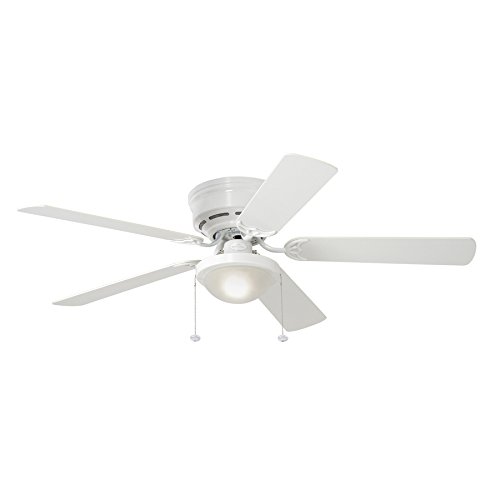
The brand makes more sense as a Lowe’s budget buy than as a long-haul ownership choice. For a straight swap in a small bedroom, hallway, or covered outdoor space, it can do the job. For a primary bedroom or any room where a broken remote, a noisy motor, or a discontinued light kit would turn into a headache, the risk rises fast.
Specs at a glance
| Brand | Retail channel | Indoor/outdoor | Lighting | Controls | Price band | Install burden |
|---|---|---|---|---|---|---|
| Harbor Breeze | Lowe’s | Both indoor and outdoor models | Many models use integrated LED modules or LED-compatible adapters | Remote and non-remote options | Budget-focused | Often DIY-friendly, but box and switch conditions still matter |
| Armitage | Lowe’s | Indoor | LED bulb included | Low-complexity setup | Roughly $40 to $70 | Typical total project often rises once labor and box checks are included |
| Mazon | Lowe’s | Indoor | Often tied to LED lighting | Some versions use remote control | Roughly $50 to $90 | Similar to a basic swap if the ceiling box is sound |
| Calera | Lowe’s | Outdoor | Varies by version | Often remote-equipped | Roughly $80 to $120 | Outdoor rating adds hardware and location checks |
| Tilghman | Lowe’s | Outdoor | Varies by version | Varies by version | Roughly $100 to $150 | More room for weather-resistant installation concerns |
| Saratoga | Lowe’s | Indoor | Often light-equipped | Remote options common | Roughly $120 to $180 | Best when the room needs more than an entry-level fan |
| Portes | Lowe’s | Indoor | Often light-equipped | Remote options common | Roughly $150 to $250 | Highest Harbor Breeze spend, so replacement-part risk matters more |

Who it is for
Harbor Breeze is for budget buyers shopping Lowe’s, DIY owners who want a straightforward replacement, and people who care more about room fit than brand cachet. It also works when the plan is simple: install a fan, use it, and move on without expecting much parts support later.
It fits best in smaller or medium rooms where the ceiling height, box condition, and control setup are uncomplicated. It fits poorly in homes that need dependable repairability over time, because replacement remotes, matched light kits, and discontinued parts can become annoying quickly.
Who makes Harbor Breeze ceiling fans
Harbor Breeze is a popular ceiling fan brand sold through Lowe’s. That retail-channel identity matters because support, parts, and model availability are tied closely to what Lowe’s carries, not to a broad dealer network with deep spare-part coverage.
What company makes Harbor Breeze ceiling fans
For shoppers, the important answer is Lowe’s rather than a wide independent service ecosystem. That setup helps at the point of sale, but it can complicate later repairs when a specific remote, receiver, blade set, or light module is no longer easy to source.
What works
Harbor Breeze gets the basics right for a budget line. It is priced low, many models are built for quiet running and lower energy use, and several include LED lighting or LED-compatible adapters. The quick-install systems are handy when the ceiling box is already in good shape.
The best Harbor Breeze wins are practical ones. A homeowner with a standard bedroom, a safe electrical box, and no need for smart controls can often get a usable fan without overspending. The indoor and outdoor split is also useful, since it gives the brand enough range for patios and enclosed spaces.
What are the most common Harbor Breeze fan problems
The recurring trouble spots are remote pairing, light kit failures, blade wobble, and motor noise. Replacement-part friction is the one that hurts most over time, because a cheap fan can become expensive the moment the original remote dies or the light module is discontinued.
Harbor Breeze’s own site even includes a remote-not-working troubleshooting topic, which tells you where support requests tend to land. That is useful, but it is also a warning: remote dependency is a real ownership risk, especially on models that do not have a simple wall-control fallback.
What does not
Harbor Breeze falls short when the install is not basic. Quick-install systems cut mounting time, but they do not fix an undersized or loose ceiling box, a bad wall switch, or wiring that needs correction. Those parts of the job are where the real cost and delay show up.
Long-term, the brand can be hard to maintain. Discontinued models create a parts problem, and even when the fan itself is inexpensive, a failed remote or light kit can make replacement feel out of proportion. That is why Harbor Breeze is a better fit for “replace and forget” buyers than for anyone who keeps spares and expects repairs.
How long do Harbor Breeze ceiling fans last
Expect lifespan to depend more on usage pattern and failure mode than on the badge. A lightly used fan in a stable indoor room can last a long time, but the first real failures often involve the remote system, light kit, or bearings showing noise before the fan stops entirely.
When a Harbor Breeze fan starts wobbling, humming louder, or losing remote reliability, that is the point to budget for replacement instead of hoping for a clean repair. For many budget fans, that trigger arrives before the motor itself is done.
Which Harbor Breeze model should you buy?
Pick the model by room size, ceiling height, lighting needs, and how much ownership friction you can tolerate. The line is not interchangeable. A flush-mount indoor fan for a bedroom behaves very differently from an outdoor-rated model or a higher-priced unit with more remote dependency.
| Model | Best room size | Ceiling height | Light/no-light | Remote/no-remote | Outdoor? | Ownership risk | Best if | Avoid if |
|---|---|---|---|---|---|---|---|---|
| Armitage | Small to large rooms up to about 400 sq ft | Low ceilings | Light included | Usually simple control setup | No | Low to medium | You want a basic indoor fan with a known budget price and simple form factor | You need a bedroom fan with advanced control convenience or long-term parts confidence |
| Mazon | Small rooms and tight spaces | Low ceilings | Often light-equipped | Remote options common | No | Medium | You need a compact fan for a room where clearance matters more than style | You dislike remote troubleshooting or want a fan with the least future friction |
| Calera | Covered patios and outdoor-adjacent spaces | Standard outdoor mounting | Varies | Varies | Yes | Medium | You need a weather-resistant fan with outdoor use in mind | You are buying for a dry indoor bedroom |
| Tilghman | Larger covered outdoor spaces | Standard to taller ceilings | Varies | Varies | Yes | Medium to high | You want a pricier outdoor model and accept more installation complexity | You need the lowest-risk Harbor Breeze buy |
| Saratoga | Medium rooms and primary bedrooms | Standard ceilings | Often light-equipped | Remote common | No | Medium | You want a step up in finish and room presence without leaving the brand | You want the cheapest repair path |
| Portes | Larger living rooms and better-finished spaces | Standard to taller ceilings | Often light-equipped | Remote common | No | High | You want the highest-end Harbor Breeze option and accept paying more for it | You are price-sensitive or worried about parts availability |
Armitage vs Mazon
Armitage is the safer default when you want a straightforward indoor fan with a clear price band and LED bulb included. Mazon makes more sense when the room is tighter and the ceiling is lower, but its remote-dependent versions raise ownership friction if controls fail later.
For a bedroom, Armitage is usually the better Harbor Breeze starting point. Mazon is more specialized.
Calera vs Tilghman
Calera is the better outdoor value if you want a weather-resistant fan without climbing too far in price. Tilghman is the higher-spend outdoor choice and is worth considering only if the space is larger or the installation deserves a more substantial fan.
Both should be judged on the covered-outdoor use case, not on indoor style.
Saratoga vs Portes
Saratoga is the more sensible upper-midrange Harbor Breeze pick for a bedroom or living room. Portes is the costliest option in the line, so the burden of replacement-part risk is harder to ignore. At that point, build quality expectations should be higher than the brand usually delivers.
If the budget can stretch that far, compare it carefully against non-Harbor Breeze options before buying.
Who is Harbor Breeze fans for?
Harbor Breeze fans are for buyers who want a Lowe’s-sold budget fan, need a simple replacement, and can live with ordinary durability over time. They are less appealing to anyone who wants a broad parts market, remote reliability, or a fan that can be serviced easily years later.
If the room is small, the ceiling is uncomplicated, and the expectation is short decision time, the brand can make sense. If the room is a primary bedroom or a hard-to-access space, the savings can disappear into future annoyance.
How much should you budget?
A real Harbor Breeze budget should include more than the box price. Fan price, electrician labor, switch changes, ceiling-box issues, and remote or receiver replacements can all move the total project cost well beyond the shelf price. The fan is only one line item.
Typical project budget
- Choose the fan price from the model band.
- Add installation labor if the wiring or box is not a basic swap.
- Check whether the ceiling box is fan-rated and secure.
- Budget for a switch upgrade if the old control setup will not suit the new fan.
- Leave room for a remote, receiver, or light-kit replacement if the model depends on them.
Practical budget examples
- Armitage: roughly $40 to $70 for the fan, then add labor and any electrical fixes if the box is not ready.
- Mazon: roughly $50 to $90, with similar install assumptions.
- Calera: roughly $80 to $120, plus outdoor-location checks and mounting labor.
- Tilghman: roughly $100 to $150, which makes installer quality and hardware condition more important.
- Saratoga: roughly $120 to $180, where total spend starts looking less like a bargain buy.
- Portes: roughly $150 to $250, where a higher-end alternative should be compared carefully.
Alternatives to Harbor Breeze
Choose something else when the room is large, the fan will be used heavily, or you care about long-term parts support more than initial price. Harbor Breeze is a budget line; that is the whole trade-off. Once you start paying for better dependability, other brands become easier to justify.

Hunter 52 inch Matte Black Indoor Ceiling Fan is the safer alternative if you want a remote and a more established ceiling-fan purchase path. Based on the spec sheet and owner feedback, it may fit better in a bedroom or living room where remote convenience matters. The drawback is price, and the renewed listing adds another layer of buyer caution.

Casablanca Wisp is the high-end alternative. The whisper-quiet motor and remote are appealing, but the price is far above Harbor Breeze, so this only makes sense when noise, finish, and long-term satisfaction matter more than keeping the budget tight. It is hard to call it a direct substitute for a bargain fan.
Should you buy it
Buy Harbor Breeze if the room is ordinary, the install is straightforward, and you are comfortable treating the fan as a practical purchase rather than a serviceable asset for the long run. That means small or medium bedrooms, covered outdoor spaces, or a quick replacement where the goal is to restore airflow with minimal fuss.
Skip it if the room is large, the ceiling setup is messy, or you expect future repairs to be painless. The brand’s weakest point is ownership friction after the sale, not the first day on the ceiling. For many homeowners, that is the difference between a deal and a regret.
Frequently asked questions
are harbor breeze fans good
They are good enough for budget rooms when the goal is simple airflow and a clean install. They are less convincing when durability, parts availability, or remote reliability matters. That is why the answer depends more on the room and the owner’s tolerance for future friction than on price alone.
which harbor breeze model is best for a bedroom
Armitage is usually the best starting point for a bedroom because it is simple, budget-minded, and easier to justify than the more remote-dependent options. If the room is small and ceiling height is tight, Mazon can work too, but remote and parts concerns still apply.
do harbor breeze ceiling fans work well without a remote
Yes, some models do fine without a remote, especially simpler indoor versions meant for straightforward operation. That said, remote-dependent models are where long-term annoyance often begins. If you dislike troubleshooting pairing issues, choose a model that can still be controlled in a basic, direct way.
Products related to this article
Sponsored / affiliate links. As an Amazon Associate I earn from qualifying purchases. I may earn additional commission from eligible campaigns.