What Size Tv Stand For A 65-Inch Tv? Size Guide
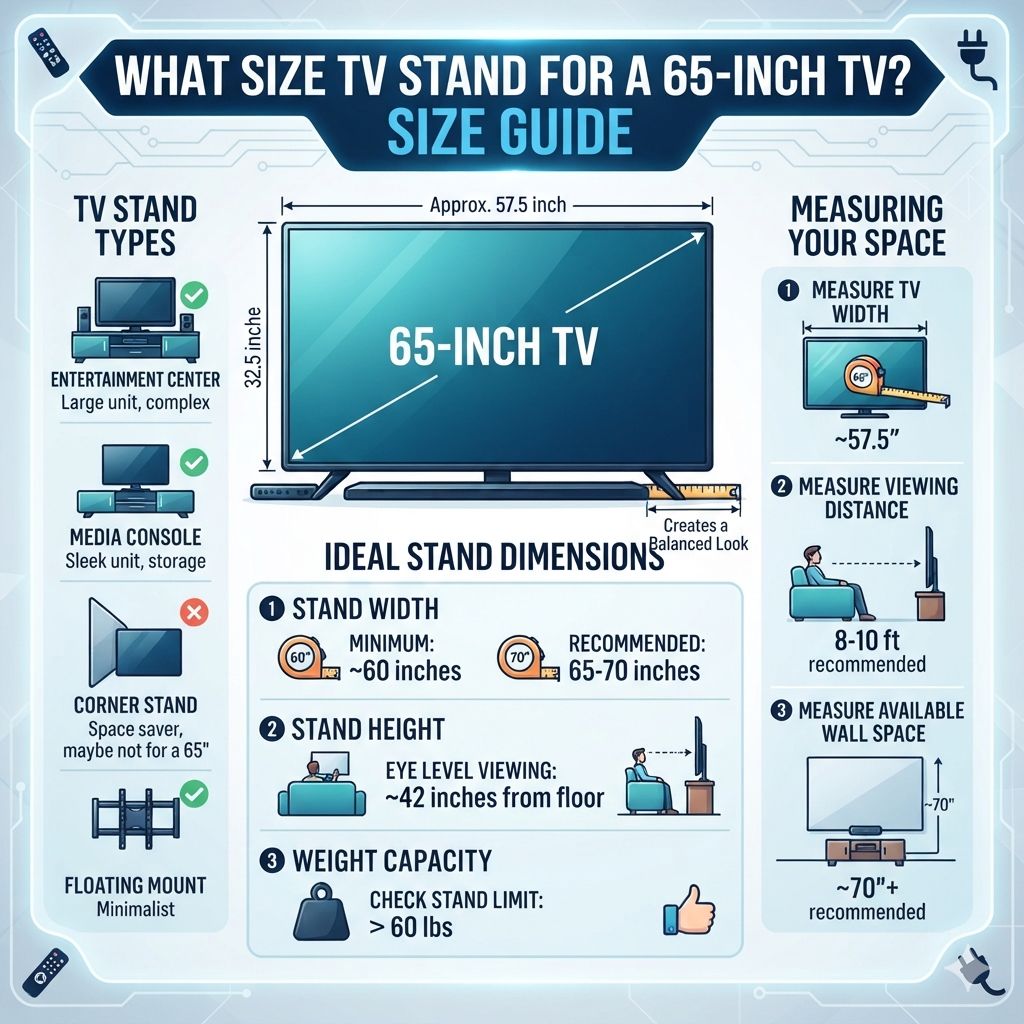
You need a TV stand that is wider than your TV’s stand but not too much wider. The ideal width is usually between 10 to 20 inches wider than your 65-inch TV’s total width. This provides stability and a balanced look. Depth and height also matter for usability and room flow.
Understanding TV Stand Size
When we talk about TV stand size, we mean a few different things. It’s not just one number. We look at the width of the stand. We also think about how deep it is. And the height of the stand is important too. These all work together. They make sure your TV looks right in your room.
Why Size Matters for Your 65-Inch TV
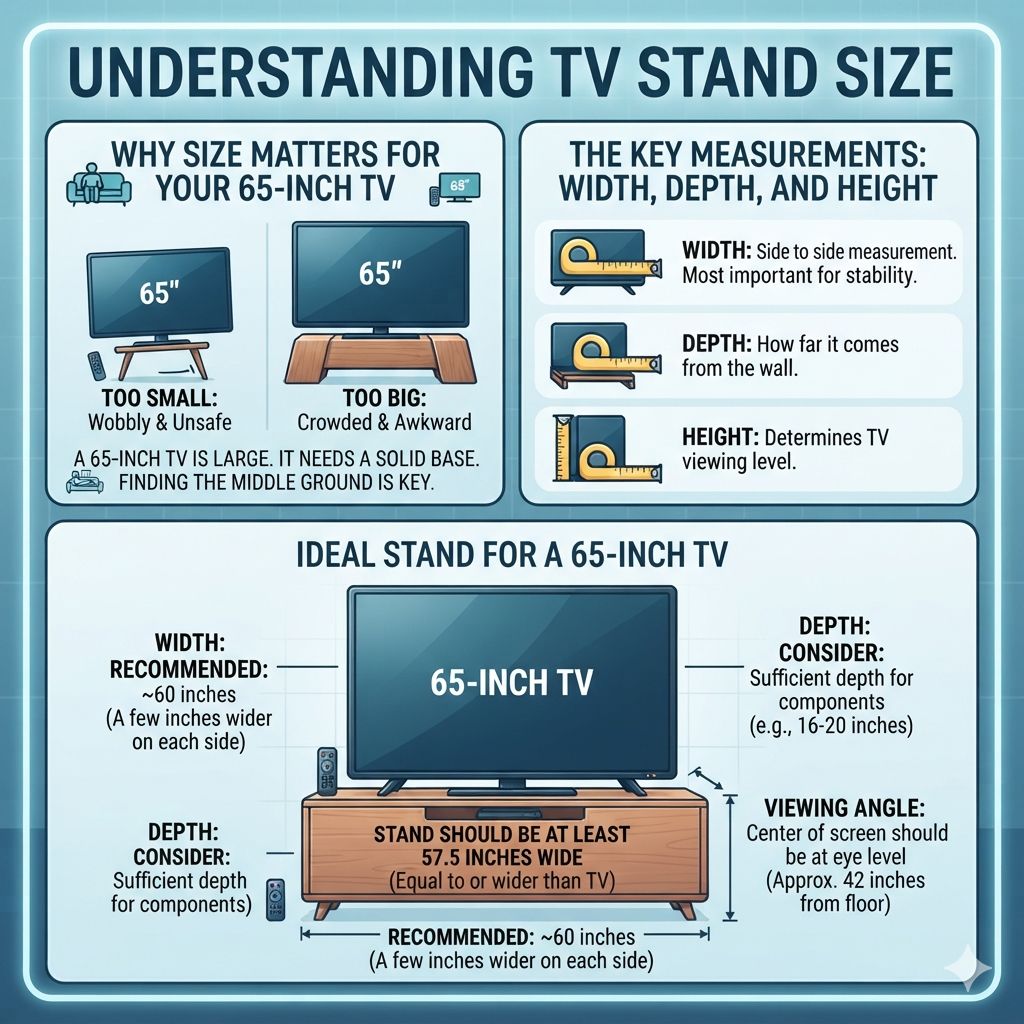
A 65-inch TV is quite large. It has a big screen. It needs a solid base. If the stand is too small, it can look wobbly. It might even be unsafe. Your TV could fall. That’s the last thing you want.
On the other hand, if the stand is way too big, it can make your room feel crowded. It might look out of place. It’s like wearing shoes that are too big. They just don’t feel right. Finding the middle ground is key.
The Key Measurements: Width, Depth, and Height
Let’s talk about the main numbers.
Width: This is the most important. It’s how wide the stand is from one side to the other.
Depth: This is how far the stand comes out from the wall. It affects how much space it takes up.
Height: This is how tall the stand is. It affects how high your TV will be.
We’ll go through each one. We’ll see what works best for a 65-inch TV.
Figuring Out the Right Width
The width of the TV stand is the biggest factor. It makes the biggest visual impact.
How Wide is Your 65-Inch TV?
First, we need to know the actual width of your 65-inch TV. TV sizes are measured diagonally across the screen. This doesn’t tell us the width. Most 65-inch TVs are around 57 to 58 inches wide. This is the measurement from the left edge of the bezel to the right edge.
Some TVs are slightly wider or narrower. Always check your TV’s manual or the manufacturer’s website. It will give you the exact dimensions. Don’t guess here.
The Golden Rule: Wider is Usually Better
For a balanced look, your TV stand should be wider than your TV. How much wider? This is where most people get stuck.
A good rule of thumb is to add about 6 to 10 inches to each side of your TV’s width. This means the stand should be about 12 to 20 inches wider than the TV itself.
Let’s do some math. If your TV is 58 inches wide, a good stand width would be between 70 inches (58 + 12) and 78 inches (58 + 20).
Why This Extra Width?
This extra width does a few things.
Stability: A wider base gives more support. This is extra important for a large TV like a 65-inch.
Visual Appeal: It makes the TV look grounded. It doesn’t look like it’s about to tip over. It also creates a nice visual balance. The stand and TV look like they belong together.
Space for Accessories: A wider stand gives you room for things like soundbars, gaming consoles, or decorative items.
What if You Have a TV with Legs?
Some TVs don’t sit on a center stand. They have two feet on either side. These feet can be quite far apart. You need to measure the distance between the feet.
If your TV feet are spread very wide, you still want the stand to be wider than the TV itself. But the feet’s position is also a factor. If the feet are, say, 50 inches apart on a 58-inch wide TV, a 70-inch stand is still a great choice. The feet will be well within the stand’s width.
The “Too Wide” Problem
What happens if the stand is too wide? It can make your TV look lost. It can also overwhelm your room. Imagine a 90-inch stand for a 58-inch TV. It would look strange. It might make your seating area feel smaller.
So, aim for that 12-20 inch wider range. It’s a sweet spot.
Quick Width Check
Your TV Width: (e.g., 58 inches)
Ideal Stand Width Range:
- Minimum: TV Width + 12 inches (e.g., 58 + 12 = 70 inches)
- Maximum: TV Width + 20 inches (e.g., 58 + 20 = 78 inches)
Look for stands between 70 and 78 inches wide.
Considering the Depth
Depth is about how much space the TV stand will take up from your wall. This is often overlooked.
Why Depth Matters
Depth affects the overall footprint of your entertainment setup.
Room Flow: If a stand is too deep, it can jut out into your room. This makes it hard to walk around. It can make a small room feel even smaller.
Ventilation: Electronics like TVs and consoles need airflow. A stand that’s too shallow might block vents. This can cause overheating.
Component Fit: If you plan to put a soundbar or other devices on the stand, you need enough depth for them.
Standard Depths for TV Stands
Most TV stands have a depth between 15 and 20 inches.
For a 65-inch TV, a depth of 16 to 18 inches is usually a good bet.
16-18 inches: This is a good balance. It’s deep enough for most soundbars and consoles. It’s also not so deep that it sticks out too much.
Less than 15 inches: Might be too shallow for some electronics. It could also make the stand feel less stable for a big TV.
More than 20 inches: Can start to feel bulky in most living rooms.
Measuring Your Space
Before you buy, measure the space where the TV stand will go. Think about how much room you have for walking.
If you have a narrow room, you might need to lean towards the shallower end (around 15-16 inches). If you have a large open space, a bit more depth (18-20 inches) might be fine.
What About the Height?
The height of your TV stand is mostly about comfort. It’s about where your eyes will be when you watch TV.
The Ideal Viewing Angle
When you’re sitting on your couch, the center of your TV screen should be roughly at eye level.
Most people sit about 8 to 10 feet away from their TV. For this distance, the ideal TV screen height is usually between 40 and 45 inches from the floor.
How Stand Height Affects TV Height
The height of the TV stand itself is only one part of this. You also need to consider the height of your TV’s stand or feet.
TV Stand Height: Most standard TV stands are between 18 and 24 inches tall.
TV Height (from bottom of TV to center): This varies greatly by TV model. Some TVs have legs that are very low. Others have legs that are higher. If your TV has a tall base, a shorter stand might be better. If your TV has very low feet, a taller stand might be needed.
Calculating Your Needs
Here’s how to figure it out:
1. Sit on your couch in your usual watching position.
2. Imagine the center of your 65-inch TV screen.
3. Measure the distance from the floor to that imaginary center point. This is your target height (around 40-45 inches).
4. Now, measure the height of your TV from the bottom of its stand/feet to its center.
5. Subtract your TV’s height from your target height. This gives you the ideal height for your TV stand.
Example:
Target TV center height: 42 inches
Your 65-inch TV’s height from feet to center: 10 inches
Ideal TV stand height: 42 – 10 = 32 inches
This is a taller stand than average. You might need to look for media consoles or entertainment centers.
If your TV has very short feet (say, 2 inches from bottom to center), then:
Target TV center height: 42 inches
Your 65-inch TV’s height from feet to center: 2 inches
Ideal TV stand height: 42 – 2 = 40 inches
This is a very tall stand. You might need to consider wall-mounting the TV above a credenza.
Height Check Steps
- Sit in your favorite spot.
- Estimate where the center of your 65-inch TV will be.
- Measure floor to that center point (aim for 40-45 inches).
- Measure your TV: bottom of feet to its center.
- Subtract TV height from target height. This is your needed stand height.
Beyond the Numbers: Other Factors to Consider
Size is critical, but other things make a difference too.
Material and Build Quality
A large TV needs a sturdy stand. Look for solid wood or metal construction. Avoid cheap particleboard if possible. It might not hold the weight well over time. Check weight limits. A 65-inch TV can weigh 50-70 pounds or more.
Style and Aesthetics
The TV stand should match your room’s decor. Do you have a modern look? Or more of a farmhouse style? Choose a stand that fits your vibe. The size also impacts how it looks. A sleek, low-profile stand can make a room feel more open. A chunkier piece can add visual weight.
Storage Needs
Do you need to store game consoles, DVDs, or other electronics? Look for stands with shelves or cabinets. Make sure the openings are wide enough for your gear. And check the depth again to ensure everything fits.
Cable Management
A big TV means lots of cables. Good cable management is a lifesaver. Look for stands with pre-drilled holes or built-in systems. This keeps things tidy and out of sight.
Common Mistakes to Avoid
Even with all this info, mistakes happen. Let’s look at some common ones.
Mistake 1: Buying a Stand Too Small
This is the most common error. People see a stand they like. They don’t check the width. Then their 58-inch wide TV sits on a 50-inch wide stand. It looks unsafe and unbalanced. Always measure your TV first.
Mistake 2: Forgetting About TV Legs
As we saw, TV legs can spread out. If the legs are wider than the TV’s base stand, you need to account for that. The stand must be wide enough to support both legs comfortably.
Mistake 3: Not Measuring the Room
You might find the perfect-sized stand. But if it’s too deep for your room, it won’t work. Always measure the space where the stand will go. Think about walking paths.
Mistake 4: Focusing Only on Width
Depth and height are just as important for how the stand functions and looks. Don’t let width be your only guide.
Real-World Scenarios
Let’s imagine some typical living room situations.
Scenario 1: The Small Apartment Living Room
You have a cozy apartment. Space is tight. You have a new 65-inch TV.
Problem: You don’t want a huge stand taking over the room.
Solution: Look for a stand around 70-72 inches wide. Prioritize a shallower depth, maybe 15-16 inches. A low-profile, minimalist design would be best. Ensure the height works for your viewing angle. You might need a taller TV, around 22-26 inches high, if your TV feet are low.
Apartment Living Stand Choice
- Width: 70-72 inches
- Depth: 15-16 inches (shallow)
- Height: Consider your TV feet. Mid-height stands (20-26 inches) often work.
- Style: Sleek, minimalist, open shelving.
Scenario 2: The Large Open-Concept Family Room
You have plenty of space. Your 65-inch TV is the focal point.
Problem: You want the TV area to feel substantial and inviting, not lost in the room.
Solution: You can go for a wider stand, perhaps 76-80 inches. A deeper stand (18-20 inches) can also work well here. This allows for more storage and a more robust look. You have more flexibility with height too, but still aim for that eye-level center screen. A console with more storage drawers or cabinets would fit this space.
Family Room Stand Choice
- Width: 76-80 inches (wider)
- Depth: 18-20 inches (deeper)
- Height: Standard heights (18-24 inches) usually work well.
- Style: Substantial, with storage, complements larger furniture.
Scenario 3: The Corner TV Setup
You’ve decided to place your TV in a corner.
Problem: Corner stands have different shapes. How do you find the right size?
Solution: Corner stands are designed to fit the angle of your walls. Their “width” is often measured along the wall. You still need to ensure the TV’s actual width fits comfortably on the stand’s surface. For a 65-inch TV, you’ll likely need a corner stand that measures at least 45-55 inches along each wall it meets. This gives enough surface area for the TV and some extra room. Check product descriptions carefully for corner stand dimensions.
Corner Stand Considerations
For 65-inch TVs in corners:
- Look for: Corner TV stands designed for this setup.
- Size: Generally need a longer surface area along the walls.
- Measure: Ensure TV width fits well on the stand’s depth and angled surface.
- Depth: Corner stands can vary; check product specs.
When is a Stand “Too Small” vs. “Just Right”?
It’s about that visual balance and safety.
Signs Your Stand Might Be Too Small
The TV’s feet are very close to the edges of the stand.
The TV looks like it’s perched precariously on top.
There’s no room for a soundbar or other accessories.
You can see the stand’s surface on either side of the TV, but it’s only by a few inches.
Signs Your Stand is “Just Right”
There are several inches of stand visible on each side of the TV (6-10 inches is ideal).
The TV feels stable and grounded.
You have space for your components and maybe a few decorative items.
The stand looks proportional to the TV and the room.
What This Means for Your 65-Inch TV Setup
Choosing the right size TV stand is crucial for both form and function. A well-sized stand enhances your viewing experience. It also contributes to the overall look of your living space.
When it’s Normal
It’s normal for a 65-inch TV to require a stand that is quite substantial. This is not a small TV. A stand that is 70-80 inches wide is common. The height might be between 18-26 inches, depending on your TV’s feet. A depth of 16-20 inches is also standard.
When to Worry
You should worry if the stand feels unstable. If the TV wobbles even slightly, that’s a big red flag. If the stand’s weight limit is exceeded, stop using it. If the stand is so deep it blocks a doorway or walkway, that’s a problem too.
Simple Checks Before You Buy
1. Measure your TV: Get the exact width.
2. Measure your space: Where will the stand go? How much room do you have?
3. Consider your TV’s feet: How far apart are they?
4. Think about your viewing height: Sit down and check your eye level.
5. Read reviews: See what others say about the stand’s sturdiness and size.
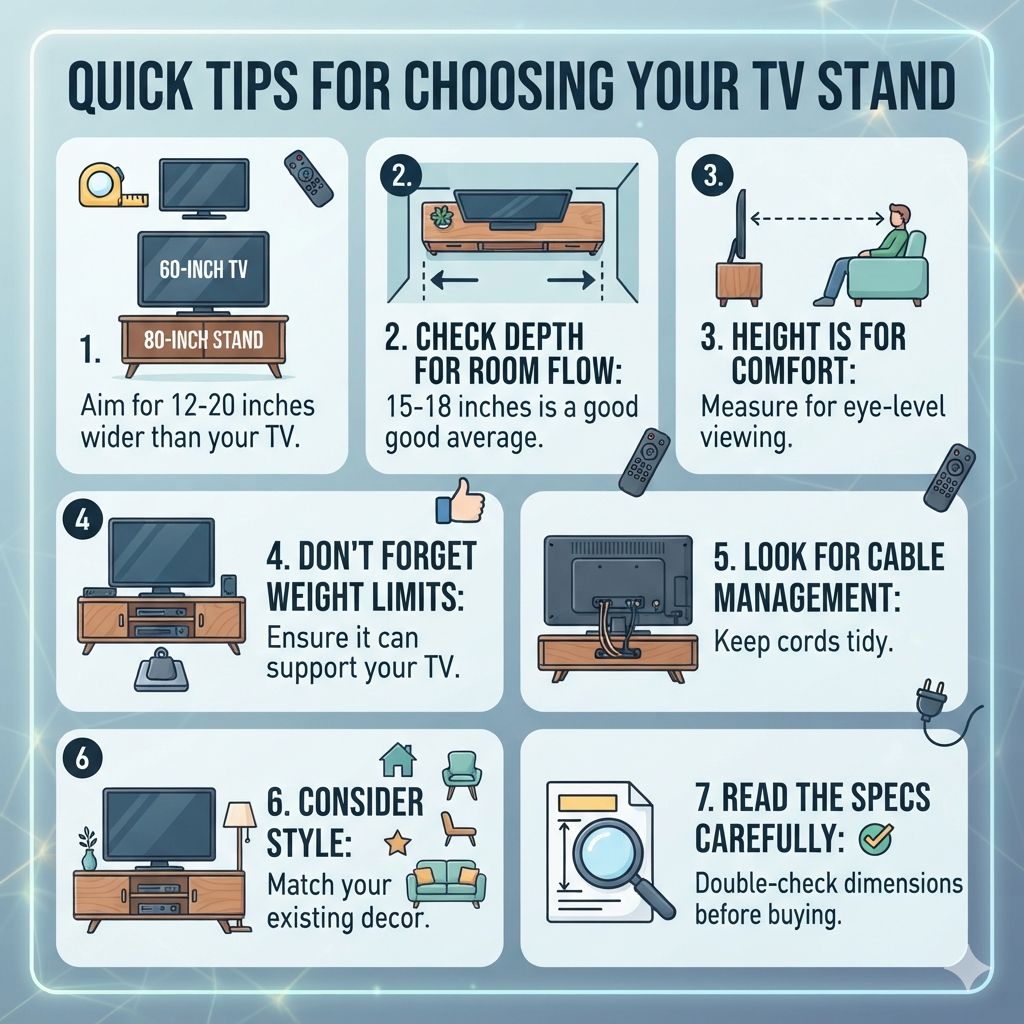
Quick Tips for Choosing Your TV Stand
Let’s wrap up with some actionable advice.
Prioritize Width: Aim for 12-20 inches wider than your TV.
Check Depth for Room Flow: 15-18 inches is a good average.
Height is for Comfort: Measure for eye-level viewing.
Don’t Forget Weight Limits: Ensure it can support your TV.
Look for Cable Management: Keep cords tidy.
Consider Style: Match your existing decor.
Read the Specs Carefully: Double-check dimensions before buying.
Frequently Asked Questions
What is the standard width for a 65-inch TV stand?
A standard width for a 65-inch TV stand is typically between 70 inches and 78 inches. This is calculated by adding 12 to 20 inches to the TV’s actual width, which is usually around 57-58 inches for a 65-inch model.
Can I use a TV stand that is the same width as my 65-inch TV?
No, it’s not recommended. A stand that is the same width as your TV will look unstable and can be unsafe. The stand should always be wider than the TV to provide proper support and a balanced look.
What depth should a TV stand be for a 65-inch TV?
For a 65-inch TV, a stand depth of 16 to 18 inches is generally recommended. This provides enough space for components like soundbars and consoles without being too bulky for most rooms.
How do I determine the correct height for my TV stand?
The correct height ensures the center of your TV screen is at eye level when you are seated. Measure your ideal viewing height (usually 40-45 inches from the floor), then measure your TV’s height from its feet to its center. Subtract the TV height from the ideal viewing height to find the needed stand height.
What if my 65-inch TV has wide legs instead of a center stand?
You still need a stand wider than the TV’s total width. Measure the distance between your TV’s legs. Ensure the stand you choose is wide enough to support both legs comfortably, with some space on either side.
Is it okay to put a 65-inch TV on a stand that is much wider than 80 inches?
While technically possible if the stand is sturdy, a stand much wider than 80 inches can make the TV look lost and overwhelm the room. It’s best to stick to the recommended 12-20 inches of extra width for a balanced aesthetic.
Conclusion
Choosing the right TV stand size for your 65-inch TV is all about balance. You want it wide enough for stability and looks, deep enough for your room, and at a height that’s comfy for watching. Always measure your TV and your space. This simple step saves you headaches and helps create a great entertainment setup. Happy shopping!
Products related to this article
Sponsored / affiliate links. As an Amazon Associate I earn from qualifying purchases. I may earn additional commission from eligible campaigns.