Floating TV Stand Problems: How to Fix Common Issues
If a floating TV stand sags, tilts, wobbles, or pulls from the wall, stop using it right away. Then check the wall type, the mounting method, and the anchors before tightening anything else. A loose mount can strip fasteners, crack drywall, or drop the unit. Match the symptom to the wall and fix the actual failure.
What you’ll need


- Manufacturer installation manual
- Bubble level or laser level
- Stud finder, magnetic or electronic
- Drill and correct-size bits
- Appropriate fasteners: lag screws, anchor bolts, washers, or rated toggles
- Tape measure and pencil
- Shims for minor leveling correction
- Hex keys or driver bits that match the hardware
- Flashlight for checking wall cavities or anchor seats
Floating tv stand problems matrix
| Symptom | Likely cause | Wall type | Severity | Immediate fix | When to stop using the stand |
|---|---|---|---|---|---|
| Sags at one end | Bracket not level, one fastener loose, or cabinet weight uneven | Drywall, plaster, or hollow wall | Moderate | Unload the cabinet, confirm level, check fastener depth and bracket alignment | Stop if the sag grows after retightening |
| Whole unit tilts downward | Missed stud, weak anchor, or screw length too short | Drywall or plaster | High | Remove weight, locate studs, remount to a load-bearing point | Stop at once if the tilt increases |
| Wobbles when the TV turns on | Dynamic load from the screen, cables, or drawers; hardware looseness | Any wall type | Moderate to high | Check interface screws, cable strain, and bracket lock points | Stop if motion is visible at the wall plate |
| Pull-away at the top edge | Anchor strip-out or insufficient embedment depth | Drywall, plaster, hollow wall | Critical | Remove load and remount with rated hardware into studs or masonry | Stop immediately |
| Stripped anchor hole | Oversized pilot hole or wrong anchor type | Drywall or plaster | High | Do not reuse the hole; move to a new location or repair first | Stop using that mounting point |
| Bracket holes do not line up | Stud spacing conflicts with bracket design | Wood or metal studs | Moderate | Recenter, change bracket position, or use a different mounting system | Stop if the bracket is forced into place |
| Cabinet front sits level but wall gap opens | Wall plate-to-cabinet interface is out of square | Any wall type | Moderate | Check interface screws and shim only after the wall plate is level | Stop if the gap widens after tightening |
| Fasteners back out | Incorrect screw length, vibration, or no washer | Drywall, plaster, masonry | High | Replace with correct fasteners and washers, then recheck depth | Stop if threads will not hold torque |
| Cracked plaster around anchors | Anchor type not suited to brittle wall material | Plaster | High | Remove load and switch to a stud or masonry attachment point | Stop immediately if cracks spread |
| Stand shifts when drawers open | Real-world load exceeds static rating | Any wall type | High | Reduce load and remount with a higher-rated method | Stop if motion is repeatable under normal use |
Why is my floating TV stand sagging or not level?
Sagging usually means the wall plate is out of level, one fastener is not seated fully, or the cabinet weight is unevenly loaded. Start with the wall plate, then check the cabinet-to-bracket interface. A level-looking front can still hide a shifting mount. Tighten only if the stand stays fixed after recheck, and always follow the manufacturer’s mounting instructions and hardware requirements first.
Check bracket alignment and level
- Unload the stand. Remove the TV and heavy devices so the bracket is not carrying a variable load while you inspect it.
- Measure the wall plate. Place a bubble level across the wall plate and the cabinet top; a small difference across a short span can show a real mounting error.
- Recheck after tightening. Tighten the hardware, then remeasure. If the level changes after torque is applied, the bracket may be shifting on the wall or the cabinet interface may be misaligned.
Check load capacity and fastener depth
Most manufacturers rate the stand for static load, but a TV plus console weight creates movement when you open drawers, touch the screen, or route cables. Stay well below the listed maximum and leave a clear safety margin. A stand rated for about 80 lb total has much less working room once cable strain and drawer motion are added.
Can a floating TV stand be mounted on drywall?
Sometimes, but drywall-only mounting is limited and risky for many floating TV stands. Use drywall-only mounting only if the manufacturer allows it and the wall, anchors, and load rating all match the installation requirements. If the stand carries a TV, a console, and moving loads, studs or masonry are the safer choice.
Drywall anchors versus studs
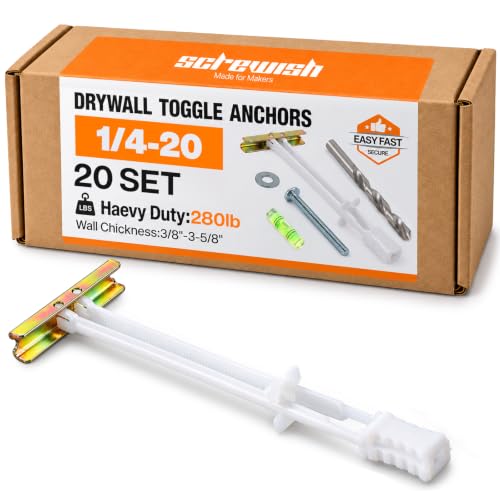
Use drywall anchors only when the wall, the load, and the manufacturer instructions all allow it. Toggle bolts usually spread load better behind the panel than simple expansion anchors, especially in thicker drywall, but both depend on correct hole size and intact board. Standard drywall is often 1/2 inch or 5/8 inch thick.
When drywall-only mounting is too risky
- Check the wall thickness. Confirm whether the wall is 1/2 inch or 5/8 inch drywall before choosing any anchor.
- Match the anchor type. Use a rated toggle only when the stand and wall condition allow it; do not assume an expansion anchor is equivalent.
- Stop on dynamic load. If the stand wobbles when the TV is adjusted, choose studs or another support surface instead of relying on hollow-wall hardware.
What studs do I need for a floating TV stand?
You need a load-bearing anchor point, which usually means wood studs or metal framing positioned to match the bracket. Common stud spacing is 16 inches or 24 inches on center, but older homes can vary. If the bracket does not land on a stud pattern, remounting is usually safer than forcing the hardware, and the wall plate should follow the manufacturer’s specified attachment points.
Wood studs versus metal studs
Wood studs accept lag screws when the pilot hole is placed correctly and the screw length matches the wall assembly. Metal studs need hardware designed for thin framing and often require a different bracket strategy because screw bite is limited. Many thin steel studs need specialty toggles, backing, or other manufacturer-approved methods rather than standard screws. A magnetic stud finder helps locate fasteners in wood framing; electronic models can help map stud edges in drywall or plaster after calibration.
Stud spacing, pilot holes, and bracket fit
- Locate both edges. Use the stud finder to mark each edge, then confirm the center before drilling.
- Check bracket span. Measure the wall plate holes against the 16-inch or 24-inch spacing so you know whether the bracket can land cleanly.
- Drill pilot holes. Place pilot holes at the marked center, with depth matched to the fastener and wall material. The fastener should reach solid wood or masonry as required, not just the wall face. Too large a hole reduces holding power fast.
Suppose the bracket lands halfway between two 16-inch studs. Do not shift the stand until one side just catches. That creates side load and often leads to tilt, strip-out, or a cabinet that looks level on the front but is stressed at the wall.
Why won’t my floating TV stand stay anchored?
If the stand will not stay anchored, the usual causes are stripped holes, the wrong anchor for the wall, bracket misalignment, or screw length that does not reach solid material. Wall type matters here. Drywall, plaster, brick, and concrete each need different fasteners, and hollow-wall constraints can make a good-looking install fail under real use. The manufacturer’s mounting instructions and hardware requirements should always override generic advice.
Strip-out, pull-away, and wobble causes
- Inspect the holes. Remove the load and check whether the screw threads are chewed out, the plaster is cracked, or the drywall has crumbled.
- Measure screw depth. Confirm minimum embedment depth into the stud or masonry, and use washers where the bracket calls for a wider bearing surface.
- Replace mismatched hardware. Use lag screws for wood framing, anchor bolts for masonry, and corrosion-resistant fasteners where moisture is present.
Hardware mismatch and wall-material limits
Brick and concrete usually call for masonry anchors or anchor bolts rather than drywall anchors. Plaster over lath can hide voids, so a stud finder may need calibration and an edge-by-edge check before drilling. A magnetic finder is useful for finding fastener heads; an electronic finder can locate framing, but both have limits with dense plaster and irregular surfaces.
A common mistake is assuming a floating TV stand will stay level even if one wall bracket is mounted into drywall while the other is fastened into a stud. An expansion anchor that feels solid in drywall can fail quickly in a hollow plaster wall, especially if the cabinet is loaded and unloaded every day.
Common mistakes
Most failures come from fixing the symptom instead of the structure. Tightening random screws can hide a bracket problem for a moment, but it will not solve a missed stud, a shallow pilot hole, or an anchor that is overloaded for the wall type.
- Skipping the manual and using the wrong bracket-to-cabinet screws
- Mounting into drywall only when the stand needs a load-bearing point
- Using a drywall anchor where the wall calls for a stud or masonry fastener
- Ignoring 16-inch or 24-inch stud spacing and forcing the bracket into place
- Overloading the stand with a TV plus devices that exceed the safe margin
- Failing to recheck level after the final tightening pass
If that didn’t work, try this next
- Remove the load. Take the TV and devices off the stand before any further repair.
- Remount to structure. Move the wall plate so the fasteners land in the manufacturer-specified attachment points, with the required support in wood stud framing, metal framing rated for the bracket, or masonry.
- Replace damaged hardware. Do not reuse stripped anchors, bent lag screws, or cracked washers.
- Stop and replace. If the wall is damaged, the bracket is bent, or the cabinet interface will not square up, replace the failed part instead of forcing another install.
Prevention is simple here: check the manual, confirm the wall type, and verify the listed load before drilling. If the stand is near its limit, lower the load and keep heavier devices off the shelf.
Frequently asked questions
How much weight can a floating TV stand hold?
Use the manufacturer rating as the starting point, then leave margin for the TV, console, cables, and normal movement. A stand rated for 100 lb should not be treated as a 100 lb working load in drywall. Wall material, fastener type, and stud spacing all change the safe limit.
Why does my floating TV stand wobble when the TV is on it?
Wobble usually means the load is moving through the bracket, not the cabinet alone. Check the wall plate, interface screws, and cable pull first, then look at anchor depth. If the wall mount moves when the TV is touched, the unit is under real dynamic load and should be remounted.
What should I do if the mounting bracket doesn’t line up with studs?
Do not force the bracket into a partial hit. Shift the layout so the wall plate lines up with about 16-inch or 24-inch stud spacing, or choose a bracket that fits the framing. If neither works, mount into masonry or replace the stand with a system designed for hollow walls.
How do I fix a floating TV stand that is pulling away from the wall?
Stop using it immediately, remove the load, and inspect the holes for strip-out or wall cracking. Then remount with the correct fasteners for the wall type and the manufacturer-specified attachment points into studs or masonry. If the wall is damaged beyond a clean remount, replace the failed area first.
Products related to this article
Sponsored / affiliate links. As an Amazon Associate I earn from qualifying purchases. I may earn additional commission from eligible campaigns.