How Does a Smart Lock Work? The Mechanics, Logic, and Security Explained
You’re standing in the rain with two grocery bags, and the keys are somewhere at the bottom of your bag. Or you’re on vacation and realize you can’t remember if you locked the front door. These moments are exactly why smart locks exist. But underneath the convenience, there’s a real engineering story about how a tap on your phone turns into a physical bolt sliding into a strike plate.
This article breaks down the mechanical movement, the wireless handshake, and the security logic that makes it happen. You’ll learn what happens when the battery dies, why your lock sometimes feels slow, and whether you actually need a smart home hub. By the end, you’ll know exactly what to look for when buying one.

PHILIPS
Philips Wi-Fi Smart Deadbolt Lock, Keyless Entry…
- 𝐅𝐥𝐞𝐱𝐢𝐛𝐥𝐞 𝐖𝐚𝐲𝐬 𝐭𝐨 𝐔𝐧𝐥𝐨𝐜𝐤: Unlock the way you want: app, passcode, fingerprint, physical key, or voice via Alexa/Google Assistant. E…
- 𝐔𝐧𝐥𝐨𝐜𝐤 𝐅𝐫𝐨𝐦 𝐀𝐧𝐲𝐰𝐡𝐞𝐫𝐞: Built-in Wi-Fi lets you lock and unlock your door remotely anytime, anywhere from your smartphone — no extra…
- 𝗩𝗼𝗶𝗰𝗲 𝗖𝗼𝗻𝘁𝗿𝗼𝗹 𝗥𝗲𝗮𝗱𝘆: Pair with Alexa or Google Assistant to unlock or lock with your voice. Great for when your hands are full or…
As an Amazon Associate I earn from qualifying purchases.
If you’re in the market, a solid example is the Philips Wi-Fi Smart Deadbolt Lock, which combines a fingerprint reader, keypad, app control, and voice commands into one unit. It’s a good reference point for the features we’ll discuss.
The Core Mechanism: From Smartphone Tap to Bolt Movement
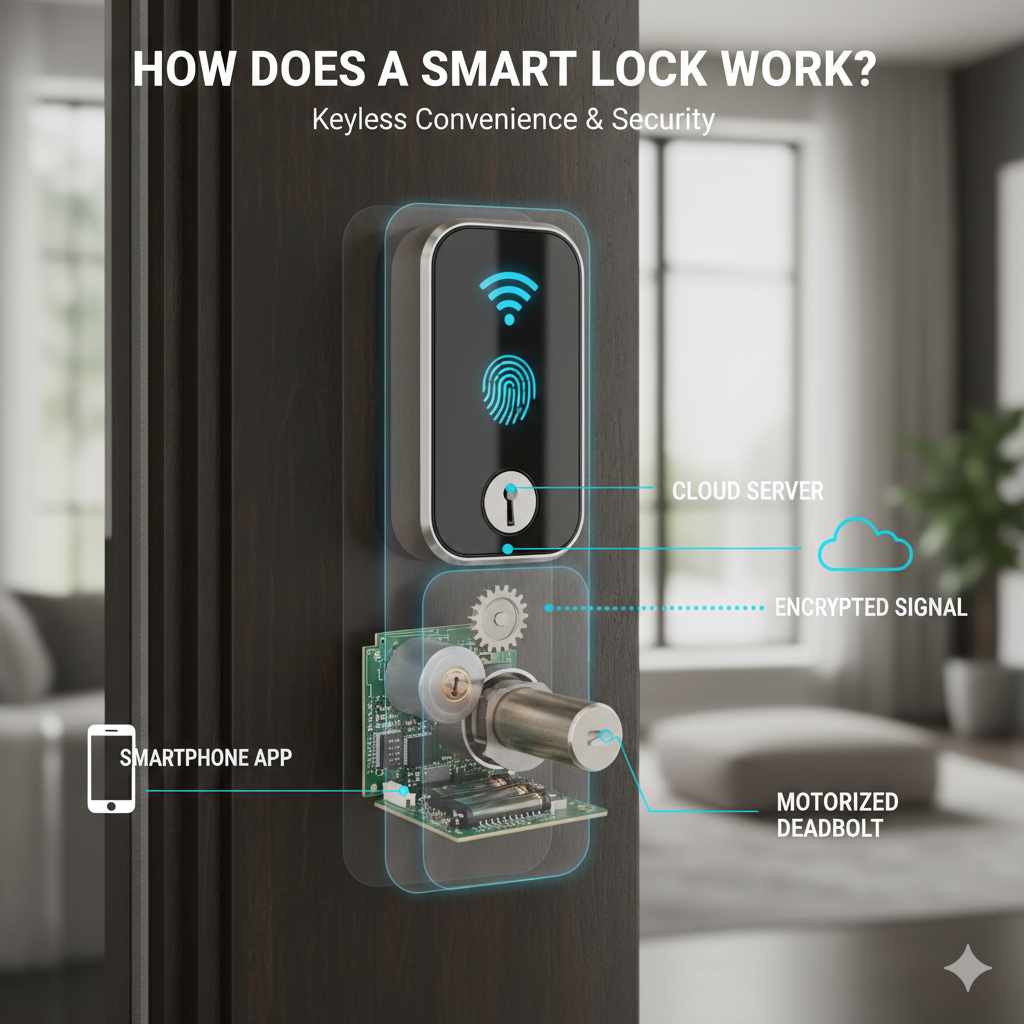
Inside every smart lock, a small electric motor does the heavy lifting. When you enter a code or tap your phone, the lock’s brain sends a signal to that motor. The motor spins a gearbox, which turns the same mechanism your thumb would normally turn on a traditional deadbolt. The bolt slides out of the door and into the frame. That’s it. The physical action is identical to a manual lock; the difference is who or what triggers it.
The motor is surprisingly small. Most use a 6-volt DC motor that draws very little current. It doesn’t need to be powerful because the gearbox multiplies its torque. A tiny motor can push a solid steel bolt because of that gear reduction. This is why a smart lock can run for months on a set of AA batteries.
When you unlock remotely, the sequence goes like this: your phone sends a command over the internet to the lock’s server, which relays it to the lock’s Wi-Fi radio. The radio passes the command to the microcontroller, which verifies the authentication, then energizes the motor. The whole loop takes about one to two seconds. Local commands, like a fingerprint scan or a keypad PIN, are much faster because they don’t leave your house.
The 4 Essential Components Inside Every Smart Lock
The Motor and Gearbox
This is the muscle. The motor spins at high speed but low torque. The gearbox trades that speed for force, allowing a tiny motor to move a heavy deadbolt. Some locks use a clutch mechanism here. If you turn the thumb turn manually, the clutch disengages the motor so you don’t strip the gears. This is a common point of failure in cheap locks, so look for a solid metal gearbox rather than plastic.
The Wireless Radio (Bluetooth vs. Wi-Fi vs. Z-Wave)
The radio is how the lock talks to the outside world. Bluetooth is the workhorse for local control. It’s fast, uses very little power, and works without an internet connection. But it only works within about 30 feet. Wi-Fi gives you remote access from anywhere, but it drains batteries faster and adds a slight delay because the command has to travel to a server and back. Z-Wave and Zigbee are mesh protocols that require a smart home hub to relay commands. They’re more reliable in large homes because each device extends the network.
Here’s the trade-off you need to remember: Bluetooth is instant but local. Wi-Fi is slower but global. Some locks, like the Philips model, use built-in Wi-Fi so you don’t need a separate hub for remote access. Others use Bluetooth and rely on a hub to bridge the gap. Check which one you’re buying.
The Microcontroller and Memory
This is the brain. It runs the lock’s firmware, manages the motor, and stores credentials. The memory holds your passcodes, fingerprint templates, and access logs. More memory means more users and a longer history of entries. A typical lock stores between 20 and 100 unique codes and keeps a log of the last 100 to 500 events. This is where the lock decides if a fingerprint matches a stored template or if a PIN is valid.
The Power Source (and Battery Failure Fail-Safes)
Most smart locks run on 4 AA batteries, which last anywhere from six months to a year depending on usage and wireless activity. Wi-Fi locks drain faster than Bluetooth-only ones because the radio is always listening. When batteries get low, the lock will warn you with a low-battery indicator in the app or a beep on the keypad. You usually get about two weeks of warning before it dies completely.
What happens if you ignore the warning? Most good locks have a mechanical key override. You pull out a physical key and unlock the door like a normal lock. Others have external jump-start terminals on the bottom. You touch a 9-volt battery to those terminals to power the lock just long enough to enter your code. If your lock has neither, you’re calling a locksmith. That’s a dealbreaker in my book.
How the Lock Authenticates Your Identity
Digital Keys and Rolling Codes
When you use your phone as a key, the lock and phone perform a cryptographic handshake. The lock sends a challenge, the phone signs it with a private key, and the lock verifies the signature. This prevents replay attacks, where someone records your unlock signal and replays it later. Each command uses a rolling code that changes every time. Even if someone intercepts one transmission, it’s useless for the next attempt.
Bluetooth pairing creates a trusted bond between your phone and the lock. Once paired, the lock recognizes your phone’s unique ID. Some locks use geofencing to auto-unlock when your phone gets close. That’s convenient, but it has a downside: if someone steals your phone, they can unlock your door. Most apps require a PIN or biometric check on the phone itself to prevent this.
Biometric Sensors and PIN Pad Logic
Fingerprint readers on smart locks use a capacitive sensor that reads the ridges of your finger. The sensor captures a high-resolution image, extracts unique features, and compares them to stored templates. It’s fast, usually under a second, but not perfect. Dry fingers, wet fingers, or a slight cut can cause a false rejection. Most locks store between 20 and 50 fingerprints, which is plenty for a family.
PIN pads work on simple logic. You enter a code, the microcontroller compares it to the stored list, and if it matches, the motor runs. Good locks add a few wrinkles. They’ll lock after a number of failed attempts, say five, and sound an alarm. Some allow a “duress code” that unlocks the door but silently notifies your phone that you’re under duress. That’s a feature worth paying extra for.
The Role of the Smart Home Hub (and Why You Might Not Need One)
A hub is a central device that connects your lock to your home network and to other smart devices. Think of it as a translator. If your lock uses Z-Wave or Zigbee, it can’t talk to your Wi-Fi router directly. It needs a hub like a SmartThings or an Echo Plus to relay messages. The hub also enables automations, like turning on lights when you unlock the door.
But you don’t always need one. Many modern locks, including the Philips Wi-Fi model, have built-in Wi-Fi. They connect directly to your router, so you get remote access without an extra piece of hardware. That simplifies the setup and saves you money. The trade-off is battery life. A lock that’s always on Wi-Fi uses more power than one that sleeps in Bluetooth mode and wakes up when a hub calls it.
If you have a Matter-compatible hub, you’re in good shape. Matter is a new standard that lets devices from different brands talk to each other without fighting over protocols. Older locks with proprietary protocols might not work with your hub at all. Before buying, check the compatibility list on the hub’s website. It’s a pain to find out after you’ve drilled holes in your door.
Security Architecture: How Encryption Blocks Remote Hacking
All communication between your phone, the lock, and the server is encrypted. Most use AES-128 or AES-256 encryption, which is the same standard banks use. This means even if someone intercepts the data packets, they see gibberish. The lock’s firmware also verifies that commands come from a trusted source. It checks the digital signature of each request before it moves the motor.
Physical attacks are a different story. A smart lock’s motorized bolt is often not as strong as a traditional deadbolt. The bolt itself is similar, but the housing is usually made of zinc alloy or even plastic in cheap models. A determined attacker with a crowbar can sometimes pry the lock body off the door. Look for locks with a solid metal body and a reinforced strike plate. The weak point is often the door frame, not the lock.
Lockpicking is less of a concern. The key cylinder on a smart lock is usually a backup, and it’s often a lower-quality one. But a burglar isn’t going to pick a lock when they can kick the door in. The real security value of a smart lock is the tamper alarm. If someone tries to force the lock or remove it, the alarm goes off and your phone gets a notification. That’s a deterrent a traditional lock can’t offer.
Installation Realities: Retrofit vs. Full Replacement
There are two kinds of smart locks: retrofit and full replacement. A retrofit lock, like the Philips model, replaces only the interior thumb turn. You keep your existing deadbolt and exterior key cylinder. Installation takes about 15 minutes with a screwdriver. You remove the two screws holding the interior plate, slide the new smart module over the tailpiece, and secure it. No drilling required.
A full replacement lock swaps out the entire deadbolt, including the exterior keypad and the bolt itself. This is more involved. You’ll need to remove the old deadbolt, check the door’s backset (the distance from the edge of the door to the center of the bolt), and possibly drill new holes. It’s doable for a DIYer, but it takes an hour or two. The benefit is a cleaner look and a more integrated keypad.
Before you buy, measure your door. The most common backset is 2-3/8 inches, but some doors use 2-3/4 inches. Also check the thickness of your door. Most smart locks fit doors between 1-3/8 and 2 inches thick. If your door is metal, you’ll need a lock that’s specifically rated for it, because the mounting screws won’t bite into wood.
Troubleshooting: Why Your Lock Feels “Slow” or “Unreachable”
If your lock takes five seconds to respond to a remote command, don’t panic. That’s often the server relay. Your phone sends the command to the cloud, the cloud sends it to the lock, and the lock sends a confirmation back. Each hop adds latency. A lock on a 2.4GHz Wi-Fi network is also slower than one on 5GHz, but smart locks only support 2.4GHz because of range. The 5GHz band doesn’t penetrate walls as well.
Distance matters. If your router is more than 65 feet from the lock, the signal will be weak. Move the router closer or add a Wi-Fi extender. Also, check for interference. Microwaves, baby monitors, and cordless phones can all disrupt the 2.4GHz band. If the lock is unreachable, try restarting the lock’s Wi-Fi module from the app. That fixes most issues.
Another common problem is the auto-lock feature. If your lock has auto-lock, it will re-lock the door after a set time, usually 30 seconds. If it seems like the lock is “randomly” locking, that’s why. You can adjust the delay or turn it off entirely. It’s a great feature for people who forget to lock up, but it can be annoying if you’re constantly going in and out.
Final Verdict: Is a Smart Lock Right for Your Door?
Smart locks are not for everyone. If you rent and can’t modify the door, a retrofit model is your only option. If you live in an area with frequent power outages, a lock with a physical key override is non-negotiable. And if you’re not comfortable managing an app, the added complexity might not be worth it.
But for most homeowners, the convenience outweighs the drawbacks. You’ll never fumble for keys again. You can give a temporary code to a dog walker and revoke it when they’re done. You’ll get a notification every time the door opens, which is peace of mind when you’re away. The tech has matured to the point where it’s reliable, and the security is solid if you choose a reputable brand.
Here are the takeaways I want you to remember:
- Always buy a lock with a mechanical key override or external battery terminals. You will eventually need it.
- Check whether the lock has built-in Wi-Fi or needs a hub. Built-in Wi-Fi is simpler, but it drains batteries faster.
- Measure your door’s backset and thickness before ordering. Nothing is more frustrating than a lock that doesn’t fit.
- Use the app to set up a duress code and a tamper alarm. These are the features that actually protect you.
- Keep spare batteries in a drawer near the door. Replacing them is a 30-second job.
- Don’t skip the physical key. It’s your fail-safe when the electronics give up, and they eventually will.
- If you want to learn more about the security side, read our guide on how to unlock a lock door for a broader look at lock mechanisms.
For a deeper dive into the technology behind these devices, check out our smart lock technology archive for more articles like this one.
Products related to this article
Sponsored / affiliate links. As an Amazon Associate I earn from qualifying purchases. I may earn additional commission from eligible campaigns.