How to Sit in Office Chair for Maximum Comfort and Health
Sitting in an office chair might sound simple, but the way you sit has a bigger effect on your health and work than you might think. Many people spend more than 8 hours a day at their desks, and poor sitting habits can lead to pain, tiredness, and even long-term injuries.

Cloomey
500lbs Big and Tall Office Chair Adjustable…
- 【𝐈𝐧𝐟𝐥𝐚𝐭𝐚𝐛𝐥𝐞 𝐋𝐮𝐦𝐛𝐚𝐫 𝐒𝐮𝐩𝐩𝐨𝐫𝐭 𝐟𝐨𝐫 𝐁𝐚𝐜𝐤 𝐏𝐚𝐢𝐧 𝐑𝐞𝐥𝐢𝐞𝐟】No need to worry about back pain due to long hours of sitting. Our executive chair…
- 【𝐄𝐧𝐣𝐨𝐲 𝐭𝐡𝐞 𝐔𝐥𝐭𝐢𝐦𝐚𝐭𝐞 𝐂𝐨𝐦𝐟𝐨𝐫𝐭 𝐁𝐲 𝟓𝟎𝟎𝐥𝐛𝐬 𝐁𝐢𝐠 𝐚𝐧𝐝 𝐓𝐚𝐥𝐥 𝐎𝐟𝐟𝐢𝐜𝐞 𝐂𝐡𝐚𝐢𝐫】Would you like to be held warmly by a chair? That's right, this 50…
- 【𝐋𝐨𝐯𝐞 𝐭𝐡𝐞 𝐔𝐧𝐩𝐚𝐫𝐚𝐥𝐥𝐞𝐥𝐞𝐝 𝐖𝐫𝐚𝐩𝐚𝐫𝐨𝐮𝐧𝐝 𝐅𝐞𝐞𝐥 𝐨𝐟 𝐎𝐟𝐟𝐢𝐜𝐞 𝐂𝐡𝐚𝐢𝐫】It is a unique feeling, a good chair, he is the one who will always give yo…
As an Amazon Associate I earn from qualifying purchases.
Good posture is not just about looking professional, it helps you stay focused, reduces stress on your body, and can prevent medical problems like back pain and carpal tunnel syndrome. In this article, I’ll guide you through everything you need to know about how to sit in an office chair the right way.
You’ll learn how to adjust your chair, position your body, and create a workspace that supports you through long hours. Whether you’re setting up a new office or want to fix your current routine, these tips will help you stay healthy and comfortable at work.
Why Proper Sitting Posture Matters
Sitting the right way can protect your back, neck, and wrists from injury. According to the Occupational Safety and Health Administration (OSHA), musculoskeletal disorders (like back pain and wrist problems) are one of the most common reasons for lost work time in offices. Poor posture puts extra pressure on your spine and muscles, making you feel sore, tired, and less productive.
Over time, sitting badly can lead to:
- Chronic back pain
- Neck stiffness
- Shoulder aches
- Wrist and hand problems
- Poor blood flow to legs
Many people don’t notice these issues right away. They develop slowly, and by the time you feel pain, the damage may be done. That’s why it’s important to learn and practice good sitting habits before problems start.
Understanding Your Office Chair
Not all office chairs are the same. The features of your chair affect how easily you can sit correctly. To get the most benefit, you need to know what your chair can do and how to adjust it.
Key Parts Of An Office Chair
Most good office chairs have these features:
- Seat height adjustment
- Backrest tilt or recline
- Lumbar support
- Armrests
- Seat depth
- Swivel base
- Wheels (casters)
Comparing Chair Features
Here’s a comparison of common office chair features:
| Feature | Basic Chair | Ergonomic Chair |
|---|---|---|
| Seat Height Adjustment | Usually present | Present, often wider range |
| Lumbar Support | Rare | Adjustable, built-in |
| Armrests | Fixed | Adjustable (height, width) |
| Backrest Tilt | Limited | Adjustable angle and tension |
| Seat Depth | Fixed | Adjustable |
Pro Tip: If your chair doesn’t have all these features, you can often add lumbar cushions or footrests to improve comfort.

Credit: eustore.hermanmiller.com
How To Adjust Your Office Chair
A well-adjusted chair supports your body in a neutral position, meaning your joints are not bent too much or stretched too far. Here’s how to set up your chair for the best posture.
1. Adjust Seat Height
Sit down and put your feet flat on the floor. Your knees should be at the same level as your hips or a little lower. If your feet don’t touch the ground, use a footrest. Adjust the height until your thighs are parallel to the floor.
2. Set Seat Depth
The seat should support your thighs without pressing into the back of your knees. There should be about two or three fingers’ width between the edge of the seat and your knees. Some chairs allow you to move the seat forward or backward.
3. Position The Backrest
Adjust the backrest so it fits the natural curve of your lower back. This is called lumbar support. The backrest should support your spine, not push you forward or let you slump. If your chair doesn’t have lumbar support, add a small pillow.
4. Adjust Armrests
Set armrests so your shoulders are relaxed and your elbows are close to your body, bent at about 90 degrees. Your forearms should rest lightly on the armrests. If the armrests are too high, your shoulders will be tense. If they’re too low, you’ll slouch.
5. Recline Angle
A small recline (about 100, 110 degrees) takes pressure off your lower back. Don’t sit bolt upright or lean back too far. Adjust the tension so you can lean back easily but still feel supported.
6. Check Seat Tilt
Some chairs let you tilt the seat forward or backward. A flat or slightly forward tilt helps keep your feet flat and your back straight. Avoid seats that tilt back too much, as this can make you slide forward.
The Correct Sitting Position
Now that your chair is set up, it’s time to focus on how you sit. Even the best chair can’t help if you don’t use it properly.
Key Points For Good Sitting Posture
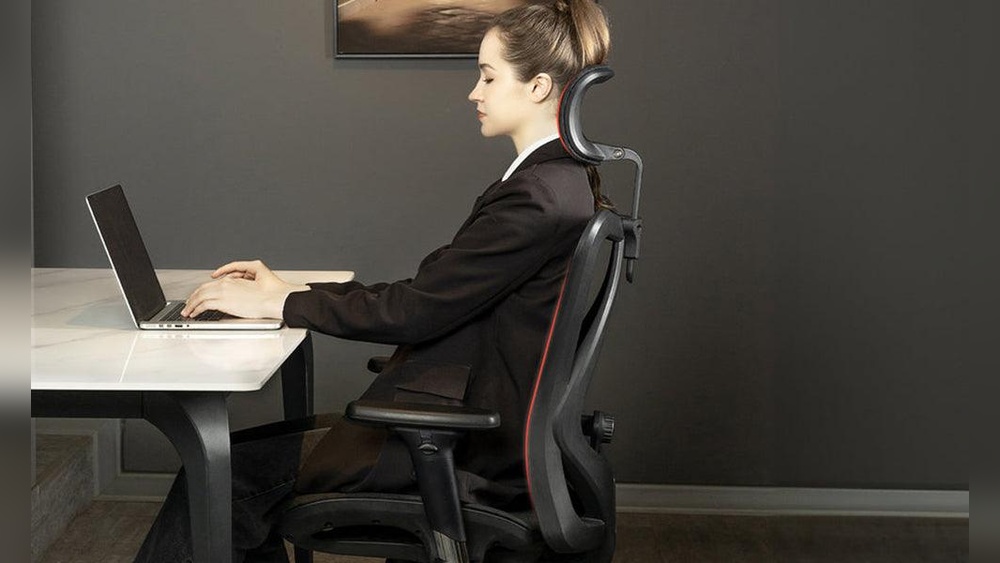
- Sit with your back straight and shoulders relaxed, not hunched.
- Your feet should rest flat on the floor (or on a footrest).
- Knees are even with or slightly lower than your hips.
- Keep your hips pushed back in the chair.
- Arms rest at your sides, elbows at about 90 degrees.
- Wrists are straight, not bent up or down, when typing.
Visual Reference
Here’s a quick table to check your sitting position:
| Body Part | Correct Position | Common Mistake |
|---|---|---|
| Feet | Flat on floor | Dangling or tucked under chair |
| Hips | Back in chair | Sitting at edge |
| Back | Straight, supported | Slouched or rounded |
| Shoulders | Relaxed | Raised or hunched |
| Elbows | Close to body | Stretched out wide |
Warning: Crossing your legs or sitting on one foot can reduce blood flow and cause numbness or pain over time.

Credit: www.youtube.com
Setting Up Your Desk And Monitor
Even if you sit perfectly, your desk and screen position can force you into bad posture. Setting up your workspace is just as important as adjusting your chair.
Desk Height
Your desk should be at a height where your forearms are parallel to the floor when typing. Most desks are 28, 30 inches high, which works for many people. If your desk is too high, raise your chair and use a footrest.
If it’s too low, try adding risers under the desk legs.
Monitor Position
Place your monitor directly in front of you. The top of the screen should be at or just below eye level, so you don’t have to tilt your head up or down. The screen should be about an arm’s length away.
Keyboard And Mouse
Keep your keyboard and mouse close enough so you don’t have to reach. Your wrists should stay straight and float above the keyboard, not resting on the desk.
Pro Tip: Use a separate keyboard and mouse if you work on a laptop for long periods. Laptop screens are usually too low, and typing on them can strain your wrists.
Movement And Breaks
No matter how well you sit, staying in one position for hours isn’t good for your body. Movement keeps your joints flexible, improves blood flow, and reduces muscle tension.
Simple Break Ideas
- Stand up and stretch every 30, 60 minutes.
- Walk around your office or house.
- Do shoulder rolls or gentle neck stretches.
- Look away from the screen every 20 minutes to rest your eyes.
Even a one-minute break can help prevent fatigue and pain. Set a timer or use a break reminder app if you tend to forget.
Dynamic Sitting
Some chairs allow small movements, like rocking or shifting your weight. This is called dynamic sitting. It can help reduce stiffness and improve comfort. Just make sure your chair is stable and doesn’t distract you from work.
Common Mistakes And How To Fix Them
Many people think they’re sitting correctly, but small habits can lead to big problems. Here are some of the most common mistakes and how to solve them.
Mistake 1: Slouching
When you get tired, it’s easy to slide down in your chair and round your back. This strains your spine.
Fix: Keep your hips pushed back and your back supported by the chair. Check your posture every hour.
Mistake 2: Feet Not Flat
Letting your feet dangle or tucking them under the chair can reduce blood flow and cause numbness.
Fix: Lower your chair or use a footrest so your feet are always flat.
Mistake 3: Reaching Forward
If your monitor or keyboard is too far away, you might lean forward, straining your neck and shoulders.
Fix: Move your screen and keyboard closer so you can sit back and stay supported.
Mistake 4: Armrests Too High Or Low
If your armrests aren’t set right, your shoulders will tense up or you’ll slump.
Fix: Adjust armrests so your arms rest naturally, without lifting or dropping your shoulders.
Mistake 5: Sitting Too Long
Even with perfect posture, sitting for hours can cause problems.
Fix: Move and stretch regularly. Stand up, walk, and do simple exercises during the day.
Ergonomic Accessories To Improve Your Setup
If your chair or desk can’t be adjusted enough, or if you want extra comfort, there are accessories that can help.
Lumbar Cushions
These small pillows support your lower back and can fit most chairs. They are helpful if your chair’s backrest is flat or not supportive.
Footrests
A footrest helps keep your feet flat if your desk is high or your legs are short. It also encourages better posture.
Seat Cushions
A cushion can make a hard seat more comfortable and help you sit higher if needed. Look for one that stays in place and doesn’t make you slide.
Monitor Risers
If your screen is too low, a riser can lift it to the right height. You can also use a stack of books, but a stable riser is safer.
Keyboard Trays
A tray under your desk can put your keyboard and mouse at the right height, reducing strain on your wrists.
Example: In my experience, adding a simple lumbar cushion to a basic office chair made a big difference in my lower back comfort during long work days.
Special Tips For Tall And Short People
People who are very tall or short often have extra challenges fitting into standard office chairs and desks.
For Tall People
- Look for chairs with higher seat height and deeper seats.
- Make sure your knees are not higher than your hips.
- Use a monitor riser to bring the screen to eye level.
- Check that armrests are wide enough for your shoulders.
For Short People
- Use a footrest if your feet don’t reach the floor.
- Choose a chair with adjustable seat depth, so the seat doesn’t press into your knees.
- Lower your desk or use a keyboard tray if your arms are too high when typing.
The Role Of Exercise And Stretching
Regular movement outside your sitting time can help prevent pain and injury. Simple exercises and stretches keep your muscles flexible and your joints healthy.
Helpful Desk Stretches
- Neck stretch: Tilt your head gently to each side.
- Shoulder rolls: Roll your shoulders forward and backward.
- Back twist: Sit up straight, twist your upper body to each side.
- Hamstring stretch: Stand, put one foot on a low stool, and lean forward gently.
These stretches only take a few minutes and can help you feel less stiff and more awake.
Pro Tip: If you have ongoing pain, consult a physical therapist or doctor for personalized advice.

Credit: www.youtube.com
How To Maintain Good Habits
Changing your sitting habits can be hard at first. Here are some ways to make good posture a regular part of your day.
Set Reminders
Use your phone or computer to remind you to check your posture and take breaks. After a while, these habits will become automatic.
Make Small Changes
Don’t try to fix everything at once. Start by adjusting your chair, then your monitor, and so on. Each small change adds up.
Listen To Your Body
If you feel pain or discomfort, adjust your setup. Sometimes, small tweaks can make a big difference.
Ask For Help
If you’re not sure how to adjust your chair, ask a coworker or look for instructions online. Many chair brands have setup guides on their websites.
Comparing Sitting And Standing Workstations
Some offices offer standing desks as an alternative to sitting. Both options have benefits and drawbacks. Here’s a quick comparison:
| Factor | Sitting Desk | Standing Desk |
|---|---|---|
| Comfort | Good with proper chair | Can cause foot fatigue |
| Posture | Easy to slouch | Encourages standing upright |
| Movement | Limited | Easier to move and shift |
| Long-term use | Can cause back pain if not set up right | Can cause leg/foot pain if standing too long |
Pro Tip: The best option is often to switch between sitting and standing during the day. If you use a standing desk, wear supportive shoes and use a mat to reduce fatigue.
Resources For Further Learning
If you want to learn more about ergonomics and healthy office setups, you can visit the **OS
Related pick: Check today's price on Amazon
Products related to this article
Sponsored / affiliate links. As an Amazon Associate I earn from qualifying purchases. I may earn additional commission from eligible campaigns.