Bestier Desk Review: Which Model Fits You Best?
Bestier desks are a solid budget choice if you need a compact straight desk or a small L-shaped layout for a home office, gaming corner, or craft area; for most small rooms, the small L-shape is the safer pick. Pick the wrong layout and you waste floor space, lose legroom, and make cable routing or monitor placement harder. This review compares Bestier desk types by use case, room size, storage, and setup features.
Verdict

- Open storage compartment plus two drawers
- Sturdy P2 particleboard with metal X-frame
- Keyboard tray and cable management holes
Based on published product details and buyer feedback, the Bestier lineup works best when you match the desk type to the room. The straight computer desk is the safer choice for renters and students who need a simple footprint, while the gaming and L-shaped options make more sense if you need monitor space, accessory storage, or a corner layout.
Specs at a glance
| Category | What Bestier offers |
|---|---|
| Desk types | Computer desk, gaming desk, standing desk, L-shaped desk |
| Size variants | 42 inch, 44 inch, 47 inch, 48 inch, 55 inch, 61 inch, 63 inch, 95.2 inch |
| Finish and color options | Gray, natural oak, cherry, rustic brown, walnut, white carbon fiber; Walmart also lists gray, natural oak, and cherry for the reviewed desk |
| Storage features | Drawers, keyboard tray, shelves, file drawer, hooks, cabinet, storage bag |
| Gaming add-ons | LED lights, monitor stand, headphone hook, cup holder on some models |
| Standing option | Height-adjustable desk with electric lift on some models |
| Review signals | Walmart lists 4.8 out of 5 stars from 84 ratings and 50 written reviews for the desk page |
| Price context | Published product prices in this lineup range from $115.99 to $179.99 |
Bestier desk decision matrix
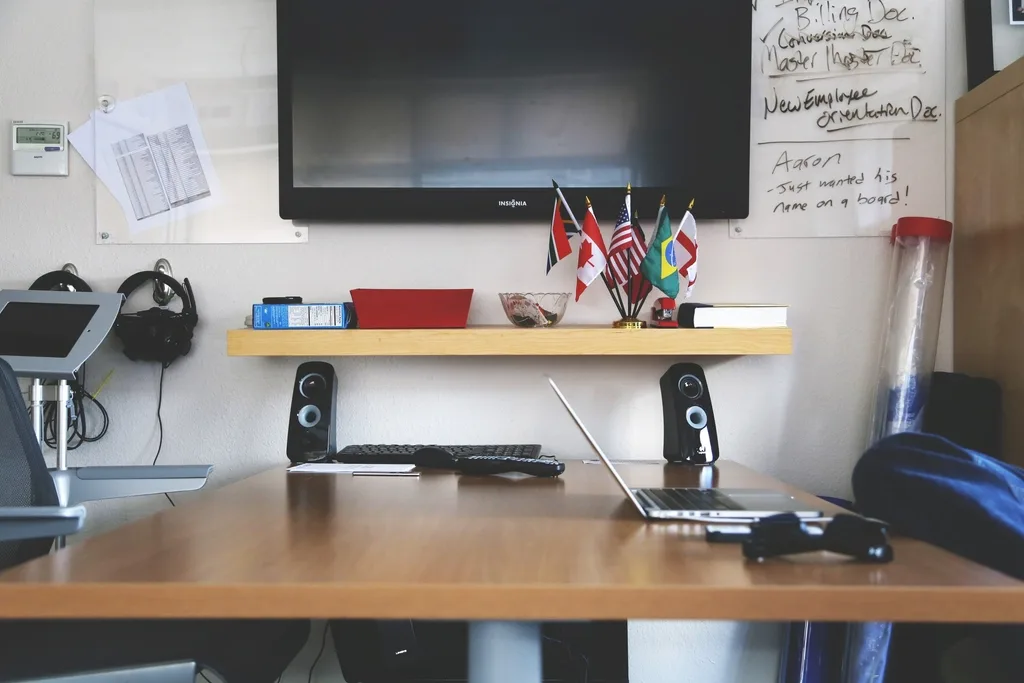
| Desk type | Footprint | Storage | Assembly effort | Cable organization | Monitor-friendliness | Best use case |
|---|---|---|---|---|---|---|
| Straight computer desk | 5/5 | 3/5 | 4/5 | 4/5 | 3/5 | Small apartments, schoolwork, light office tasks |
| Gaming desk | 4/5 | 3/5 | 3/5 | 4/5 | 4/5 | Single- or dual-monitor gaming, streamer corner, small rooms |
| Standing desk | 3/5 | 2/5 | 3/5 | 3/5 | 4/5 | Mixed office use, sit-stand workflows, long typing sessions |
| L-shaped desk | 2/5 | 5/5 | 2/5 | 4/5 | 5/5 | Corner placement, dual monitors, two-person or hybrid work |
| Recommendation | Small apartments: straight computer desk. Gamers: gaming desk. Students: straight desk with drawers or keyboard tray. Dual-setup users: L-shaped desk. | |||||
Is a Bestier desk good for a home office?
Yes, if you choose the right size and layout. Bestier desks can fit a home office well because the line includes compact straight desks, larger L-shaped options, and a height-adjustable model. The better fit depends on your workspace dimensions, how much storage you need for supplies, and whether you need room for one monitor or two.
Workspace dimensions
The published lineup gives you real choice. A 48-inch or 55-inch straight desk suits a narrow wall, while the 63-inch L-shaped desk fits a corner office better. The 95.2-inch two-person L-shaped desk is for a much larger room, not a tight apartment.
Storage for office supplies and paperwork
Storage is the main reason to pick Bestier over a bare-bones table. The reviewed desk page includes a pull-out keyboard tray, a file drawer, and another drawer, which helps with paper storage and small items. Other Bestier desks add shelves, a cabinet, or hooks for accessories.
A file drawer matters if you keep folders, notebooks, or printer paper within reach. Drawers also make a desk look cleaner in a shared room, because chargers, pens, and cable clutter can stay out of sight.
Cable and accessory organization
Bestier often builds in cable holes, shelves, or side storage, which helps when you need to route a monitor cable, lamp cord, and charger without turning the back edge into a mess. That matters more in a home office than in a decorative vanity setup.
Picture a 48-inch desk in a bedroom office with one laptop, one monitor, and a printer on the floor. A desk with a keyboard tray and cable cutouts keeps the typing area open, while a shelf or drawer gives you a home for paper and accessories.
Fit for schoolwork, crafting, and vanity use
Bestier’s mix of sizes and finishes makes the line flexible for more than office work. A straight desk can handle schoolwork and paperwork. A drawer-equipped model is more useful for crafting tools or makeup storage, while a white-and-gold style is easier to place in a bedroom vanity setup than a heavy gaming look.
Who is it for?
Bestier is a fit for shoppers who need function first and have limited floor space. It is most useful for renters, students, gamers with one or two monitors, and anyone who wants a practical desk without paying for a large executive setup.
Small apartments and renters
Renters usually need furniture that leaves room to move around. A 42-inch or 44-inch gaming desk, or a 48-inch straight desk, is easier to place against a wall than a large L-shaped unit. If the room is narrow, avoid buying the biggest surface just because it looks useful on paper.
Students and shared rooms
Students need a desk that works for reading, laptops, and paperwork. A straight desk with a keyboard tray or drawers is usually enough. Shared rooms also benefit from desks with a cleaner visual profile and a smaller footprint, since the desk has to live with a bed, dresser, or storage bin nearby.
Gamers and streamers
Bestier’s gaming desks are the clearest match for this group. Models with LED lights, a monitor stand, a headphone hook, and a cup holder are aimed at setups where accessories matter as much as work surface. A 61-inch gaming desk is the better pick if you want more room than a compact 42-inch version.
Dual-setup users
Anyone running two monitors, a laptop dock, and extra peripherals should look at an L-shaped desk first. The corner format gives you more usable elbow room and makes it easier to separate a work zone from a gaming or crafting zone. That is why the 95.2-inch two-person option stands out for shared work.
What works
Bestier’s main strength is variety with a clear use-case split. The brand sells straight desks, gaming desks, standing desks, and L-shaped desks, so you can match the layout to the room instead of forcing one desk type to do everything.
Pros and cons
- Pros: Good size spread, from compact 42-inch and 44-inch models to a 95.2-inch two-person L-shaped desk.
- Pros: Useful storage options such as drawers, shelves, hooks, a file drawer, and a keyboard tray.
- Pros: Several models are aimed at small rooms and corner placement.
- Pros: Gaming versions add features many budget desks skip, including monitor stands and LED lights.
- Cons: The largest L-shaped models need serious floor space.
- Cons: Storage and cable management vary by model, so you have to compare listings carefully.
- Cons: Some desks will take more effort to assemble than a plain tabletop and legs.
- Cons: Drawer alignment and overall fit can be more sensitive on lower-cost furniture than on premium office desks.
Assembly time and instruction clarity
Assembly is one of the most common concern areas in reviews for this price tier. Bestier desks are usually not a one-piece setup, and a desk with drawers, shelves, or a keyboard tray takes longer than a plain writing table. Expect more steps when the layout includes a cabinet, crossbars, or a reversible configuration.
A common first-timer mistake is buying a 63-inch or 95.2-inch corner desk for a room that only has a 48-inch wall run available. The desk may fit on paper, but assembly becomes awkward when you cannot slide panels, line up brackets, or flip the frame comfortably.
Sturdiness, wobble, and drawer alignment
Buyer feedback points to decent value rather than premium stiffness. The reviewed Bestier desk page has a 4.8 out of 5 star rating from 84 ratings, which is a strong sign for a budget desk, but it does not erase the limits of particleboard construction or lightweight frames. Metal supports help, yet large spans still need careful assembly.
Wobble is most likely to matter if you plan to hold a heavy ultrawide monitor or lean on the desk edge while typing. Drawer alignment can also be an issue if the frame is not squared during assembly, especially on models with multiple drawers or a pull-out tray.
Keyboard tray, file drawer, shelves, and hook utility
The pull-out keyboard tray is useful when you want a lower typing position and more desktop clearance above the main surface. It can help if you keep a laptop on the desk and need the main surface free for notes or a second screen. The tradeoff is reduced knee space if the tray hangs too low.
The file drawer matters most for paper-heavy work. It is better than a shallow catchall drawer because it separates documents from chargers, pens, and adapters. Shelves are better for open storage, while hooks are handy for headphones, bags, or cables that you want within arm’s reach.
What does not?
Bestier is not the best answer for every room. The largest layouts can eat floor space fast, and the smallest desks may feel cramped if you want dual monitors, a printer on top, or a wide writing area. Some buyers will also prefer a cleaner one-drawer design over mixed open-and-closed storage.
Where the lineup falls short
If you want a desk that feels substantial in the way a heavy wood office desk does, a budget Bestier model may not be the match. Some users will also need to watch for drawer clearance, because a pull-out tray or file drawer can interfere with leg room if the setup is tight.
Another limitation is style matching. Bestier sells finishes that aim at different rooms, from office-like gray and natural oak to more decorative looks, but the styling still needs to fit the rest of the room. A gamer-focused desk with LED accents is not always the right choice for a calm home office.
Which Bestier desk should you buy?
Choose the desk type by room size first, then storage second. If the footprint is wrong, the rest of the features matter less. Bestier’s line is broad enough that the right model can work well, but the wrong one will feel oversized, underused, or awkward to route cables through.
Best computer desk for basic office use
The straight computer desk is the best starting point for most people. It is the easiest to place in a small room, and it usually gives you enough surface for a laptop, a monitor, and a lamp without taking over the wall. If you need a desk for schoolwork or paperwork, start here.
Best gaming desk for compact setups
The 44-inch gaming desk is the safer compact pick, while the 61-inch gaming desk makes more sense if you want more working room. The 42-inch gaming desk is the smallest option and adds LED lights plus a monitor stand, which suits a tight gaming corner better than a broad office setup.
Best L-shaped desk for corner or two-person use
The 63-inch farmhouse L-shaped desk is the more realistic choice for a corner office with extra storage, because it adds a charging station and cabinet. The 95.2-inch two-person L-shaped desk is for shared rooms or large spaces where two users need separate work zones and more shelf space.
Best standing desk for mixed office use
The standing desk makes the most sense if you want one surface for office work and occasional gaming, or if you prefer changing posture during the day. The 71-inch adjustable model gives you the most generous top in the listed lineup, but it also needs more room than a compact straight desk.
Alternatives

- Electric height adjustment with 3 memory presets
- Spacious 71" desktop with 28" depth
- Quiet tri-motor system under 50dB
The DEVAISE 71-inch adjustable-height desk is the strongest alternative if your priority is sit-stand flexibility rather than storage-heavy office use. It gives you a much larger desktop than the compact Bestier options, and the memory presets are useful if more than one person uses the same station. The tradeoff is that it is not a space-saver.

- Elegant fluted white and gold design
- Three drawers for organization
- Sturdy metal frame with diagonal rods
The Bestier 47.6-inch fluted desk is the alternative for a more decorative home office or vanity setup. Three drawers make it more storage-friendly than a bare writing desk, and the white-and-gold look is easier to place in a bedroom. The drawback is that the style is less neutral than the industrial gray desk.
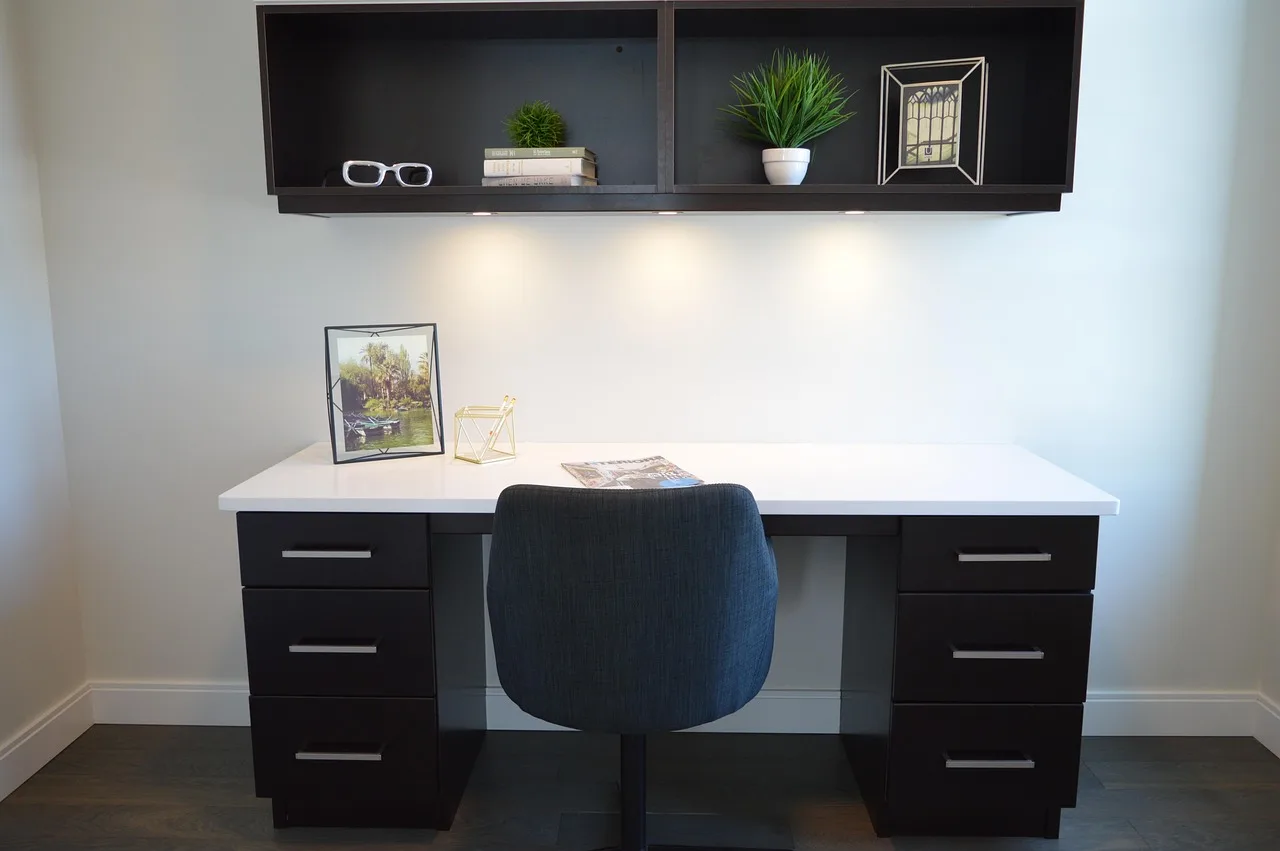
The Bestier 47-inch office desk with drawers is the safer pick if you want the most balanced mix of compact footprint, storage, and cable control. Its open compartment, two drawers, keyboard tray, and cable management holes make it practical for a student room or a small home office. The tradeoff is that the surface is still compact compared with the bigger gaming and L-shaped models.
Should you buy it?
Buy Bestier if you want a desk that solves a room problem, not a status problem. The lineup is strongest for small rooms, corner offices, gaming corners, and mixed-use spaces where drawers or a keyboard tray matter. It is weaker if you want premium materials, generous legroom, or a heavy-duty executive feel.
If your space is tight, start with the 44-inch or 48-inch class. If you need more storage, move to an L-shaped model with shelves or a cabinet. If your main priority is posture, the standing desk is the outlier worth considering. For most buyers, though, the safest choice is still the small straight desk or the smaller L-shape.
Frequently asked questions
How hard is it to assemble a Bestier desk?
Assembly is usually moderate rather than simple, especially on models with drawers, shelves, a keyboard tray, or an L-shaped frame. The job is easier when parts are clearly labeled and the room has enough space to lay everything out before tightening the hardware.
Does the Bestier desk have enough storage for office supplies?
It can, depending on the model. The desk page with buyer reviews mentions a file drawer, another drawer, and a pull-out keyboard tray, while other Bestier desks add shelves, hooks, or a cabinet. That is enough for basic office supplies, but not for bulky filing needs.
Is the Bestier desk sturdy enough for a computer setup?
For a normal laptop or single-monitor setup, yes, it should be adequate for many buyers. The stronger versions use metal support frames, but sturdiness still depends on size, assembly quality, and how much weight you place on the desktop. A dual-monitor setup calls for more care.
What size Bestier desk is best for small spaces?
The 42-inch, 44-inch, and 48-inch models are the safest starting points for small rooms. If you need a little more working room and still want a compact footprint, a 55-inch straight desk can work, but a large L-shaped model is usually too much for a tight space.
What do Bestier desk reviews say about drawer operation?
Reviews commonly focus on whether the drawers line up cleanly and move as expected. A file drawer is helpful for document storage, but lower-cost furniture can show variation in drawer feel if the frame is not assembled square. That is why alignment matters as much as the hardware itself.
Does Bestier make standing desks or only computer desks?
Bestier makes more than basic computer desks. The broader lineup includes a height-adjustable standing desk, as well as gaming desks, L-shaped desks, and even other furniture categories. That range makes it easier to match the desk to the room, instead of forcing a one-size-fits-all choice.
Products related to this article
Sponsored / affiliate links. As an Amazon Associate I earn from qualifying purchases. I may earn additional commission from eligible campaigns.