What Makes Gaming Chairs Different: Key Features Explained
Anyone who spends long hours playing video games knows that comfort is not a luxury, it’s a necessity. But why are gaming chairs so different from regular office chairs or basic home seating? You might notice the bold colors, bucket-style seats, and built-in cushions, but the differences go much deeper. Understanding these key differences can help you choose the right chair, prevent discomfort, and even improve your gaming performance. This article explores what truly sets gaming chairs apart, moving beyond the flashy looks to reveal the science, design, and real-world benefits behind these specialized seats.
The Origins Of Gaming Chairs
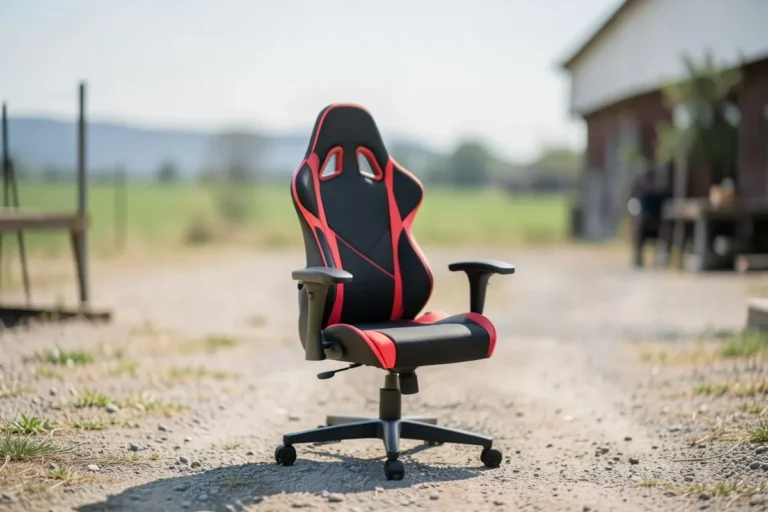
Gaming chairs did not appear out of nowhere. Their design roots are found in racing car seats. Early eSports professionals and streamers wanted a seat that provided both support and style, something that looked good on camera and kept them comfortable through long tournaments.
The first popular gaming chairs were inspired by racing bucket seats. These chairs were designed to keep a driver in place during sharp turns, with high sides and snug fits. Over time, gaming chair makers adapted these features to fit the needs of gamers sitting at a desk, focusing on back support and extended use.
Core Features That Set Gaming Chairs Apart
Unlike regular chairs, gaming chairs are purpose-built. Here are the core features that make them different:
Ergonomic Design
Ergonomics is about making products fit the human body. Gaming chairs use adjustable lumbar and neck pillows, taller backrests, and customizable armrests. These features help support the spine, reduce slouching, and prevent pain, especially during marathon gaming sessions.
The shape of the chair also matters. Most gaming chairs have a high, winged back and a slight curve to match the natural ‘S’ shape of your spine. This is different from many office chairs, which may be flat or only offer a basic lumbar bump.
Adjustability
One major difference is the range of adjustments. Gaming chairs often allow you to:
- Tilt the backrest up to 180 degrees for lying flat
- Adjust seat height and tilt tension
- Move armrests in multiple directions (height, forward/backward, side to side, and rotation)
- Adjust lumbar and neck pillows or remove them
This high degree of customization is essential because every body is different. In my experience, even slight changes in armrest height or lumbar support can make a big difference in comfort and focus.
Aesthetics And Style
Gaming chairs are easy to spot thanks to their bold colors, racing stripes, and branded embroidery. Manufacturers often use bright reds, blues, or even custom prints. This stands in sharp contrast to the neutral colors and simple lines of most office chairs.
While the looks are important for streamers and content creators, they also help set a mood or theme in a game room. However, it’s worth noting that some brands now offer more subtle, all-black options for those who prefer a low-key look.
Support For Long Sessions
Gaming chairs are built for endurance. Their foam padding is usually denser and more durable than what you find in budget office chairs. The tall backrest supports the entire spine, while adjustable headrests and lumbar pillows help prevent fatigue.
Pro Tip: Some low-quality gaming chairs use cheap foam that loses shape quickly. Always check for high-density or cold-cure foam, which holds up better over time.
Unique Seat Shape
Most gaming chairs have a bucket-style seat, inspired by sports cars. The raised sides help keep your legs in place, but not everyone finds this comfortable, especially for larger body types. There’s also a cut-out area behind your knees to reduce pressure and improve circulation.
Here’s a comparison of seat shapes:
| Chair Type | Seat Shape | Impact on Comfort |
|---|---|---|
| Gaming Chair | Bucket-style with raised sides | Holds legs in place, supports posture |
| Office Chair | Flat or gently curved | Fits more body types, less restrictive |
| Basic Home Chair | Flat, little contouring | Short-term comfort only |
Materials And Build Quality
Frame Construction
A sturdy metal frame is standard in most gaming chairs, especially in mid- to high-end models. This provides better support and durability. Cheaper chairs might use plastic frames, which can creak or break over time.
Upholstery Choices
You’ll find several types of material:
- PU leather: Most common; looks like real leather but is more affordable.
- PVC leather: Similar to PU but even more resistant to water and stains.
- Fabric: Breathable and cooler but can stain more easily.
- Genuine leather: Found in premium models; durable and luxurious.
Example: I once tested a fabric gaming chair during a hot summer, and it stayed much cooler than my old PU leather chair, making long sessions more comfortable.
Foam Quality
High-density foam is a key detail. It maintains shape longer and provides more consistent support. Low-density foam flattens quickly, forcing you to replace the chair sooner.
Base And Casters
The chair base (the part that touches the floor) is typically made of metal in gaming chairs, while budget office chairs might use plastic. Good casters roll smoothly on both carpet and hard floors.
Differences In Armrest Design
Armrests are often overlooked, but they play a big role in comfort and health. Gaming chairs offer multi-directional armrests (sometimes called 3D or 4D armrests):
- Height: Raise or lower to fit your desk.
- Depth: Slide forward or backward.
- Width: Move in or out.
- Rotation: Angle inward or outward for wrist comfort.
This flexibility helps prevent shoulder and wrist strain, especially during fast-paced games or long typing sessions. Many office chairs only allow height adjustment, which can cause discomfort if your arms are not supported well.
Comparing Gaming Chairs To Office Chairs
| Feature | Gaming Chair | Office Chair |
|---|---|---|
| Backrest Height | Tall, often with neck pillow | Medium, sometimes adjustable |
| Lumbar Support | Removable pillow, adjustable | Built-in, often fixed |
| Armrest Adjustability | Multi-directional | Usually height only |
| Style | Racing-inspired, colorful | Neutral, corporate |
| Seat Shape | Bucket-style | Flat |
| Padding Density | High-density foam | Varies, often thinner |
Gaming chairs focus on style and long-term support, while office chairs are often chosen for simplicity and blending into a work environment. However, some high-end office chairs (like the Herman Miller Aeron) offer better ergonomics than many entry-level gaming chairs.
Specialized Features In Gaming Chairs
Some gaming chairs go beyond the basics, adding features you won’t find in regular chairs.
Built-in Speakers And Vibration
A few models include Bluetooth speakers in the headrest. These can add sound effects or music directly behind your head, making games more immersive. Some even have vibration motors that sync with in-game actions.
Footrests
Retractable footrests let you stretch out during breaks or when watching movies. While not everyone needs this feature, it’s a nice bonus for those who spend a lot of time at their desk.
Cooling Gel And Breathable Materials
Gaming chairs sometimes include cooling gel layers or mesh panels to reduce sweating. This is especially useful if you live in a hot climate or play for hours at a time.
Extra-wide Or Heavy-duty Models
Not all gamers are the same size. Some brands offer extra-wide seats and higher weight limits, sometimes supporting over 400 lbs. This inclusivity is important for comfort and health.
Recline And Rocking Functions
Many gaming chairs let you recline the backrest almost flat, and some can rock back and forth. This allows you to change position, relax, or even nap without leaving your chair.
Health Considerations And Ergonomics
Good posture is essential for gamers. Poor seating can cause back pain, neck strain, and even long-term injuries like carpal tunnel syndrome. Gaming chairs address these issues by:
- Supporting the spine’s natural curve
- Reducing pressure on the hips and thighs
- Allowing frequent adjustment to prevent stiffness
- Supporting the head and neck during long sessions
One insight many beginners miss is that a gaming chair alone will not fix poor posture. You also need to adjust your monitor height, desk position, and take regular breaks.
Pro Tip: The best ergonomic setup is one that you adjust for your own body, not just one that looks good in photos.
Price Ranges And Value
Gaming chairs vary widely in price, from under $100 to well over $500. What do you get at different price points?
- Budget (under $200): Basic features, often PU leather, limited adjustments, smaller frames.
- Mid-range ($200-$400): Better foam, more adjustability, metal frames, improved style.
- Premium ($400+): High-quality materials (real leather, mesh), advanced ergonomics, heavy-duty frames, unique features.
While it’s tempting to buy the cheapest chair, investing a little more often brings better comfort, durability, and health benefits. If you spend several hours a day gaming or working at your desk, consider a chair as important as your PC or console.
Credit: gtplayer.com
Common Mistakes When Choosing A Gaming Chair
Many buyers focus only on looks or price and miss out on important details. Here are some mistakes to avoid:
- Ignoring Weight and Height Limits: Always check that the chair supports your body type. A chair that’s too small or weak will break down quickly and be uncomfortable.
- Overlooking Adjustability: Make sure the chair can be adjusted to fit your height, desk, and posture needs.
- Choosing Based on Looks Alone: A cool design is nice, but comfort should always come first.
- Not Considering Room Size: Some gaming chairs are very large and need more space than a basic office chair.
- Forgetting About Materials: Think about your climate and how easy it is to clean different fabrics. PU leather can get hot and sticky, while fabric may absorb spills.
Who Should Use A Gaming Chair?
Gaming chairs are not just for professional gamers or streamers. They are a good choice for:
- Anyone who spends more than two hours at a desk per day
- Streamers or content creators who want a stylish background
- People who suffer from back or neck pain using regular chairs
- Students who need a seat for both gaming and homework
However, they might not be the best fit for everyone. Some office chairs offer better ergonomics for pure work tasks, and very short users may find gaming chairs too large.
The Real-world Impact: Does A Gaming Chair Improve Performance?
There’s no magic in a gaming chair, but comfort and support can affect your focus and reaction time. Sitting properly helps keep your hands and arms relaxed, so you can react faster in high-stress games.
A comfortable chair also means fewer breaks due to pain, so you can practice or compete longer. This is why many eSports teams and top streamers use high-end gaming chairs.
Sustainability And Environmental Concerns
One insight that’s often missed is the environmental impact of gaming chairs. Cheaper models may use materials that are hard to recycle, and low-quality foam can break down quickly, leading to more waste. Some brands now offer chairs with recycled materials or sustainable production methods, but this is still rare.
If you care about sustainability, look for:
- Durable designs (last longer, less waste)
- Recyclable materials (metal frames, fabric covers)
- Companies with clear environmental policies

Credit: global.aorus.com
How To Test A Gaming Chair Before You Buy
Buying online is common, but if possible, try a gaming chair in person. Here’s what to look for:
- Sit in the chair for at least 10 minutes
- Adjust armrests and backrest to see if they fit your body
- Check the lumbar pillow position
- Try rocking or reclining to test stability
- Look for creaking or wobbling (a sign of weak build quality)
If you can’t test in person, read detailed reviews and check return policies. Some brands offer a 30-day trial period.
Example: My Experience Switching To A Gaming Chair
When I switched from a budget office chair to a mid-range gaming chair, the first thing I noticed was the difference in back support. The adjustable lumbar pillow let me find the perfect spot for my lower back, and the taller backrest supported my shoulders, a big plus during long strategy games.
It took a few days to get used to the bucket seat, but after that, I had less back pain and could focus for longer periods.

Credit: www.wayfair.com
Are Gaming Chairs Worth It?
If you value comfort, style, and support, a gaming chair can be a smart investment. However, not all gaming chairs are created equal. Focus on ergonomics, adjustability, and build quality rather than just design or price.
Consider your own needs: body size, desk setup, climate, and how many hours you spend sitting. For some people, a high-end office chair may be a better choice, but for most gamers, a well-chosen gaming chair delivers real benefits.
For further reading on ergonomics in seating, you can check Wikipedia: Ergonomics.
Frequently Asked Questions
What Is The Main Difference Between A Gaming Chair And A Regular Office Chair?
The most important difference is ergonomics and adjustability. Gaming chairs offer more adjustments (backrest tilt, armrest movement, removable pillows) and often have a taller backrest for full spine support. Office chairs focus on simplicity and blending into a work setting, with fewer customizations.
Can Gaming Chairs Help Prevent Back Pain?
Gaming chairs can help reduce back pain if you set them up correctly. The lumbar and neck pillows support your spine’s natural curve. However, the chair alone is not enough
Products related to this article
Sponsored / affiliate links. As an Amazon Associate I earn from qualifying purchases. I may earn additional commission from eligible campaigns.