
The best TV stand for a 75-inch TV must be at least 60 inches wide for stability and safety. Look for stands rated to safely support the weight of your specific large television. Key factors include width, depth (for wall clearance), and required weight capacity to ensure a secure setup.
Buying a new, massive 75-inch TV feels great—until you look at your old, tiny TV stand. Suddenly, that beautiful new screen looks wobbly, crowded, and just plain wrong! Finding the right stand for such a large TV can feel overwhelming. You need something sturdy enough, wide enough, and something that doesn’t look like a bulky monster in your living room. Don’t worry; you don’t need an engineering degree to get this right. We are going to break down exactly what size, what style, and what features you need to look for so your big screen sits securely and looks fantastic. Let’s make sure your setup is safe and stylish!
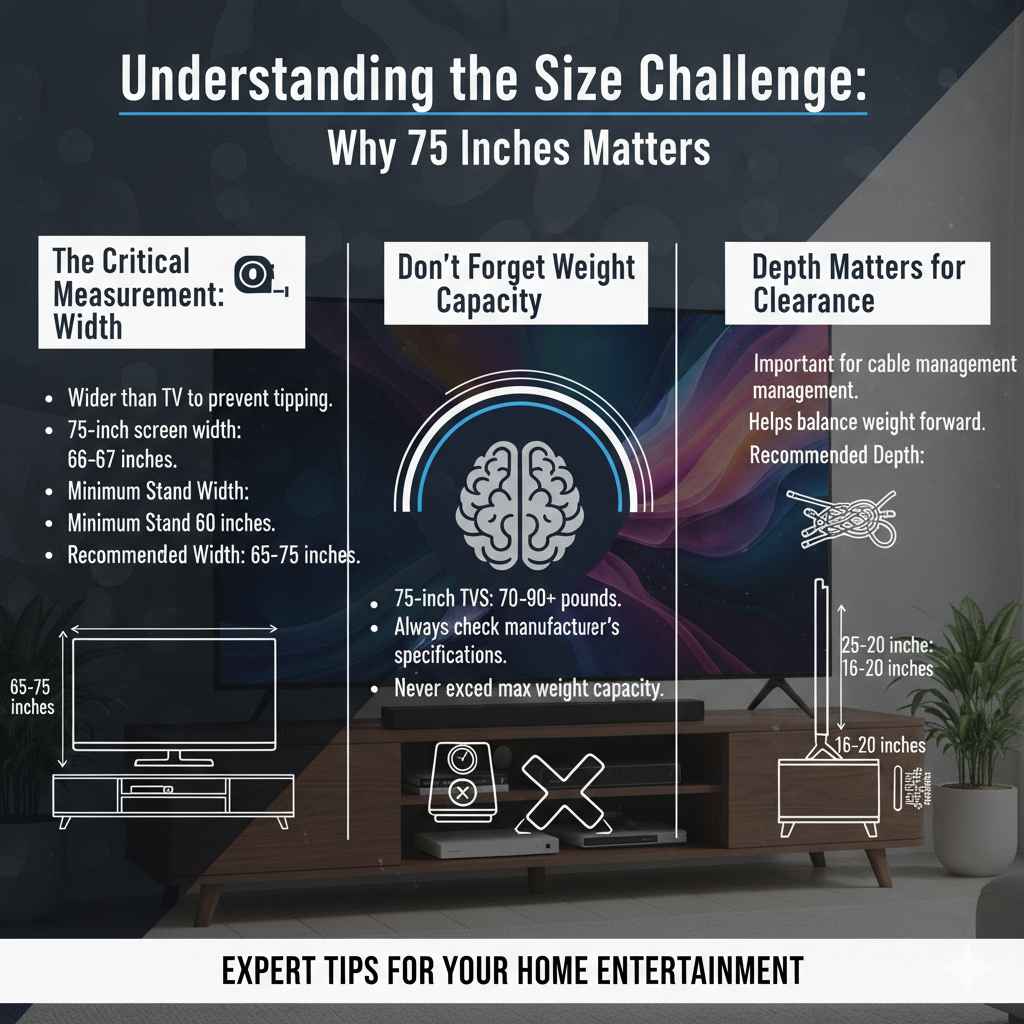
Understanding the Size Challenge: Why 75 Inches Matters
A 75-inch TV is a significant piece of equipment. It’s wider, heavier, and demands respect when you choose its home. Using a stand meant for a 50-inch TV is a recipe for disaster, not just aesthetically, but for safety.
The Critical Measurement: Width
When people ask “how big of a tv stand for 75 inch tv,” they are usually asking about width. You need a base that is wider than the TV itself to prevent tipping.
Most 75-inch TVs have a screen width (not including the stand legs) that hovers around 66 to 67 inches. However, the most important factor is the stand’s footprint, not just the screen size.
For safety, you should always choose a stand that is:
- Minimum Width: 60 inches.
- Recommended Width: 65 to 75 inches.
Why the extra room? If the stand is exactly the same width as the TV, a slight bump could cause the TV to teeter right off the edge. A wider stand provides a safer, more stable platform.
Don’t Forget Weight Capacity
Modern TVs are slimmer, but they can still be surprisingly heavy. A 75-inch TV can easily weigh between 70 and 90 pounds, sometimes more depending on the brand and features.
You must check the stand’s maximum weight capacity. Never assume a large stand can hold a large TV. Always check the manufacturer’s specifications.
Depth Matters for Clearance
Depth is often overlooked but is crucial, especially if your TV sits close to a wall or if you have children or pets.
A deeper stand (usually 16 to 20 inches deep) gives you more room behind the TV for cable management and helps balance the weight forward, especially if the TV stand is tall.
| TV Size (Diagonal) | Approximate Screen Width (Inches) | Minimum Stand Width (Inches) | Recommended Stand Depth (Inches) |
|---|---|---|---|
| 75 Inches | 66 – 67″ | 60″ | 16″ – 20″ |
| 65 Inches | 57 – 58″ | 55″ | 14″ – 18″ |
Choosing the Right Style for Your Living Room
Once you know the minimum size requirements, you can focus on style. The best TV stand for a 75-inch TV should complement your room, not dominate it.
Low-Profile vs. Tall Media Consoles
This is where personal preference and viewing height come into play.
Low-Profile Stands (Under 24 inches high):
- Look: Sleek, modern, and minimalist. They keep the focus entirely on the screen.
- Best For: Viewing when seated on a low couch or floor cushions. They naturally keep the bottom of the TV at eye level when seated.
Taller Media Consoles or Armoires (Over 30 inches high):
- Look: Traditional or rustic, often offering more built-in storage.
- Best For: Viewing when seated on a high-backed sofa, or if you need the TV slightly elevated above furniture or vents.
Types of Stands to Consider
Different setups require different solutions. Here are the main options suitable for your large screen:
- Credenza/Long Console: The most popular choice. These are wide and relatively short, offering lots of surface area for decor and plenty of storage underneath. They look balanced with a 75-inch TV.
- Floating Shelves/Wall Mounts with Lower Console: If you want a super clean look, you can mount the TV (see safety note below) and place a long, low floating shelf underneath for components. This frees up floor space dramatically.
- Entertainment Centers: These large units surround the TV with shelving. They are excellent if you have many devices, movies, or decorative items, but they take up much more space.
A Quick Note on Mounting and Stands
Many people opt to wall-mount their 75-inch TV. If you choose this route, you still need a stand underneath for your soundbar, gaming consoles, and cable box. In this case, the stand needs to be wide enough to look proportional to the mounted TV, even if it doesn’t bear the TV’s weight.
When mounting, ensure your wall studs are strong enough to support the combined weight. The Consumer Product Safety Commission (CPSC) strongly recommends proper installation to prevent tip-overs, whether using a stand or a wall mount.
Essential Features for Your Large TV Stand
A great stand does more than just hold the TV; it helps manage the mess and keeps your equipment running cool.
Cable Management is Your Friend
A 75-inch TV usually comes with many devices: streaming sticks, gaming consoles, Blu-ray players, and a sound system. This means a nest of ugly cables. Look for stands designed with cable routing in mind.
Look for these features:
- Cable Holes: Pre-drilled holes, usually near the back center, to feed wires from the TV down to the components.
- Back Panels: Some stands have removable back panels, making it easy to thread large cables or plug things in without contorting yourself.
- Internal Shelves: Shelves deep enough to hide power strips or cable organizers.
Ventilation for Electronics
Your gaming console (like a PlayStation or Xbox) and modern receivers generate significant heat. If you stack them tightly in a closed cabinet, they will overheat, which shortens their lifespan.
When selecting a stand, especially one with doors, ensure there is ample airflow. Mesh backing, slatted doors, or open shelving are the best choices for keeping your electronics cool.
Storage Needs: Open vs. Closed
How much stuff do you have to hide? Be honest with yourself!
Open Shelves: Great for items that need frequent access (remotes, controllers) or that need maximum airflow (receivers). They look tidier if you keep them organized.
Closed Cabinets (with Doors): Perfect for hiding clutter, cable boxes (if they have good remote sensor access), and movies. If you choose closed cabinets, ensure the shelves are deep enough for your components and that ventilation is adequate.
Material Matters: Durability and Look
The material of the TV stand directly impacts how long it lasts, how much weight it can handle, and the overall look of your room.
Solid Wood vs. Engineered Wood
For supporting a heavy 75-inch TV, material strength is paramount.
Solid Wood (Oak, Maple, Acacia):
- Pros: Extremely durable, highest weight capacity, beautiful, ages well.
- Cons: Expensive, can be very heavy, might warp slightly with extreme humidity changes.
Engineered Wood (MDF or Particle Board):
- Pros: Affordable, often comes in modern, clean finishes (like matte white or black).
- Cons: Lower weight capacity unless reinforced properly. Can sag over time if overloaded or exposed to moisture. You must check the weight rating carefully!
Metal and Glass Options
Metal frames paired with wood shelves offer a great industrial or mid-century modern look. Glass shelves are visually light but can look messy if you have lots of components underneath. Remember that glass shelves must be tempered (toughened) for safety.
How to Check Quality Before Buying
If you are shopping in person, give the stand a gentle shake. Does it wobble? If so, it won’t handle a 75-inch TV well. Check the shelf thickness; thicker shelves (at least 1 inch) support weight better than thin ones. If buying online, always look at the stated weight capacity, which is the ultimate sign of structural quality.
Installation and Placement Guide
Setting up the stand is almost as important as picking it out. A poorly placed stand is a safety risk.
Step-by-Step Assembly Tips for Large Stands
Large TV stands often require assembly. Take your time—rushing leads to stripped screws or unstable joints.
- Check Your Inventory: Lay out all the pieces and compare them to the parts list. Ensure you have all the hardware.
- Work on a Soft Surface: Assemble the unit on carpet or use the cardboard packaging underneath to prevent scratching the finish.
- Secure Structural Pieces First: Assemble the main frame (sides and bottom) tightly before attaching any back panels or shelving inserts.
- Use the Right Tools: If the kit provides an Allen wrench, you might want to use your own ratchet screwdriver for better leverage, but be careful not to overtighten particleboard screws.
- Attach Anti-Tip Hardware (Crucial): If the stand includes straps or hardware to secure it to the wall, DO NOT skip this step, especially with a tall unit. This prevents the entire stand from tipping forward if a child tries to climb it. You can find guidance on proper furniture anchoring from organizations like the CPSC.
Optimizing Viewing Height
The ideal viewing height ensures comfort and reduces neck strain. For most living room setups, the center of the TV screen should be slightly below eye level when you are seated comfortably.
For a 75-inch TV:
- Measure the distance from the floor to your eye level while seated on your couch.
- Subtract half the screen height (a 75-inch TV is about 37 inches tall diagonally, meaning the screen itself is roughly 35 inches tall).
- The bottom edge of your TV should land near that calculated height mark.
A stand that places the top of the stand around 20 to 24 inches high usually works perfectly for standard seating arrangements.
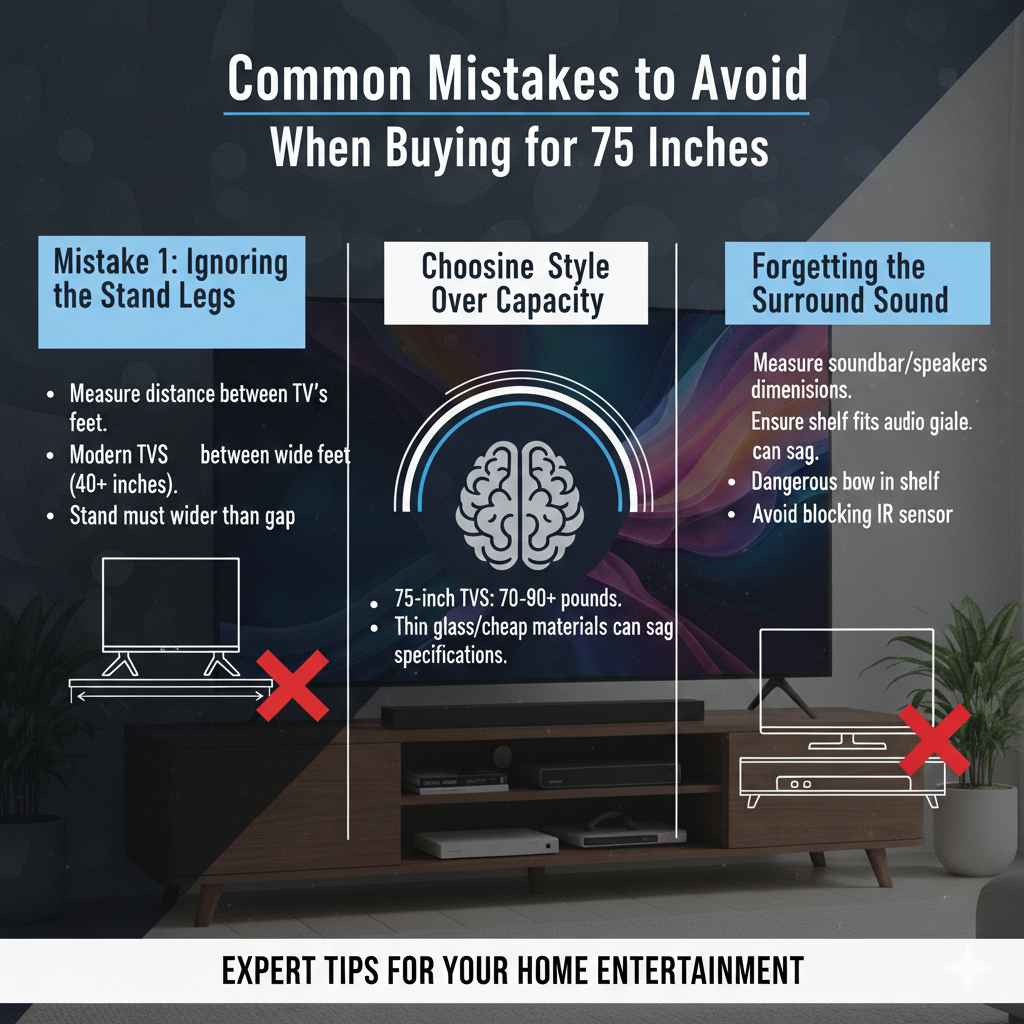
Common Mistakes to Avoid When Buying for 75 Inches
As your trusted guide, I want to help you avoid the hiccups that trip up new big-screen owners.
Mistake 1: Ignoring the Stand Legs (If Not Using a Wall Mount)
If your 75-inch TV uses its original pedestal stand, you must measure the distance between the TV’s feet.
Many modern TVs have feet that are very far apart (sometimes 40 inches or more!). If you buy a 60-inch stand, the feet might hang off the edges. Always measure the distance between your TV’s feet and ensure your stand is wider than that gap.
Mistake 2: Choosing Style Over Capacity
That beautiful, thin glass console looks amazing, but if it only holds 100 pounds and your TV is 85 pounds, you are asking for trouble. Always prioritize the weight rating listed by the manufacturer. A stand that looks robust but is made of cheap, thin materials will sag in the middle over time, creating a very dangerous bow in the shelf supporting your expensive television.
Mistake 3: Forgetting the Surround Sound
If you have a large soundbar or a center channel speaker, measure its dimensions before buying the stand. Many people buy a stand, put the TV on it, and realize their large speaker won’t fit on the designated shelf or blocks the TV’s IR sensor. Ensure any open shelf designated for audio gear is deep enough and tall enough for your specific speaker.
FAQ: Quick Answers for Your Big TV Stand
Q1: What is the minimum width I need for a 75-inch TV stand?
The absolute minimum width you should look for is 60 inches. However, for maximum stability and the best visual balance, aim for a stand that is 65 inches wide or larger.
Q2: Do I need a deeper stand for a 75-inch TV?
Yes, depth is important. A depth of 16 to 20 inches is recommended. This allows the stand to support the weight properly and gives you necessary clearance behind the screen for cables and heat dissipation.
Q3: How do I check if the TV stand can hold my TV?
Always find the manufacturer’s stated weight capacity. Compare this number to the weight of your 75-inch television (usually listed on the TV box or in the manual). The stand’s capacity must be higher than the TV’s weight.
Q4: Can I use a stand that is shorter than my TV is wide?
Technically, you can if the TV stand’s feet fit safely on the surface, but it is strongly discouraged. A TV wider than its stand looks disproportionate and is less stable. For a 75-inch screen, stick to stands that are at least 60 inches wide.
Q5: What is the best material for supporting heavy electronics?
Solid wood or engineered wood with a thick core (MDF) that is properly reinforced offers the best support. Avoid thin particleboard, especially for shelves that will hold heavy receivers or game consoles.
Q6: Are floating TV stands safe for large TVs?
Floating consoles (shelves below a wall-mounted TV) are safe for holding components, but the TV itself must be secured to the wall using a high-quality mount that attaches directly into wall studs, not just drywall anchors. Always follow the mount manufacturer’s guidelines.
Final Thoughts: Confidence in Your Setup
You’ve invested a lot in that beautiful 75-inch display, and now you know exactly how to secure it properly. Remember the key takeaways: aim for 65 inches wide, confirm the weight capacity exceeds your TV’s weight, and make sure you have space for your cables and components to breathe.
Don’t settle for a stand that looks skimpy or feels wobbly. By keeping an eye on width, depth, and structural integrity, you ensure your big-screen experience is safe, enjoyable, and looks fantastic in your home for years to come. Happy viewing!